
A page can be available on the internet without appearing in search results. Whether you are researching a topic or publishing your own site, separate three questions: can the page be reached, has it been indexed, and does it appear for the query you care about?
What Is a Search Engine Used For?
It helps you reach a source without knowing its address. “How to replace a bicycle tyre” calls for instructions. “Bicycle repair near me” calls for a local business. A particular shop's name may call for its website. Those searches share a subject but need different answers. When writing a page, start by identifying its search intent.
The search engine results page is often called a SERP. It can contain organic links, advertisements, maps, images and direct answers. A high position does not by itself mean a placement is paid; look for the advertising label. Google's description of its search process says it does not accept payment for more frequent crawling or a higher organic ranking.
How Do Search Engines Work?
Consider a newly published bicycle maintenance page as we walk through Google's three stages. The example below explains the process; it is not a crawl log from an actual website.
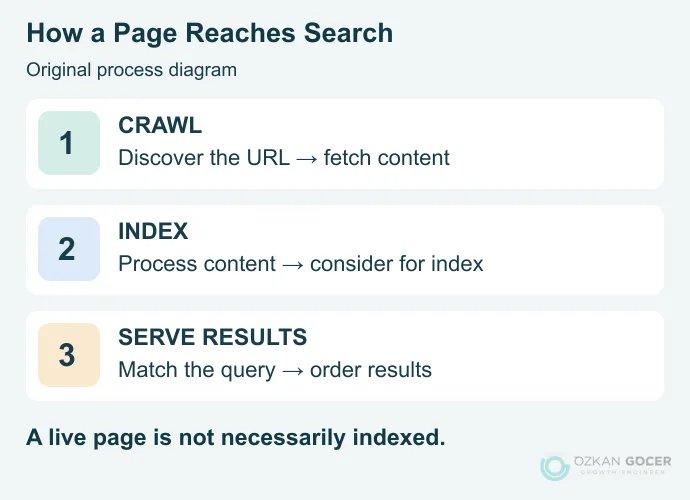
1. Crawling: Discovering and Fetching the Page
A crawler can discover the address through a link or a sitemap, then request its content from the server. Linking the maintenance page from a relevant section of your site creates a route to it. Merely uploading a file does not create that route. There is no guaranteed deadline for crawling every known address.
2. Indexing: Processing the Content
The fetched page is analysed to understand its content. When similar URLs exist, a representative, or canonical, URL may be selected. Different parameter versions of the bicycle page do not all need their own search result. Being crawled does not establish that a page has been indexed.
3. Serving Results: Matching the Query
When someone searches, the system evaluates relevant sources and orders the results. Instructions for changing a tyre serve a different need from a bicycle repair business listing. Language, location and device can affect the results too. A search does not start by crawling the entire internet again; web search largely draws on previously processed information.
Browser vs Search Engine: What Is the Difference?
Scroll sideways to read every column. Keyboard: focus the table and use the arrow keys.
| Tool | Job | Examples |
|---|---|---|
| Browser | Fetches and displays a page at a web address. | Chrome, Firefox, Safari, Edge |
| Search engine | Finds sources relevant to a query. | Google Search, Bing, DuckDuckGo |
| Website | Contains the material you read or the service you use. | A news publication or bicycle shop |
Type a full website address into Chrome's address bar and it opens that address. Type a question and the browser passes it to your default search engine. One input serving two purposes explains much of the confusion. Mozilla's explanation of browsers covers how pages are fetched and displayed. Search services can also be accessed through apps; a desktop browser is not their only entry point.
Search Engine Examples and Types
Google, Bing, Yandex, DuckDuckGo and Brave Search are examples of general web search services. Compare their sources, language support, local results and privacy settings rather than treating a numbered list as a quality ranking. Knowing more engine names is less useful than finding the right source for your task.
Services do not necessarily produce every result themselves. DuckDuckGo describes combining multiple sources, with traditional web links and images largely coming from Bing. Specialist searches, such as a shop's product search or an academic publication search, work within a narrower collection. General search, specialist search and source aggregation describe different aspects of scope; they are not mutually exclusive quality tiers.
How to Get More Useful Search Results
- Name the task. “Replace rear tyre on city bike” gives a clearer instruction than “bicycle”.
- Add a condition that matters. Include the part model, city or operating system when it changes the answer.
- Open the source. A result summary may omit a condition that matters to you. Check the date, method and circumstances behind the advice.
- Cross-check consequential information. For a health, payment or security decision, find the relevant organisation's original guidance instead of relying on one summary.
To change your default search engine in desktop Chrome, open Settings → Search engine → Change. The official Chrome instructions explain device and managed-account differences. Changing this setting keeps the browser installed and changes where address-bar searches are sent.
Privacy and AI Answers: What Should You Check?
A privacy-focused search service does not make you anonymous on every website you subsequently open. Results can still vary by location. DuckDuckGo's local results documentation explains how it estimates an approximate location from an IP address without retaining the address. Avoiding a search history therefore does not imply that everyone receives identical results.
AI-assisted search may present a generated answer alongside sources. That does not make web indexes or source verification unnecessary. Google's AI features documentation retains the usual SEO foundations and does not require special AI schema. For the user-facing distinction, see Google AI Mode and AI Overviews.
How Does Search Engine Behaviour Affect SEO?
SEO helps search engines reach content and helps that content meet a relevant user need. Begin with “where is the problem?” rather than “how many times have I repeated the keyword?”
- If the page is undiscovered: check relevant internal links, sitemap inclusion and server access.
- If crawling is blocked: remember that robots.txt controls crawling. It is not a reliable stand-alone removal method or a way to secure private information.
- If an indexed page answers the wrong question: align its title, opening, examples and sections with the task. The SEO content writing workflow develops that editorial work.
- If you need to measure visibility: distinguish one-off rank checks from ongoing tracking instead of relying on your own search session.
Follow the technical SEO checks when you find an access problem. If access and indexing are working, repeatedly changing those settings is less useful than examining the answer your reader needs. Google's SEO starter guide likewise emphasises useful content and understandable site structure. No individual change guarantees a particular position.