Someone starting out usually needs a reliable route from a service search to a useful page, rather than an introduction to every advertising format. This walkthrough therefore focuses on a Search campaign. Video, Shopping, App, Demand Gen and Performance Max require different setups. Labels and step order can vary by account; the instructions follow Google documentation checked on 13 October 2026.
How Google Ads Works and What Determines Cost
Google Ads, formerly Google AdWords, is an advertising platform for businesses. In Search, consider the query, keyword, ad and landing page together. Do not assume one charging model applies to every Google Ads campaign; campaign type and bidding choices matter.
The highest bid does not always secure the highest placement. Ad Rank considers factors including the bid, auction-time ad and page quality, thresholds, competition, search context and the expected effect of assets. The reported 1–10 Quality Score is a diagnostic tool, not a direct auction input. Multiplying your bid by that score cannot calculate an exact position or click price.
1. Prepare the Goal and Landing Page
Decide whether a quote request, phone conversation or completed purchase matters. A contact-button click is not the same as a successful enquiry. Define both the action to measure and what makes an enquiry suitable. If you are still choosing a channel, begin with the relationship between marketing objectives and channels.
For an illustrative example, imagine a bicycle repair business serving selected districts. The ad, page heading, service area and booking method should set the same expectation. Open the page on a phone and test valid and invalid form submissions before advertising. This is a proposed example, not a client campaign or measured result.
A slow or unstable page can make booking harder. Core Web Vitals measurements help investigate technical issues; an individual speed score is neither an Ads Quality Score nor a conversion guarantee.
2. Create the Account and Search Campaign
Sign in to Google Ads with the Google account you will use for the business. A new-account flow may request business, website and billing details. Keep the business owner’s access intact and give other people appropriate user access instead of sharing a password. Check the billing country, currency and payment information before confirming.
In an existing account, use Campaigns → New campaign → Search. Choose the objective that fits, such as sales, leads or website traffic. Google’s current Search setup instructions require at least one conversion goal even when creating a campaign without goal guidance. Read the preselected goals; do not let every page view or incidental form interaction direct optimization.
3. Choose Location, Language and Networks
Select the area you serve and a language in which you can support customers. Presence targeting and interest in a location have different reach. A business providing services only to people in its area might choose people in or regularly in that area; one accepting advance bookings from travelers may need a different choice. Location signals are not perfect, so check the enquiries you receive as well.
Evaluate additions such as search partners separately. If you choose a narrow starting scope, record which networks are enabled instead of accepting every recommendation unread. Schedule call-dependent advertising around your actual ability to answer.
4. Group Keywords by Search Intent
“Bicycle repair” and “bicycle mechanic jobs” describe different needs. Start with small ad groups organized around the services you provide. The intent and grouping approach to keyword research helps here; search volume alone does not establish purchasing intent.
Scroll sideways to read every column. Keyboard: focus the table and use the arrow keys.
| Match type | How to think about it | Check |
|---|---|---|
| Exact | Can include searches with the same meaning or intent. | Do not expect only the identical typed phrase. |
| Phrase | Can reach searches that include the keyword’s meaning. | Check whether the actual query fits the service. |
| Broad | Uses wider related queries and additional signals. | Plan conversion measurement, bidding and search-term review together. |
Match types control the reach of keywords. Use negative keywords for irrelevant demand such as job searches, but learn their separate matching rules. A negative does not automatically exclude every synonym. Nor should you exclude “free” indiscriminately if you genuinely offer a free inspection.
5. Write the Ad and Page as One Offer
Use responsive Search ad headlines and descriptions to explain the service, area and a genuine reason to choose it. Each combination should make sense. Specific information such as accepted bicycle types or the booking process is more useful than unsupported claims to be the best, cheapest or guaranteed.
The final URL should lead to the service being advertised. Add sitelinks and call assets only when their destinations and details are useful. Do not advertise a price or service absent from the page. Check policy and eligibility status when publishing; saving an ad does not mean it is approved.
6. Set the Budget and Bidding Strategy
Google advertising has no universal fixed price. Assess the planned keywords, location, estimated click costs and desired outcome before allocating money. A small amount may support a technical test while producing too little data for a meaningful performance comparison.
An average daily budget does not require identical spending every day. For most campaigns, the daily billed limit is twice the average daily budget and the monthly limit is 30.4 times it. Google’s spending-limit rules include exceptions: Pay for Conversions campaigns do not have a daily limit.
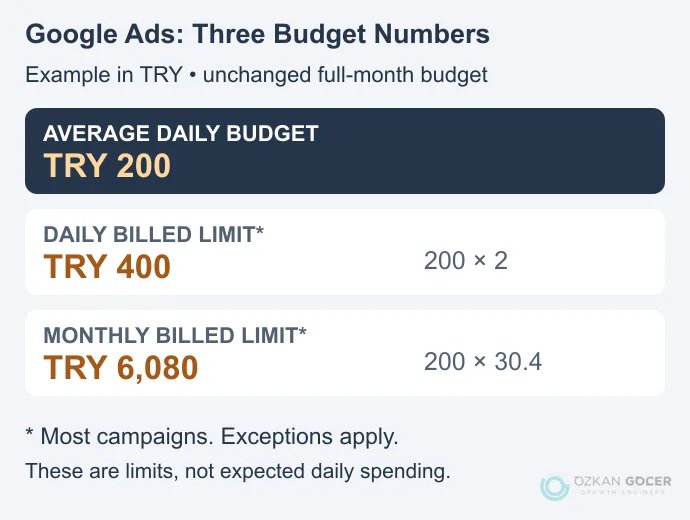
The illustrative diagram uses Turkish lira: with an unchanged TRY 200 average daily budget for a full calendar month, most campaigns have a TRY 400 daily limit and a TRY 6,080 monthly limit. These are arithmetic examples, not recommended budgets or market click prices. Starting mid-month, changing the budget or using a campaign total budget requires a different calculation; inspect your own budget report. Review taxes and other billing items separately from advertising spend.
Choose bidding to suit the objective. A clicks-focused strategy aims to bring visits; Smart Bidding aims to optimize conversions or conversion value. There is no universal requirement for every new campaign to begin with a clicks strategy. Before choosing conversion-based bidding, verify the action being measured. A system receiving failed form attempts as successes is learning from the wrong outcome.
7. Validate Conversions Before Publishing
You can measure through Google Ads tags or an appropriate Analytics connection. Check the primary and secondary conversion actions used by the campaign. Including two separate actions that measure the same purchase in optimization can inflate the result. Inspect the actual goals as well as their labels: secondary actions in custom goals can also be used for bidding.
- Does a failed submission avoid producing a successful-lead event?
- Is a valid enquiry measured once, and does refreshing the page repeat it?
- Are the goal, location, language, networks, budget and final URL correct?
- Are ads and assets eligible, and are there any billing warnings?
After launch, examine the queries available in the search terms report. If ads are not appearing, start with status and diagnostic information instead of repeatedly searching for and clicking your own ad. Fix broken measurement or irrelevant spending promptly. When judging performance, allow for conversion delay and the amount of evidence; there is no fixed waiting period that makes every campaign comparable.
Promotional Credit and Free Google Visibility
Advertising credit is not unconditional money available to every account. Read the eligibility, spending, verification and expiry terms of the offer shown to you. You may need to spend your own budget first, and credit may not arrive immediately. Do not apply an amount or deadline from one promotion to another account.
“Free advertising on Google” can describe different needs. A Google Business Profile is free for eligible businesses; it is a different product from a paid Search campaign. SEO concerns organic visibility. A promotional credit does not turn either option into unlimited free advertising.
Why Has Google Ads Charged My Card?
Compare the bank transaction with the account’s billing activity. Under postpay billing, reaching a payment threshold or the first day of the month can trigger a charge. Pausing a campaign does not erase charges already accrued. Prepay and monthly invoicing availability depends on the billing country, currency and account conditions.
If a charge does not match your account, review access and linked accounts and use Google’s unrecognized-charge troubleshooter. Do not send card details to someone asking for them in a message. Resolve the billing issue before increasing spend through new campaigns.
At the first review, put valid enquiries, qualified leads and cost alongside clicks. If you commission outside help, agree account access, measurement ownership and reporting scope as part of the advertising management service.