Someone might click an ad on Monday and buy on Thursday. A report based on the ad interaction and another based on the purchase date can place that same sale on different days. Key events and conversions also belong to different reporting contexts. Start by separating these issues.
Choose the Right Report: Key Events or Conversions?
You can mark a form submission as important to your business in GA4. That does not automatically make it a bidding goal in every Google Ads campaign. In Google’s current terminology, key events support behavioral analysis, while shared conversion definitions support advertising measurement and optimization.
- Open Advertising in GA4. The newer navigation separates Key events and Conversions.
- If available, open Conversion performance and select the Google Ads account and conversion action you want to compare. Do not match a total containing many actions against one purchase action.
- Record whether the metric is All conversions or Google Ads’ Conversions. Their scope is different.
The newer conversion reporting features are rolling out gradually. If the menu is missing, check the linked Ads account, created conversions and your access. Key-event reporting can still be needed for older dates or events without a created conversion; label that comparison accurately.
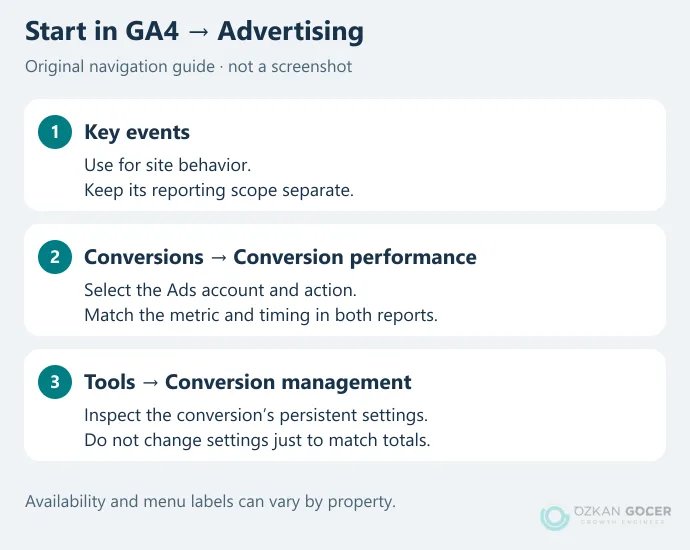
In the Conversion performance report, the selected account, model and timing all matter. Switching between the Google Analytics perspective and a Google Ads account changes more than the label. Include that perspective in your comparison notes.
What Last Click and Data-Driven Attribution Tell You
An attribution model is a rule or calculation that allocates conversion credit to eligible interactions. It does not, on its own, prove that a sale would never have happened without an ad. Budget decisions also need order quality, profit and, where appropriate, controlled experiments. When reading attributed revenue, keep ROAS separate from profitability.
Scroll sideways to read every column. Keyboard: focus the table and use the arrow keys.
| Approach | How to read it | What to check |
|---|---|---|
| Last click | Allocates credit to the eligible final interaction. | Which channels can receive credit and how direct traffic is treated. |
| Data-driven attribution (DDA) | Calculates credit from observed paths rather than splitting it equally by a fixed rule. | Measurement quality, data volume and a comparison within the same scope. |
Google Ads offers data-driven attribution and last click. GA4 key-event attribution also distinguishes paid and organic last click from Google paid channels last click, alongside DDA. Selecting something called “last click” in both products is therefore not enough to establish equivalence.
Google’s GA4 attribution explanation excludes direct visits from credit unless the path consists entirely of direct visits. The illustration below assumes all interactions were measured within the eligible window. It is an explanation, not an account result.
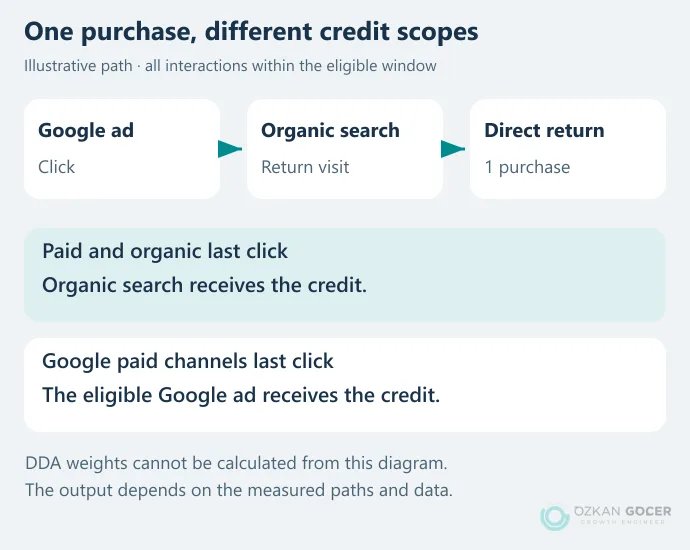
Do not look for first-click, linear, time-decay or position-based models in current GA4 settings; those options have been removed. In Ads, channels eligible for credit can also depend on the conversion source. Read the action’s actual scope instead of assuming every Ads conversion always uses an identical channel boundary.
How Much Data Does DDA Need?
The current Google Ads documentation makes DDA available to conversion actions regardless of volume. Its recommendation of 200 conversions and 2,000 ad interactions in 30 days supports more precise modeling; it is not a mandatory eligibility threshold. With limited data, results can resemble last click. Adding page views to a sales goal just to increase volume does not improve the meaning of that goal.
Align Six Fields Before Comparing the Numbers
Choose one action, such as a completed purchase, and fill in the following fields for both reports. Record the existing settings before editing anything. Otherwise, it becomes difficult to explain which change affected the result.
Scroll sideways to read every column. Keyboard: focus the table and use the arrow keys.
| Check | Record | Common mismatch |
|---|---|---|
| Action and source | Event/action name, GA4 property and Ads account | Purchases versus a total of all key events |
| Metric | Conversions or All conversions; the campaign’s selected goal | Primary actions versus secondary observations |
| Date | Interaction time or conversion time; time zone | Click date versus order date |
| Model and channels | Last click/DDA; eligible channels | Matching model names with different scopes |
| Window | Conversion window or key-event lookback window | A delayed action falling outside one comparison |
| Counting | One/every in Ads; per event/session for GA4 key events | Repeated enquiries by the same person |
Why Can the Same Sale Appear on Different Days?
Standard Ads conversion columns can assign results to the ad interaction date. To compare purchases by the day they happened, choose the appropriate by conversion time column. Check the timing selection in GA4’s conversion report too. Google Ads column options include “All conv. (by conv. time).”
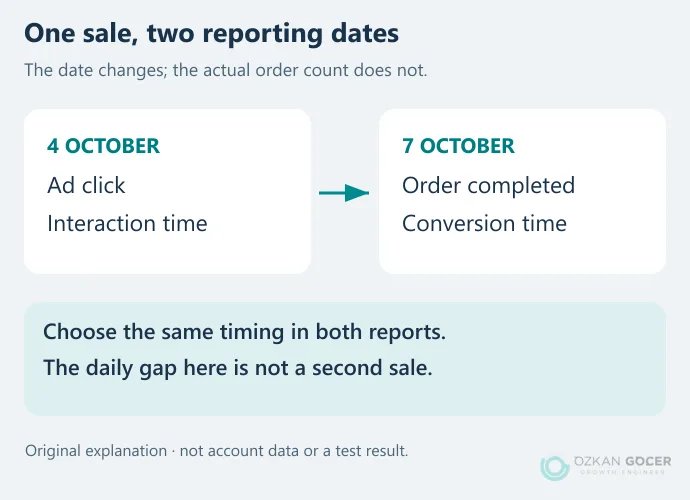
This matters especially at month boundaries. A click on September 30 followed by a purchase on October 2 can add a conversion to the September interaction-based report later. Around midnight, compare the property and account time zones as well; identical calendar ranges do not necessarily describe identical periods.
Do Two Form Submissions Count as One or Two?
Ads’ One and Every settings apply per conversion action. When the same action happens twice after an ad click, One can report a single conversion. It does not deduplicate that person across the entire account for their lifetime.
GA4 key events instead offer once per event or the legacy once-per-session method. Two valid enquiries within one session can produce different counts under those settings. Once per session is not a direct equivalent of Ads’ One setting. Nor is a counting rule a substitute for repairing a duplicate tag trigger.
Separate Primary and Secondary Actions
In Ads, a primary action contributes to bidding and the Conversions column when its standard goal is used by the campaign. Secondary actions normally appear in All conversions for observation. A secondary action included in a custom goal can still be used for bidding, so inspect the goal itself. The conversion checks in the Google Ads setup guide cover the campaign side.
Reporting Difference or Tracking Error?
If matching the comparison conditions explains the gap, correct the reporting note. If it does not, inspect the tags and data flow. These symptoms require more than a different attribution model:
- A failed form produces a successful-lead event: trigger the event on confirmed success rather than the button click alone.
- Refreshing the page sends the same purchase again: inspect triggers and
transaction_id. Each separate order needs a separate identifier. - One sale enters bidding as two separate actions: check how the Ads-tag action and the GA4-sourced action are included in the campaign.
- Revenue or currency looks wrong: compare
value,currency, tax and shipping treatment with the order record.
Google’s ecommerce validation instructions explain event and parameter checks in DebugView. If you cannot establish where a tag fires or how often, follow the testing sequence in the GA4 setup and data validation guide. The diagrams here illustrate diagnosis; no customer purchase test or campaign performance experiment was run for this article.
Processing delays, consent signals and identity matching can also affect the comparison. Google’s Analytics conversion-import guidance includes reporting delays. Avoid a final verdict from incomplete same-day data, but do not wait for a visible duplicate-counting bug to fix itself.
What to Record Before Changing a Model
Save the action name, previous model, eligible channels, window, counting method and change time. Use model comparison to see where credit moves before making a permanent edit. Changing the model, window, conversion goal and budget together makes the result harder to explain.
The GA4 key-event reporting model can apply to historical and future data; changes to its lookback window apply going forward. Ads model changes affect standard conversion reporting prospectively. A temporary model comparison within a report is different from editing a conversion’s persistent settings.
Also check the dimension’s scope. First user source, Session source and event-scoped Source answer different questions. Changing GA4’s reporting model does not rewrite user- and session-scoped dimensions in the same way.
A useful conclusion is more specific than “we made both panels match”: “We compared the purchase action using the same period, timing, scope and counting method; this remaining difference needs this particular check.” Keep unexplained gaps visible. Adding Ads, GA4 and order-system counts together does not produce a new total of sales.
If the reporting gap is holding up a budget decision, start by recording the dates and conversion definitions you compared. You can bring those notes to a review of your ad account and conversion tracking. That gives us a specific discrepancy to investigate together, rather than a vague discussion about performance.