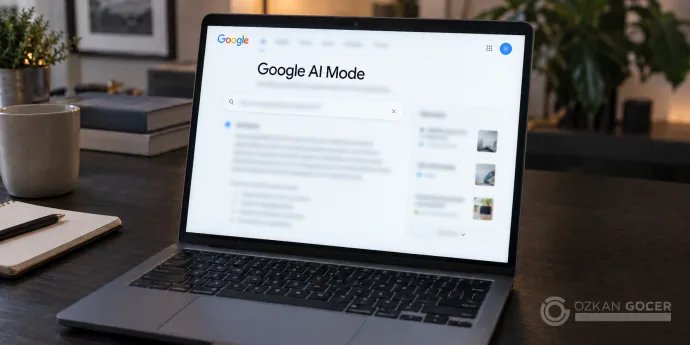
For someone searching, the benefit is being able to explain what they need in more detail. For a website owner, the question is whether a page actually answers that need. A workshop page might say “coffee classes in Ankara” without explaining whether eight beginners can attend together on a weekend. That gap makes the implications for SEO much easier to understand than a promise to “optimize for AI.”
How to Open and Use Google AI Mode
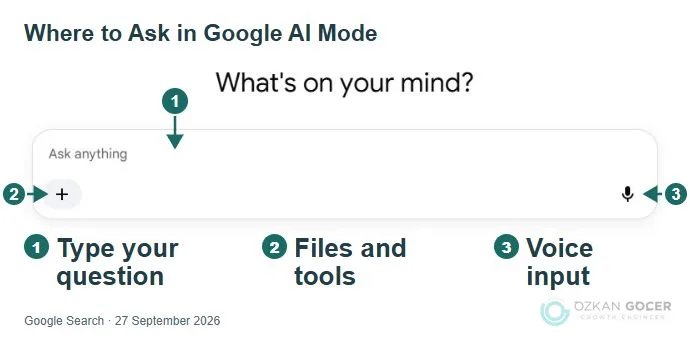
Open google.com/ai in your browser, select AI Mode in Google Search, or open it from the Google app's home screen. There is no separate AI Mode app to install. Although it uses the Gemini family of models, the product you are accessing is Google Search.
- Describe your goal and constraints together. For example: “We need a beginner coffee workshop in Ankara for eight people on a weekend, somewhere accessible by public transport.” That gives the search more context than a short keyword.
- Open the sources behind the suggestions. Compare dates, capacity, and travel details with the business's current information. Check whether the source actually supports what the answer says.
- Ask about the missing detail that affects your choice. You could follow up with “Which options can take all eight of us in the same session?” Confirm availability with the business if its published information does not settle the question.
You can also ask questions using voice, images, and supported files; the available options can vary by interface. Google's AI Mode help page explains the current access methods.
Turkey and Turkish are supported. Google announced the rollout in Turkey on February 18, 2026. Availability of the main experience in a country does not mean that every experimental feature is enabled for every account there.
How Is AI Mode Different from AI Overviews?
AI Overviews provide an AI summary within search results when Google considers it useful. AI Mode supports a more extensive investigation with follow-up questions. Describing one as strictly a one-way summary and the other as a conversation is now misleading: you can move from an AI Overview into AI Mode by asking a follow-up.
Scroll sideways to read every column. Keyboard: focus the table and use the arrow keys.
| Comparison | AI Overviews | AI Mode |
|---|---|---|
| Starting Point | Google shows a summary for a suitable search. | You can open AI Mode directly or continue from an overview. |
| Use | A quick introduction to a topic. | Exploring several requirements and developing a question. |
| Checking Sources | Review the links supporting the summary. | Review links in the answer and subsequent responses. |
Google's AI Overviews documentation explains how the transition works. For a publisher, being linked in one experience does not guarantee inclusion in the other.
From One Question to Several Searches: Query Fan-Out
Google can use query fan-out to investigate a complex question. It runs related searches and uses the information it finds to construct an answer. The wording someone types does not have to match every query used to gather that information.
In the workshop example, location, group capacity, experience level, and weekend availability are separate information needs. These are illustrative examples, not a record of the internal queries Google actually ran. We should not assume a fixed number of searches per question, or that every follow-up repeats an identical process.
The editorial response is to resolve the information gaps on the appropriate page. A workshop's schedule, entry requirements, and location can sit together without a separate page for every phrase someone might type. Google's generative AI optimization guide specifically warns against producing pages for query variations primarily to manipulate rankings or AI responses.
How Does Google AI Mode Affect SEO?
AI Mode changes the route from search to a website: a user can read information drawn from several sources in one answer without visiting every page. The practical SEO question is how source visibility translates into visits and useful outcomes. Google's search index and quality systems underpin this experience too, so crawlability, useful content, and a clear page structure remain relevant.
Organic Rankings, Source Links, and Traffic Are Different Outcomes
A high position in ordinary search results does not guarantee selection as a source for a particular AI Mode answer. Related searches used to build a response can also bring in pages that address a narrower detail than the original question. One keyword's position therefore cannot tell you how visible your site is in AI Mode.
A reader who finds enough information in the answer may not visit your site; someone who needs more detail may open a source link. Appearing as a source, receiving a visit, and turning that visit into a booking are different outcomes. Monitor impressions, organic visits, and conversions together for your own pages. Do not apply a click-loss percentage measured for AI Overviews directly to AI Mode: the interface and queries being measured may differ.
Build the Content Plan Around Search Intent
Start with what the searcher is trying to achieve: learning, comparing options, or taking action. Fill the gaps that prevent that decision on the relevant page. Someone seeking a definition needs a clear explanation; someone comparing options needs conditions and differences; someone ready to book needs dates and availability.
The title, H1, and opening should describe the answer the page actually provides, with subheadings that make the promised details easy to find. Link naturally to related pages that resolve a separate need: for example, a beginner course when explaining a workshop's prerequisites, or the current calendar when the reader is ready to book.
Technical SEO: Check Whether the Page Can Be Used
Start with crawlability and indexing checks, then assess the value of the page's answer. Eligibility does not guarantee selection as a source. Removing a technical barrier and persuading Google's systems to use a page for a particular response are separate matters.
- Indexing: Use URL Inspection in Search Console to check the correct page's indexed status. Googlebot access, a successful HTTP response, and indexable content underpin Google's technical requirements.
- Snippet eligibility: The page must be eligible to appear in Search with a text snippet. Check for unintended restrictions such as
nosnippet. - The Search Console control: Under Settings > Search generative AI, check that the site is included. Inclusion is the default; child properties may inherit a parent property's choice.
According to Google's documentation for this control, it became available to websites worldwide by August 31, 2026. Exclusion affects links and content in the relevant AI features; it is not a ranking or inclusion signal for other parts of Search.
Google-Extended is a different control. Google's crawler documentation explains that it does not affect inclusion or ranking in Google Search. When investigating AI Mode visibility, start with Search's controls instead of treating every AI-related bot rule as interchangeable.
Build a Page That Helps Someone Make a Decision
My editorial test is whether a visitor can tell if the recommendation fits their needs after opening the page. “We offer the best experience” does little to help. Explaining who the workshop suits, when it runs, and how a group can book moves the decision forward.
The following table evaluates a hypothetical coffee workshop page. It is an editorial example, not a business case study or a measured visibility result.
Scroll sideways to read every column. Keyboard: focus the table and use the arrow keys.
| Visitor's Question | Information to Look For | Change If It Is Missing |
|---|---|---|
| Can all eight of us attend together? | Session capacity and group booking conditions. | Publish the capacity confirmed by the business and explain how to book. |
| Is there a suitable weekend session? | A dated schedule and a way to confirm available places. | Update the schedule without presenting a past event as an upcoming one. |
| Can a complete beginner join? | Prerequisites, course content, and equipment requirements. | Explain who can attend instead of simply saying “suitable for everyone.” |
| Can we get there by public transport? | A full address, nearby stops, and an accurate location link. | Check that the address agrees with the business profile. |
To adapt the method, start with real questions received by your sales or support team. Add missing answers where visitors need them. Repeating an existing answer just to fit another keyword does not improve the decision. Use business-specific photographs, measurements, processes, or experience when you actually have them. A competitor's claim is not evidence of your own experience.
If several pages answer the same question, decide which one should be the main resource. Developing the relevant details there gives readers a clearer destination than spreading similar text across several URLs. For work that also covers other platforms, consider the broader question of visibility in AI search; the Search Console controls discussed here apply specifically to Google Search.
How to Measure AI Mode's SEO and Traffic Impact
Search Console's Generative AI performance report tracks impressions in AI features. Its dimensions include page, country, date, and device; the Web text and Web multimodal types cover AI Overviews and AI Mode together. It does not provide queries, clicks, CTR, or average position. Do not label its total as “AI Mode traffic.”
AI Mode also contributes to standard Search Console performance data. Google's metric definitions include external link clicks and impressions in Web data, with each follow-up counted as a new query. Those aggregate Web totals cannot, on their own, be attributed to AI Mode either. Search Labs experiments are excluded from this measurement.
In practice, keep three records separate: the pages receiving impressions in the AI report, visits arriving from Google organic search, and useful outcomes from those visits. Track results such as form submissions or bookings in your analytics tool. A visit from Google cannot be labeled an AI Mode visit without evidence that distinguishes it.
If you manually check whether a page appears for specific questions, record the question, date, language, country, and session conditions. Save the links shown. A change at the next check is an observation; it does not, by itself, prove that your edit caused it. A source list produced by a different chat model is not a measurement of Google AI Mode.
Start with one page you want people to discover. Check its technical eligibility, resolve the missing information that prevents a reader from deciding, and record its current impression level. More FAQs or a longer article will not compensate for an unanswered question. For work spanning technical access and content planning, consider SEO consulting; for a project focused on visibility as a source in AI answers, you can discuss your needs through AEO consulting.