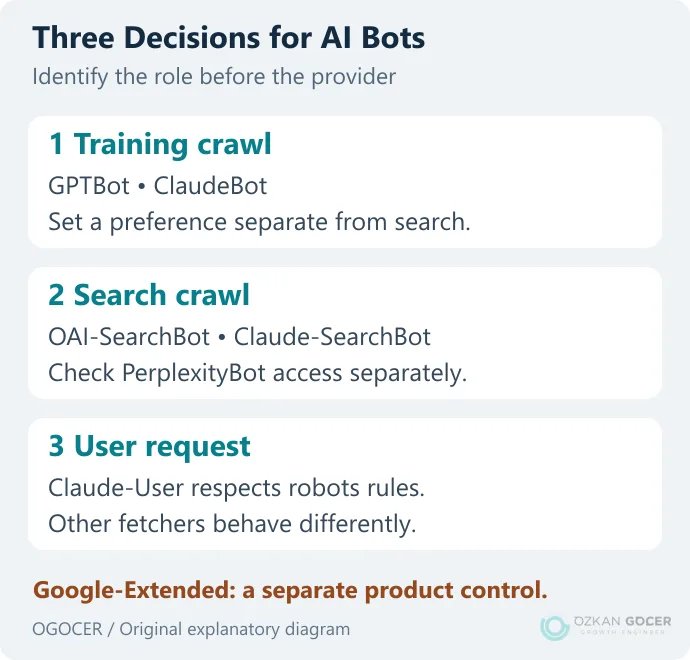
You can, for example, decline training crawls while remaining eligible for ChatGPT search. Blocking GPTBot does not mean disappearing from every AI product. Allowing a search crawler does not guarantee a citation either. The AI search page audit covers the other checks involved in visibility.
Where Does robots.txt Belong, and Which Rules Apply?
The file sits at the root of the relevant site, such as https://example.com/robots.txt. Its scope can change with the subdomain, protocol or port. Editing the main site's file does not automatically control every subdomain.
User-agentidentifies the crawler addressed by a group.Disallow: /asks a matching crawler not to crawl any path.Disallow: /archive/restricts that path and paths beneath it.Allowdefines an exception under the supported matching rules.User-agent: *is the general group used when no specific group matches.
The Robots Exclusion Protocol is not an authorization system. A compliant crawler without a specific match looks for the wildcard group; “a bot is not named, so everything is allowed” is incorrect. Google's implementation documentation also explains that a specific group does not automatically inherit the wildcard group's rules.
Which Bot Does What?
Scroll sideways to read every column. Keyboard: focus the table and use the arrow keys.
| Name | Documented Purpose | Decision Boundary |
|---|---|---|
| GPTBot | Crawling for OpenAI model training | Configured independently of OAI-SearchBot. |
| OAI-SearchBot | ChatGPT search | Permission does not guarantee inclusion. |
| ChatGPT-User | User-initiated page requests | OpenAI says robots rules may not apply. |
| ClaudeBot | Model development and training crawls | Separate from Claude-SearchBot and Claude-User. |
| Claude-SearchBot / Claude-User | Search / user-requested retrieval respectively | Anthropic says both respect robots directives. |
| PerplexityBot | Crawling for Perplexity search | The provider does not describe it as a foundation-model training crawler. |
| Perplexity-User | User-requested retrieval | The provider says it generally ignores robots rules. |
| Google-Extended | A preference for specified Gemini/Vertex training and grounding uses | Not a separate HTTP user agent or Google Search ranking signal. |
These names and roles were checked against the current documentation from OpenAI, Anthropic, Perplexity and Google. User-triggered fetchers are not interchangeable: Claude-User's documented behavior differs from ChatGPT-User and Perplexity-User.
Example: Decline Training Crawls While Keeping Search Available
The following is not a complete robots.txt file. It is an example addition for a site declining GPTBot and ClaudeBot training crawls. If groups for those names already exist, review them together rather than leaving a second contradictory copy.
User-agent: GPTBot
Disallow: /

User-agent: ClaudeBot
Disallow: /
This example does not grant new permission to OAI-SearchBot, Claude-SearchBot or PerplexityBot, nor does it remove an existing restriction. Check each search bot's specific group, or the * group if none matches, along with server security rules. If your existing wildcard group contains Disallow: /, adding the block above will not open search crawling.
Make a separate decision about Google-Extended. It is not a training-only token: the documented scope also includes grounding, using web content to support answers in specified Gemini/Vertex products. If you want to restrict those uses, this group can be considered as a separate preference:
User-agent: Google-Extended
Disallow: /
A new crawl rule does not prove that previously collected data or information in an already-trained model has been erased. Do not present a crawl preference as retroactive deletion.
A Specific Bot Group Does Not Inherit General Restrictions
A subtle mistake is losing an existing path restriction while opening access for a search bot. In this incorrect example, you might assume the /archive/ restriction also applies to OAI-SearchBot:
# Incorrect assumption: specific groups do not inherit *
User-agent: *
Disallow: /archive/

User-agent: OAI-SearchBot
Allow: /
If you need a specific OAI-SearchBot group, include the crawl restriction you intend to retain in that group too. The following example restricts the path for both groups:
User-agent: *
Disallow: /archive/

User-agent: OAI-SearchBot
Disallow: /archive/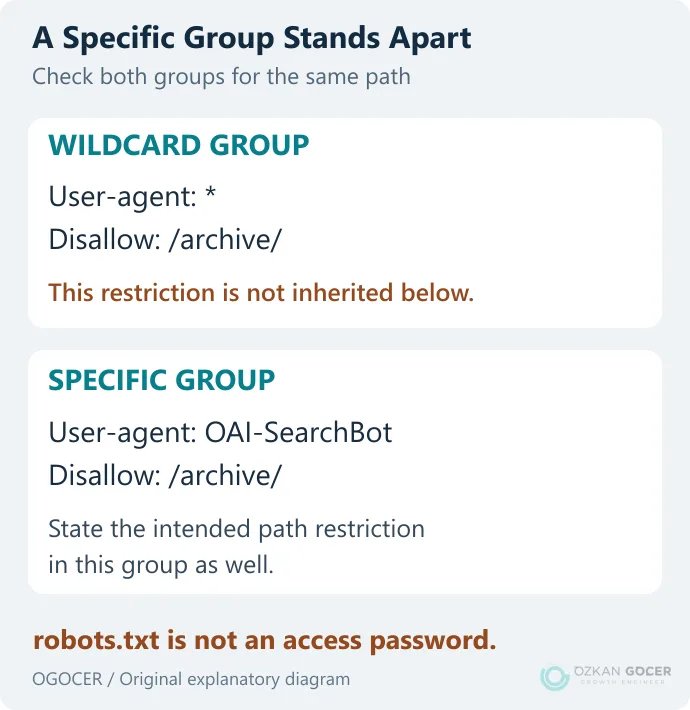
The path here is only a crawl example. Private files and administration panels need authentication, authorization and server access controls. Listing sensitive paths does not hide them; anyone can read a public robots.txt file.
How Do You Control Google AI Overviews and AI Mode Separately?
Google-Extended does not control inclusion or ranking in Google Search. Blocking Googlebot broadly also affects ordinary search crawling. A publisher wishing to opt out specifically from generative Search features now has the Search generative AI preference in Search Console.
Google's documentation for this setting says exclusion does not affect inclusion or ranking in other Search results and distinguishes it from model-training controls. Check inherited settings from parent properties too.
Preview controls such as nosnippet, max-snippet and data-nosnippet operate at another layer and can also affect ordinary search previews. A small snippet limit is not a universal opt-out from AI use. The Google AI Mode guide explains the product experience, while the technical SEO guide covers broader indexing issues.
How Should You Check a Change?
- Save the existing file. Record the changed lines, their purpose and a rollback copy.
- List bot/path pairs. For example, OAI-SearchBot plus a public article should be allowed, while the same bot plus a restricted archive path should be disallowed. Write down each expected result.
- Read the file at its public URL. Confirm the correct version reaches visitors through the server and CDN. The text in an admin panel may differ from the file served publicly.
- Check HTTP and security responses separately. Robots permission does not override a 403, a 429 or an access challenge.
- Monitor later crawls. Verify crawler identity using the provider's current methods. A User-Agent header alone is not proof.
A read-only command to retrieve your site's file and response headers is:
curl -i https://example.com/robots.txtReplace example.com with your domain. A successful request using a copied User-Agent does not prove that a genuine crawler arriving from the provider's IP will pass the same checks. Reading robots.txt also does not prove that article access or source selection is working.
Keep a Record of the Policy Decision
For each provider, keep separate rows for training, search and user requests. Add the reason, change date and verification result. When a preference changes, update the relevant group instead of guessing months later why a line was added.
Use robots.txt for crawl preferences, server controls for actual access enforcement, and the product's own controls for indexing and previews. Reviewing those layers separately makes your preferences clearer and reduces the chance of accidentally blocking search access you intended to retain.