
Email marketing means sending useful information, product updates or offers to people who want to hear from you. A manageable starting point is a clear signup promise, an authenticated sender, a message with one purpose and a way to assess the response. Sending is not the same as reaching an inbox, and a recorded open is not necessarily a person reading.
Suppose a bicycle workshop offers a monthly maintenance newsletter, then sends daily discounts. The problem starts with the broken promise, not the subject line. Decide what subscribers should expect before designing the campaign. Email is one part of digital marketing; it cannot do every job in the customer relationship.
Give the Message a Specific Job
Scroll sideways to read every column. Keyboard: focus the table and use the arrow keys.
| Type | When it fits | Example |
|---|---|---|
| Welcome | After signup is complete | Deliver the promised checklist |
| Newsletter | At the advertised frequency | A maintenance tip with a link to the full explanation |
| Promotion | When there is a relevant, genuine offer | A service package with clear terms and an end date |
| Transactional message | After an order or appointment | The appointment time and preparation instructions |
An appointment confirmation and an offer for another service serve different purposes. Keep that distinction in your messaging and permission decisions. Cart reminders and re-engagement emails also need suitable data, permissions and triggers; an available automation template is not a reason to send it to everyone.
Build a List Around a Clear Promise
Explain the topic and expected frequency on the signup form. Ask for an email address and only the additional fields you will use. Record when and where someone subscribed and what the form said. Purchased or scraped addresses are not a substitute for your own subscribers; Mailchimp’s audience requirements prohibit third-party lists.
Single opt-in completes signup when the form is submitted. Double opt-in asks the person to confirm through a subsequent message, which can help catch mistyped addresses or unwanted signups. The opt-in setting does not, on its own, establish compliance with every applicable law.
For campaigns governed by Turkish rules: the Ministry of Trade explains consent requirements and exceptions, including provisions for traders and artisans and the effect of an opt-out. Turkey’s IYS system manages commercial-message permissions and refusals. Do not translate this into a blanket claim that every email worldwide requires fresh consent. Review the rules applicable to your sender, audience and message, alongside personal-data obligations.
Prepare the Sending Domain
Add your provider’s DNS records in your domain management account. SPF concerns permitted senders, DKIM signs messages, and DMARC checks domain alignment and specifies handling policy. Use the values supplied for your own setup, rather than copying another business’s records.
Gmail’s sender requirements include SPF or DKIM for all senders to personal Gmail accounts. Sending over 5,000 messages daily brings additional requirements, including SPF, DKIM, DMARC and one-click unsubscribe for marketing messages. These are selected requirements, not the complete checklist. Inspect the provider’s authentication status and a test message’s headers. Passing authentication does not guarantee inbox placement.
Build One Complete Campaign
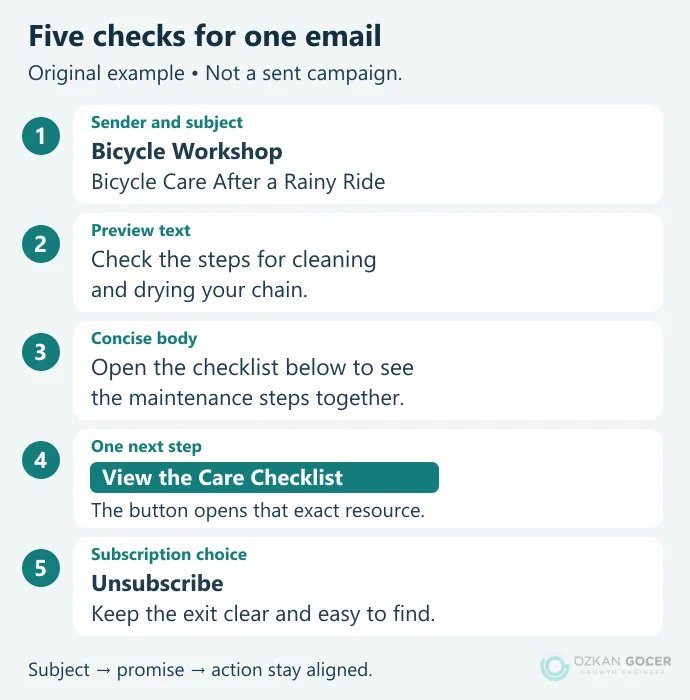
The bicycle newsletter below is an original teaching example, not a campaign sent for a client. Its subject, preview and button make the same promise:
- Recipients: select people subscribed to maintenance updates. Exclude opted-out and invalid addresses.
- Subject: “Bicycle Care After a Rainy Ride” describes something the email actually covers.
- Preview: “Check the steps for cleaning and drying your chain.” Add detail rather than repeating the subject.
- Body: answer one question briefly. Use text that remains useful with images disabled and meaningful image alternatives.
- Action: a “View the Care Checklist” button should open that checklist, not a homepage or unrelated offer.
- Test: inspect the sender name, reply address, personalization fields, links, mobile layout and unsubscribe flow.
Mailchimp’s campaign checklist separates recipients, sender, subject and content. Keep those checks even if you use a different product. For a dedicated signup destination, check that the landing page’s offer and form agree with the invitation.
Separate Opens, Clicks and Sales
Open and click rates need their measurement definitions. Image-based opens can be affected by Apple Mail privacy features and automated activity. Security scanners can also generate clicks; inspect the reporting tool’s bot filters. Do not treat every missing open as proof that a person lost interest.
Scroll sideways to read every column. Keyboard: focus the table and use the arrow keys.
| Measure | Calculation | Interpretation |
|---|---|---|
| Delivery rate | 950 ÷ 1,000 = 95% | Delivery does not prove inbox placement. |
| Unique click rate | 38 ÷ 950 = 4% | The denominator here is delivered messages. |
| Orders / deliveries | 5 ÷ 950 ≈ 0.53% | Assumes orders matched to this campaign and reporting window. |
These figures are neither targets nor industry averages. Returns, product costs and campaign expenses matter before drawing a profit conclusion. The distinction between ROAS and ROI helps keep attributed revenue separate from investment return.
Tag outbound campaign links consistently, for example ?utm_source=bicycle_newsletter&utm_medium=email&utm_campaign=autumn_care. Google’s campaign parameters identify traffic sources; never put a person’s name or email address in them. If website outcomes are missing, review your GA4 installation and event checks. A URL tag does not install purchase tracking.
Start Automation with a Small Flow
Begin with one welcome email that delivers the promised resource after signup. Write the entry, waiting and exit conditions before adding more messages. A subscriber who opts out must leave the marketing flow; someone who already purchased should not keep receiving the same purchase prompt. Check total frequency across scheduled newsletters and automation.
Use your content marketing plan to choose topics. Adding a first name is a small formatting choice. Answering different questions for a newcomer and an existing customer is a more useful distinction.
Choose Tools and Improvements by the Task
In a trial account, look for permission records, segmentation, domain authentication, unsubscribe handling, test sends, reporting and exports. Compare sending limits, automation scope and integrations as well as contact counts. Check current plan details before assuming the features you need are free.
Low clicks call for a look at the offer and destination; delivery problems call for sender and list checks before a rewrite. A few people can move the percentage sharply on a small list. Compare campaigns with the same purpose and change one meaningful variable at a time, rather than declaring a winner from a single send.