
A business account can stall even when there is no shortage of ideas. The photograph is ready, but nobody knows who should approve the price. A customer asks a question, but no one owns the reply. A workable management process addresses those gaps as carefully as it handles content creation.
What Does a Social Media Manager Do?
A manager decides what the account should communicate and to whom, coordinates production, and oversees publishing and community responses. In a small business, the same person may also write and design posts. A larger operation may divide photography, design, customer support and advertising among different specialists. Delivering every part personally is not an inherent requirement of the role.
Scroll sideways to read every column. Keyboard: focus the table and use the arrow keys.
| Work Area | Deliverable | Decision to Make First |
|---|---|---|
| Planning | Goals, channels and topics | Is the priority awareness, enquiries or support? |
| Production | Copy, images, video and captions | Who supplies the footage and owns the usage rights? |
| Publishing | An approved content calendar | Who checks prices, dates and the final version? |
| Community | Comment and message responses | What are the working hours and escalation rules? |
| Measurement | A period comparison and next decision | Which source will show the intended result? |
An influencer creates for an audience of their own. Managing a company's accounts and developing your own publication are different jobs. If the latter is your goal, see the guide to becoming an influencer and approaching partnerships. The social media specialist guide explores the career's responsibilities and skills.
Connect the Business Goal to an Audience Need
“More followers” expresses an ambition, but it gives little direction for the next post. Imagine a pottery studio seeking bookings for weekend classes. Its account should address questions such as “Do I need experience?”, “Are materials included?” and “When can I collect my finished piece?” The useful business result is an enquiry from someone genuinely interested in attending, not simply another like.
Read existing comments, recurring customer questions and concerns raised before a purchase. Competitor accounts can reveal topics and formats worth considering. Public likes cannot tell you a competitor's sales, advertising spend or profitability. Keep observations about their publishing separate from evidence about your own customers.
An account might support purchases, explain product use or introduce a new service. Consider how it works with the website and other digital marketing channels. A single post does not have to fulfil every business objective at once.
Which Platform Should You Start With?
Narrow the choice with three questions. Where does your intended audience look for relevant content? Which format lets you explain the subject well? Can you produce that format regularly? A workshop that can show how products are made may start with visual demonstrations. Detailed teaching may suit longer videos, while professional knowledge may work well in a business discussion.
Match different types of social media, such as video sharing, professional networking and messaging, to the account’s purpose. One well-maintained primary channel can be a sensible starting point. Adding another also creates more production, response and measurement work. Do not base the decision solely on a platform's total user count. Compare how social platforms are used and the starting plan for small businesses. For visual material people may discover well after publication, Pinterest's approach to discovery is another option to assess.
Build Approval into the Content Calendar
A date and a topic may not be enough. Include the post's purpose, format, destination link, creator, approver and current status. The following fictional week belongs to the pottery example; it is not a recommended posting frequency for every account.
Scroll sideways to read every column. Keyboard: focus the table and use the arrow keys.
| Day and Content | Audience Benefit | Owner and Check | Next Action |
|---|---|---|---|
| Monday: short making video | Shows what happens in a first class | Tutor records; manager checks captions | Read the class details |
| Wednesday: question cards | Explains materials and experience requirements | Manager prepares; business approves facts | Ask an unanswered question |
| Friday: class announcement | Confirms date, location and booking terms | Business checks available places | Visit the booking page |
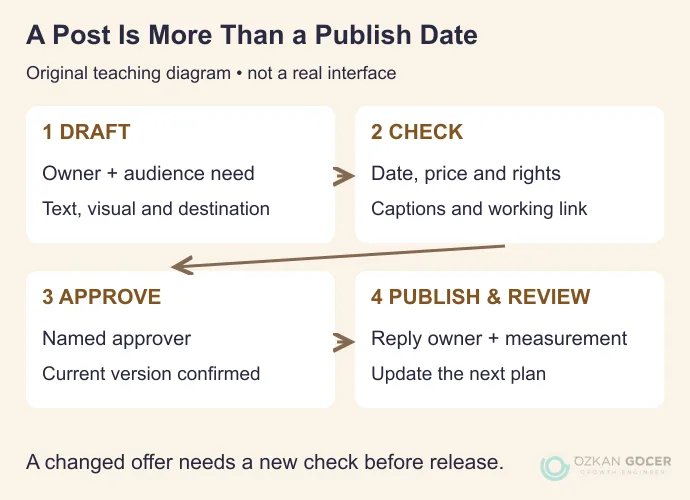
A post awaiting approval should not automatically enter the publishing queue. Update scheduled posts when an offer ends, an event is cancelled or service terms change. Even if one person handles everything, separating draft, review, approval and publication reduces the risk of sharing an outdated version.
Buffer's calendar documentation explains channel filters and adapting a post for each network. Check the account's time zone and selected channels when scheduling. For a fuller topic bank and publishing plan, use the social content planning guide.
Consider Design, Copy and Community Together
Give each post a clear main message. Put dates and prices in the caption as well as the image, so readers do not have to extract essential information from a graphic. Caption spoken video and write alternative text that describes what an image actually shows. Check social image dimensions for the intended placement, and keep essential wording away from edges that may be cropped.
Create a short response guide too. Routine questions can receive a direct answer; conversations involving orders, payments or personal details should move to an appropriate private support channel. Deleting a complaint merely because it is negative does not resolve it. Set clear moderation criteria for harassment, spam and exposed personal information. Decide in advance who can pause automated posts during a crisis.
Do not present sponsored content as an independent customer recommendation. For work in Turkey, consult the Ministry of Trade's current advertising disclosure announcement; free products and other benefits may also require disclosure. Verify product claims, prices and permission to use the material before publishing.
Which Social Media Management Tools Do You Need?
A shared spreadsheet, an organised asset folder and the platform's own analytics may be sufficient at first. Before buying software, name the task it needs to make easier.
- Planning: Google Sheets or Excel can hold topics, owners, approvals and links. A scheduling tool such as Buffer may help when you need a calendar view.
- Design: Templates can speed up production. Review which tasks Canva suits, then adapt the layout to the message rather than filling every post with the same treatment.
- Publishing and measurement: Start by checking your platform's available scheduling and analytics features. For an external tool, verify support for your account type, formats and required data history.
- Access: Use supported user and task permissions instead of circulating a shared password. Enable two-step verification, remove access when someone leaves, and keep account ownership with the business.
Free versus paid is only one part of the choice. Approval steps, permission controls, report exports and account limits matter too. Buffer's measurement documentation explains that networks do not all make the same data available. A blank field in an external dashboard should not be interpreted as zero performance.
Choose a Result That Matches the Goal
For awareness, examine reach and whether you are reaching the intended audience. For enquiries, follow link clicks, website behaviour and relevant enquiries. For support, examine resolved questions and response time. Likes can help explain a response to content, but they do not represent every business outcome.
A post may earn many saves and few bookings. People may find it useful but be unable to attend the date or location; the booking link may also be hard to find. Check the explanation and destination page before drawing conclusions. One weak post is not evidence of an algorithmic penalty. The social media algorithm guide covers distribution, while the ROAS and ROI guide separates different business calculations.
End the review with a change you can make: “Questions about materials kept recurring, so we will add that information to the booking page.” Measurement becomes part of management when it changes the next piece of content or the information customers receive.
How Should You Compare Management Prices?
A single market rate would hide substantial differences in scope. Preparing a few posts from supplied images is a different assignment from filming, editing video, answering messages daily and managing advertising. A proposal should specify channels, original deliverables, shoot days, revision allowances, response hours and reporting.
Ask for management fees, advertising spend, software subscriptions and creator partnership budgets separately. Agree how files and account access will be handed over when the work ends. If a creator is involved, evaluate the scope of a micro-influencer partnership separately; it is not automatically included in day-to-day account management.
You do not need a complete software stack to begin. Prepare a one-week plan for a primary channel, with an objective for the period and named responsibilities. Review the production workload, unanswered questions and contribution to the goal before expanding.