
The short answer: for newsletters, compare contacts and sends. For sales or membership journeys, check the events, conditions and exit steps you need. Instead of naming one winner for everyone, this guide compares the plans needed for the same stated workload.
What We Checked—and the Limits of the Comparison
On 24 October 2026, we used all four public pricing pages in a browser. We adjusted their contact or sending selectors for lists of 1,000 and 5,000 and saved screenshots of monthly prices. We checked feature limits against provider documentation.
We did not upload a subscriber list, send campaigns or measure inbox placement, editor usability or sales uplift. This is a price and scope comparison. You still need to try your own workflow before committing.
Monthly Costs for 1,000 and 5,000 Contacts
Both examples assume four newsletters per subscriber per month: 1,000 × 4 = 4,000 and 5,000 × 4 = 20,000 emails. Welcome messages, resends and post-purchase emails are additional. Include those when estimating your real volume.
Scroll sideways to read every column. Keyboard: focus the table and use the arrow keys.
| Tool and plan compared | 1,000 contacts / 4,000 sends | 5,000 contacts / 20,000 sends | Watch for |
|---|---|---|---|
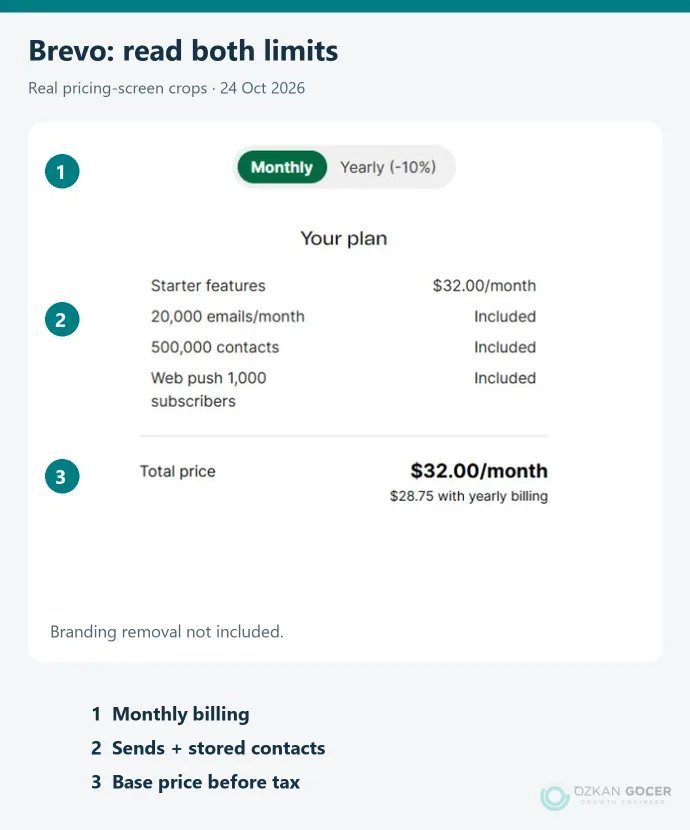
| Brevo Starter | $17/month; 10,000 sends, 1,500 stored contacts | $32/month; 20,000 sends, 500,000 stored contacts | A lower tier may have enough sends but insufficient contact storage. |
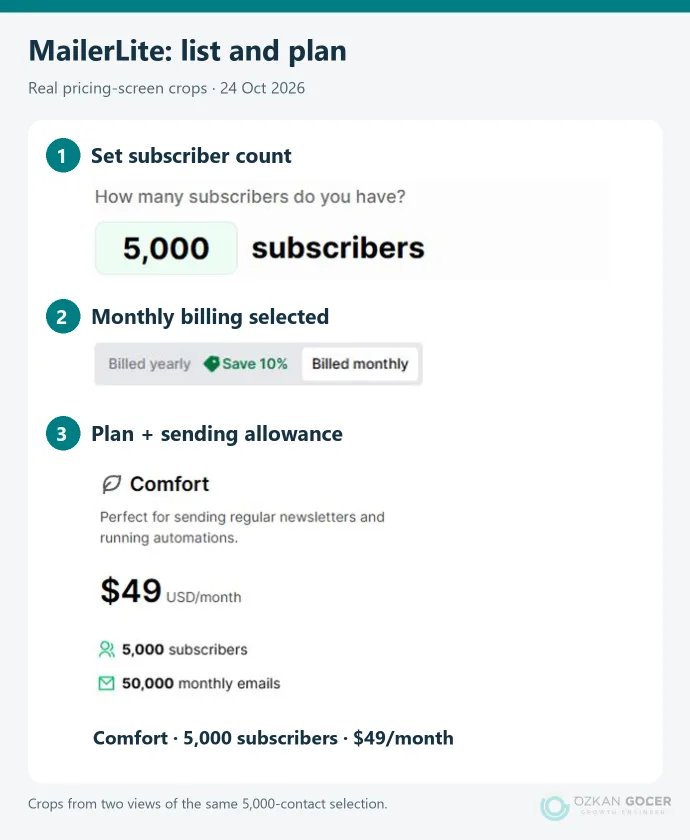
| MailerLite Comfort | $19/month; 10,000 sends | $49/month; 50,000 sends | Check active subscribers and sending capacity together. |
| Mailchimp Essentials | $26.50/month; 501–1,500 contact tier | $75/month; 2,501–5,000 contact tier | Billable contacts are not limited to people who can receive marketing email. |
| GetResponse Starter | $19/month; unlimited monthly emails | $54/month; unlimited monthly emails | Unlimited sends do not mean unlimited automation features. |
These are USD monthly-billing prices before tax on the check date. We did not apply annual discounts, temporary offers, SMS or optional services. The plans are not feature-equivalent: the table compares the stated newsletter workload only. Current calculators: Brevo, MailerLite, Mailchimp and GetResponse.
In the Brevo 5,000-contact example, four newsletters consume the full 20,000-send allowance. A welcome sequence needs extra capacity. Check automation requirements before purchasing the cheapest row.
Which Tool Is Worth Considering for Your Situation?
Brevo: Separate the List from the Sending Schedule
Its tier structure is worth examining if you keep a large list but send infrequently. Do not reduce it to “send-based pricing”: Starter also has contact-storage tiers. Automation is limited to 2,000 contacts on Starter. Sending a newsletter to 5,000 people is therefore different from placing all 5,000 in automation. The branding-removal option was off in our calculation; it appeared as a $12 monthly add-on.
MailerLite: Newsletters and Several Separate Sequences
Comfort is a candidate for a small team combining newsletters with welcome or content sequences. The current limits document lists 50 automations for Comfort. A workflow count does not confirm that your required conditions, integration and sending capacity are available. Check those individually, and use current plan names rather than an old comparison.
Mailchimp: Existing Connections and Billable Contacts
If your store or data flow already depends on Mailchimp, include migration work in the comparison. Its contact-type guidance counts unsubscribed and non-subscribed records towards the limit. Duplicates across separate audiences can also increase the total. Essentials supports up to four flow steps; the Standard prices we observed were $45 for the 1,000-contact scenario and $100 for 5,000. Sketch the workflow before choosing a plan.
GetResponse: Check Workflow Scope, Not Just Sends
Starter offers unlimited email sending, but the plan documentation allows only one automation workflow. For multiple journeys, abandoned-cart features or advanced segmentation, examine Marketer. We observed monthly prices of $59 at 1,000 contacts and $95 at 5,000. Growing a list and adding more customer journeys can create different upgrade needs.
What Do the Free Options Actually Cover?
Scroll sideways to read every column. Keyboard: focus the table and use the arrow keys.
| Tool | Free usage at the check date | Practical limitation |
|---|---|---|
| Brevo Free | 300 emails per day | You cannot send one newsletter to 1,000 people on the same day. |
| MailerLite Free | 250 active subscribers; 2,500 emails per month | The example list of 1,000 does not fit. |
| Mailchimp Free | 250 contacts; 500 sends per month, up to 250 per day | Four newsletters to 250 contacts exceed the monthly allowance. |
| GetResponse | 14-day feature trial | Limited free access after the trial is not a continuation of the paid feature set; verify the functions you need. |
MailerLite changed its free limits on 16 June 2026. An older reference to 500 subscribers or 12,000 sends no longer describes this offer. Daily limits also remain daily limits: multiplying by 30 does not mean you can send that total in one batch.
Try One Small Workflow Before Paying
Read whether a trial requires a card and whether it renews as a paid subscription. Use a few permission-based test addresses you control for the checks below. This is a proposed acceptance test, not a report of campaigns we ran.
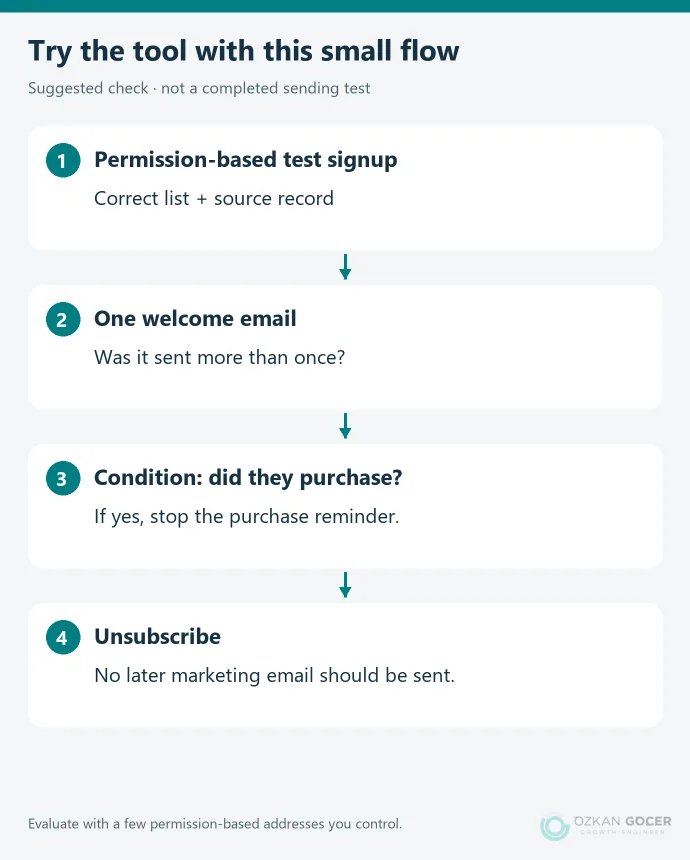
- Signup and permission: Does the contact reach the correct list with the necessary source and permission details?
- Workflow: Is the welcome sent once? Does a purchase stop an unnecessary reminder?
- Exit: Is an unsubscribed test address excluded from later marketing steps?
- Portability: Can you export fields, tags and records that must remain suppressed?
- Reporting: Can you distinguish a link click from a completed enquiry or order on your site?
Choosing software and planning a campaign are separate tasks. Our guide to preparing an email campaign covers permission, messaging, domain authentication and measurement. To decide where email belongs alongside other activity, compare the roles of different internet marketing channels.
Making the Final Choice
Shortlist two tools and try the same workflow in both. If one cannot receive the event data you need, a lower monthly price will not fix the gap. Consider cost, the team’s ability to maintain the process and the ability to move the data later.
If your signup forms need to connect to the right pages and measurement on your website, we can help define that within a website design and development project. Clarifying where visitors subscribe and what they see afterwards also makes the software decision easier.