Seeing position 8 in one tool and 12 in another does not immediately establish an error. Dates, locations, devices, target URLs and measurement definitions may differ. Make the measurements comparable before deciding whether a paid plan solves your problem.
Which Rank Tracking Tool Fits Your Task?
The comparison below uses official product documentation accessed on October 7, 2026. It is not an accuracy or speed benchmark. The distinctions help you choose a workflow rather than declare a universal winner.
Scroll sideways to read every column. Keyboard: focus the table and use the arrow keys.
| Tool | Useful For | Check Before Choosing |
|---|---|---|
| Google Search Console | Free reporting on your property's impressions, clicks and average position. | No access to competitors' properties; it does not run your entire chosen keyword list every day. |
| Ahrefs SERP Checker | A free look at leading results for a keyword in a selected country. | A lookup is not the same as a continuously monitored project history. |
| SERPROBOT | Free on-demand checking or account-based ongoing monitoring. | The free checker and automatic reports, alerts and history have different scopes. |
| Semrush Position Tracking | Scheduled keyword monitoring by location and device, with competitor comparison. | Daily tracking, target limits and whether your plan covers multiple locations. |
| Ahrefs Rank Tracker | Keyword, competitor and SERP-feature tracking within Ahrefs. | Country/city/postcode targeting, mobile/desktop scope and the update frequency in your account. |
Sources: Search Console Performance, Ahrefs SERP Checker, SERPROBOT, Semrush Position Tracking and Ahrefs Rank Tracker. Semrush's documentation describes daily updates; the Ahrefs product page accessed for this comparison describes weekly updates. Do not buy on the assumption that every paid tracker refreshes daily. Check current account and plan terms.
How to Check Google Rankings for Free
Start With Search Console for Your Own Site
Open Performance → Search results and set a date range. Add query, country and device filters, then use the Pages tab to identify the URL appearing. That avoids treating a site-wide average as one article's position. A query missing because it had no impressions or was withheld for privacy is not evidence that nobody searches for it.
Use a Spot Check to Inspect the Results Page
The public Ahrefs SERP Checker interface has a keyword field, country selector and Check SERP button. Enter the keyword, choose the target country and compare the returned URLs with your intended page. Free-access limits or verification steps can change. Do not report one lookup as a complete picture of weekly visibility.
A practical zero-budget workflow is to find a change in Search Console, inspect the result format with a free lookup and record the date. Consider a subscription when scheduled competitor, city or device tracking becomes necessary. If you also need site auditing, compare SEO analysis tools by task.
Why Does Search Console Show a Different Position?
In Google's metric definitions, average position is based on the highest result recorded across impressions. Grouping by property or page changes the calculation. A tracker checks a selected query under configured conditions. Those numbers answer different questions.
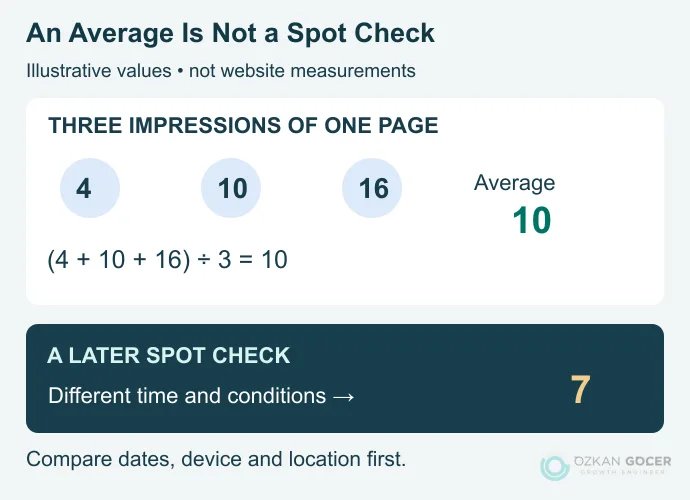
For a simplified teaching example, suppose the same page appears in positions 4, 10 and 16 across three impressions. Its average is 10. A later spot check returning 7 is not a contradiction. These are invented teaching values, not website measurements. Ads, maps and other result features also mean that organic position and vertical space on the screen are different things.
If the underlying process is unfamiliar, start with crawling, indexing and serving search results. A rank checker does not reveal an unchanging Google results list shared by every user.
Build a Ranking History You Can Compare
- Map each keyword to a page. Give each row an intended URL. Avoid a high-volume term if the page does not answer its intent; establish that match during keyword research.
- Record country, language and device. Do not compare a Turkey mobile measurement with a US desktop measurement. City or service-area targeting matters for local businesses.
- Separate result types. Organic links, map results and AI citations do not belong in one undifferentiated position column.
- Check the measurement timestamp. A dashboard opened today may contain an older observation.
- Repeat with the same settings. Record when content changes and avoid judging the outcome from one day.
Semrush's current setup instructions say the original location and device cannot be changed after campaign setup. If you need a different measurement area, check whether your plan supports additional campaigns. Do not treat observations from the new target as an uninterrupted continuation of the old series.
Keep Local Rankings and AI Visibility Separate
A city-centre check does not establish your visibility in every neighbourhood. Before purchasing map tracking, ask which coordinates, radius and devices it measures. The measured area should match the service area of your local SEO work.
Search Console's generative AI performance report lets you examine AI Overviews and AI Mode impressions by page, country, device and date. It is neither a citation log for every generated answer nor an organic position report. Decide which measurement you need before choosing a tool. See the distinction between AI Mode and AI Overviews before comparing their outputs.
What Should You Check When Rankings Drop?
Check the measurement conditions before rewriting the page. An incorrect device setting or stale timestamp is not a content defect. In Search Console, compare clicks, impressions and position for the same page across suitable periods. The newest figures can still be preliminary; check the report's data status.
- If the page is unavailable or has left the index: prioritise server responses, noindex, redirects and canonical settings.
- If impressions decline while position looks similar: examine demand, seasonality and the query mix. One metric cannot establish the cause.
- If impressions persist but clicks fall: inspect intent, the displayed title and changes to the results page. If content is missing, base the article revision on that finding.
- If another URL from your site appears: investigate whether two pages serve the same need before deleting either.
Use Google's traffic-drop diagnostic approach to narrow the cause, then choose the relevant organic traffic improvements. A tracker measures rankings; it does not raise them by itself. Begin with a manageable set of business-relevant keywords and a record of intended URLs and measurement conditions.