
Write down the job first: connecting a household's devices, protecting traffic on a network while travelling, or routing a particular application through a tunnel. Then check device support, simultaneous connections and payment terms. Extra features matter only when they serve that job.
What This Comparison Establishes
Official plan pages and support documents were reviewed on October 17, 2026. The table records published limits and explains how they affect a choice. On October 18, we also ran an actual Mullvad connection, browser and short-transfer trial; its results appear in a separate section below. The other five services were not tested under the same conditions, so the table is not a speed ranking. An audit or no-logs statement is not treated as an unlimited security guarantee.
If the connection itself is unfamiliar, the VPN setup and usage guide provides the background. This article focuses on what to compare before paying and what to check on your own device afterwards.
Six VPN Services to Compare by Need
Scroll sideways to read every column. Keyboard: focus the table and use the arrow keys.
| Service | Verified Difference | Reason to Consider It | Limit to Check |
|---|---|---|---|
| Proton VPN | Free: no data cap, 1 simultaneous device. VPN Plus: 10 simultaneous devices. | Try a free plan before deciding whether broader server and feature access is useful. | Free does not include every Plus server-selection, P2P and streaming feature. |
| Mullvad | €5 per month including VAT; up to 5 devices. | Calculate costs without committing to a long introductory term. | No port forwarding. Simple pricing does not guarantee access to every streaming service. |
| NordVPN | 10 simultaneous devices. | Connect desktop and mobile devices within that limit. | Additional products vary by package; read the renewal price separately. |
| Surfshark | Unlimited simultaneous device connections. | Personal use across many devices. | Usage terms still apply. Unlimited connections do not mean unlimited speed or permission to resell the service. |
| ExpressVPN | Basic: 10, Advanced: 12, Express Pro: 14 simultaneous devices. | Choose a tier around device count and additional features. | A single device limit or price does not describe all subscriptions. |
| Windscribe | Free: 2 GB/month; 10 GB/month with a confirmed email and the promotional-email condition. | Check whether a capped free plan covers occasional use. | The allowance can fall if the email condition changes; a small quota may not suit large uploads. |
The table is a shortlist, not an inventory of every provider. Omission is not a negative rating. Also distinguish a browser extension that routes browser traffic from an application intended to cover the device. Read the documentation for your exact operating system and version before assuming both provide the same coverage.
What a VPN Protects and What It Cannot Hide
A VPN protects the traffic routed through its tunnel between your device and the VPN server. A destination website generally sees the VPN exit address, while the local network can see a VPN connection. The provider becomes another party you must trust. EFF's VPN selection guidance explains that shift and the limits of anonymity claims.
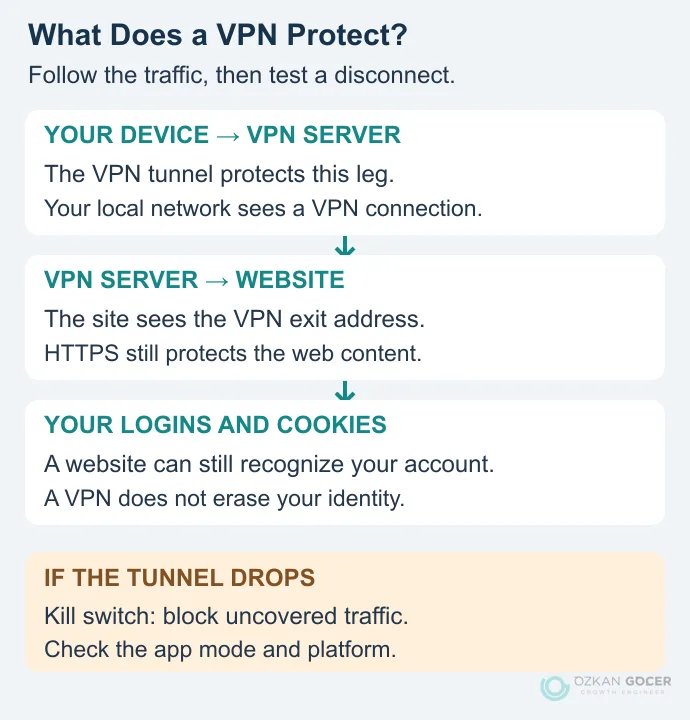
A website can still recognize an account you sign into. Cookies, browser fingerprints, device permissions and account history do not disappear when the VPN connects. HTTPS continues to matter, and a VPN does not make a fraudulent login form trustworthy. If search profiling is the concern, compare privacy-focused search engines as a separate decision from routing device traffic.
What Changed When We Connected Mullvad?
On October 18, 2026, we took measurements on the same Windows PC with the VPN off, with Mullvad connected, and again after disconnecting. The exit IP changed, and two browser tools reported no WebRTC leak in the connected session. Short file transfers were slower through Norway. Those observations answer different questions: where traffic exits, what the browser exposes, and how long a file takes to move.
The setup was an Ethernet connection in Türkiye, Windows 10 Pro 19045, Chrome 155.0.8059.80 and the installed Mullvad 2026.4 client. The transfer test used no-svg-wg-004 in Stavanger over WireGuard/UDP. We kept the existing Norway selection rather than searching for the nearest or fastest server. Split tunneling, custom DNS, multihop and DAITA were off. The client offered a newer release; the findings here belong to the installed version.
Read the IP, DNS and WebRTC Results Together
With the VPN off, Mullvad Connection check showed three red results. That is the baseline without a VPN tunnel, not evidence of a failed tunnel. We reloaded the same page after connecting: the exit was recognized as Mullvad, and both DNS and WebRTC indicators turned green. The DNS details named no-svg-wg-004. A separate BrowserLeaks WebRTC check showed the current VPN exit address as the public IP and reported no leak. No camera or microphone permission was granted.
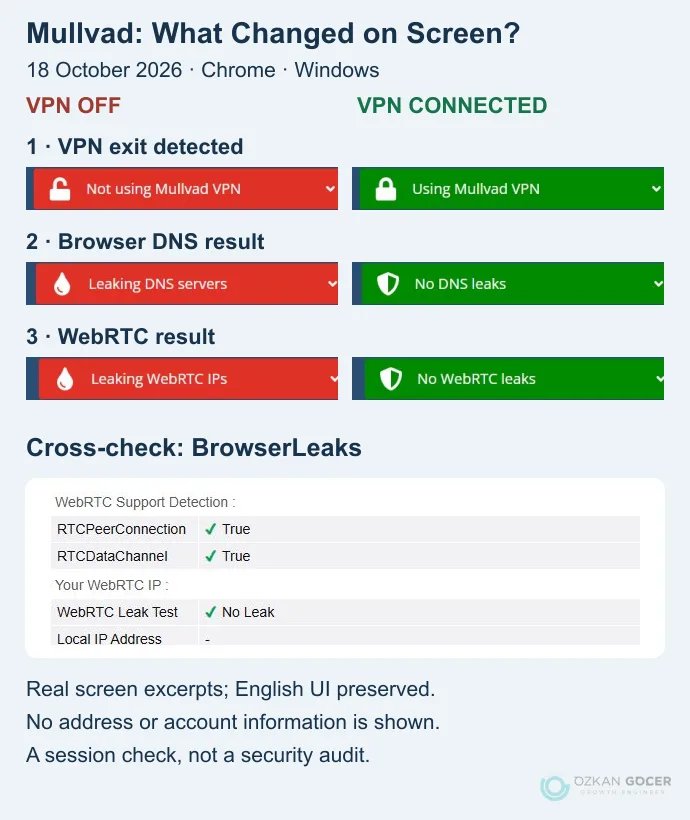
Green indicators have a limited scope. They describe this browser session, not every application or future connection failure. In-tunnel IPv6 was off, so the trial cannot establish leak protection with IPv6 enabled. Browser DNS settings also matter when interpreting a result; Mullvad’s DNS-check explanation discusses that distinction.
File Transfers: Do Not Stop at the First Number
In each of the three stages, we made three 10 MB downloads, three 1 MB uploads and five empty-response requests to Cloudflare’s test endpoints. Uploads used randomly generated data, not personal files. The table gives the median, the middle value after sorting the results. Transfer rates divide the number of bits sent or received by the whole request duration.
Scroll sideways to read every column. Keyboard: focus the table and use the arrow keys.
| Stage | 10 MB Download, Mbps | 1 MB Upload, Mbps | Time to First Byte, ms |
|---|---|---|---|
| VPN off, before | 193.80 | 24.42 | 87.30 |
| Mullvad connected, Norway | 79.35 | 5.76 | 348.62 |
| VPN off, after | 287.31 | 25.59 | 85.52 |
Time to first byte includes steps such as DNS resolution, connection setup and TLS; it is not a ping result. These short, single-request transfers do not measure maximum line capacity. We used Cloudflare’s documented test endpoints, but this small measurement sequence is not the Cloudflare browser speed score.
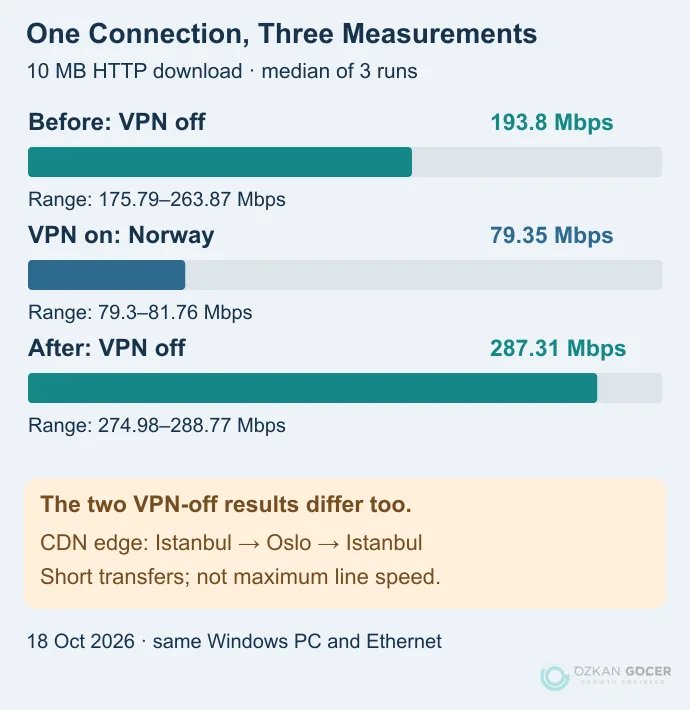
The difference between the two VPN-off stages matters. Cloudflare’s response identified the IST data center without the VPN and OSL while connected, so the route and physical destination also changed. Encryption alone cannot explain the entire difference. Short files moved more slowly through Norway in this session; another server, time or network may behave differently. For large photo archives, test a longer upload to your actual destination as well.
What Did a Normal Reconnect Show?
During one normal reconnect, we sent 15 requests to the exit-address service. One timed out; all 14 successful responses identified a Mullvad exit. None of the samples returned the original public IP. Gaps between requests were not inspected, so this is not proof that the kill switch prevents leaks under every failure condition. We did not unplug the network, suspend the device or force a tunnel failure.
Lockdown mode was off. At the end, we manually disconnected and verified that the original direct internet exit returned. Mullvad’s connection and Lockdown documentation distinguishes manual disconnection from protection during a tunnel failure. The useful finding is specific: the tunnel worked in this setup, the browser checks returned the expected results, and the measurements showed how transfer rates changed. Without testing the other five services under comparable conditions, there is no basis for naming a speed winner.
Look Beyond the Free-Plan Data Allowance
Proton's free-versus-paid comparison separates unlimited data from server and feature access. No data cap does not mean unrestricted country selection or guaranteed access to every video service. Windscribe's free allowance likewise needs to be read together with its email conditions.
An app is not automatically trustworthy because it appears in an official store or charges a fee. Examine the operator, privacy policy, requested permissions, update history and support route. A free plan, a limited trial and a money-back period are different offers: a refund policy can require an initial payment and impose conditions.
Compare Upfront and Renewal Payments
A $3.49 monthly label need not mean monthly billing. The NordVPN pricing page reviewed for this article showed Basic at $94.23 for the first 27 months, renewing at $139.08 per year; sales tax may apply. $94.23 ÷ 27 = $3.49 is the initial term's monthly equivalent. $139.08 ÷ 12 = $11.59 is the displayed renewal's monthly equivalent. These calculations describe the USD offer seen on October 17, not a price guaranteed for every country or checkout.
The Proton VPN pricing page showed VPN Plus at $83.76 for the first 24 months on the same date, then $83.88 for each 12-month renewal. The monthly equivalents are $83.76 ÷ 24 = $3.49 and $83.88 ÷ 12 = $6.99. Distinguish this from Free and the broader Proton Unlimited bundle. Confirm taxes and the final payment for your country at checkout.
Mullvad's published €5 monthly rate is a different payment model. Do not rank EUR and USD prices without accounting for conversion and taxes. Surfshark also publishes separate renewal prices, which should be read alongside its introductory offers.
- The total charged today and the period it covers.
- The renewal amount and billing period for equivalent features.
- Taxes, currency conversion and necessary extras.
- Cancellation, automatic renewal and refund terms for the purchase channel.
Five Checks after Installation
These are checks for your own device, not reported results from testing every service above. Avoid interruption tests during an important upload or call.
- Define the scope. Are you using a device client or browser extension? If split tunneling is enabled, record which applications are excluded.
- Compare the exit address. Use the same IP-checking tool before and after connecting. Record the expected change; a changed IP alone does not prove every application is protected.
- Inspect DNS and IPv6 behaviour. Follow the provider's supported testing method. Compare visible resolvers or addresses with the expected configuration rather than treating every unfamiliar name as a leak.
- Check interruption handling. Use the client's documented kill-switch test. Find out whether covered applications can reach the open internet when the tunnel cannot connect.
- Try your actual work. Check video calls, uploads, a local printer and required business applications. Record the software version, network, server, protocol and time.
The kill-switch mode matters. Proton's advanced kill-switch documentation explains that advanced mode can block internet access even after you manually disconnect. Standard mode handles manual disconnection differently. Pressing Disconnect and observing working internet is therefore not a universal failure test. Nor does one successful check prove protection under every failure condition.
Speed, Mobile Use and Streaming
Server distance, routing, congestion, device performance and protocol all affect results. A nearby server is a reasonable starting candidate, not a guaranteed winner. Take several VPN-on and VPN-off measurements on the same device and network at comparable times. Look at upload speed, latency variation and disconnections as well as download speed.
A photographer uploading large image batches may exhaust a 2 GB allowance quickly. A gamer may experience latency spikes despite a high download result. For a mobile VPN, test transitions between Wi-Fi and mobile data, battery impact and reconnection during the tasks that matter to you.
No provider can be assumed to work with every streaming service in every country. P2P support, port forwarding and rights to the downloaded material are separate questions. Connection availability in Turkey or a travel destination does not establish legal permission for every use; this comparison does not provide country- and activity-specific legal advice.
Reduce the Shortlist to Two Candidates
First eliminate plans that fail your required device support or budget. Compare renewal terms, privacy policies and interruption behaviour among the remaining options. When reading an audit, identify the auditor, date, scope and follow-up. An application assessment is not a permanent assurance covering the entire infrastructure.
A useful final decision is concrete: “This plan covers my devices, I understand the next payment, and I have checked what my applications do when the tunnel drops.” Keep anything you have not checked visible as uncertainty rather than filling the gap with a brand's reputation.