WHAT IS A VPN AND HOW TO USE IT?

What Is a VPN and How to Use It?

A Virtual Private Network (VPN) encrypts your internet traffic and routes it through a secure server, hiding your IP address and protecting your data from prying eyes. You can use one by installing a dedicated app on your device, logging in, and connecting to a server location with a single click. I will show you how to choose a reliable provider, configure your settings for maximum privacy, and bypass regional content blocks safely.

What Is a VPN? (What It Stands For)

A virtual private network (VPN) establishes an encrypted tunnel between your device and the internet. When you use a VPN, your internet traffic routes through a secure connection on a remote server, masking your IP address and protecting your data from interception. In my own practice managing web infrastructure, I configure these tunnels to shield sensitive corporate assets from unauthorized access. Such configurations transform an insecure public connection into a private network environment, ensuring that external observers cannot read your transmitted packets. Routing traffic through encrypted tunnels prevents internet service providers from tracking your online activities.

The term virtual private signifies that the network connection is created logically over public infrastructure rather than through physical, dedicated cables. Modern vpns handle data routing by wrapping each data packet in an outer packet through encapsulation, securing it during transit. For enterprise security, organizations often deploy modern alternatives like Cloudflare Zero Trust or traditional virtual private systems to manage user access.

Cloudflare provides solutions that often replace or augment traditional vpns by verifying every single request to the private network, regardless of the user's physical location. Implementing such systems requires careful planning of routing tables and DNS configurations.

Security remains the primary driver for adopting a vpn. Employees working remotely require secure access to internal databases, which a standard internet connection cannot guarantee. By routing traffic through a dedicated gateway, you prevent local network administrators, internet service providers, and malicious actors on public Wi-Fi from logging your browsing history. While a vpn does not make you completely anonymous online, it forms a fundamental layer of defense for digital operations. You must evaluate encryption protocols to balance speed and protection.

Protocol Encryption Standard Speed Performance
WireGuard ChaCha20 High
OpenVPN AES-256 Moderate
IKEv2/IPsec AES-256 High

How Does a VPN Work? (Encryption and Tunneling)

A virtual private network establishes a secure tunnel between your device and a remote server operated by the VPN provider. When you access the internet, your device encrypts all outgoing data traffic before it leaves your local network. Encrypted data travels through an ISP (Internet Service Provider) connection to the VPN server, which decrypts the information and forwards it to the destination website.

In my own practice configuring secure remote environments, I have observed how tunneling effectively masks your IP (Internet Protocol) address, making your online actions trace back to the VPN server rather than your actual physical location. The external web destination sees the request coming from the private network of the VPN provider, keeping your home or office network details private.

Security protocols govern how the virtual private tunnel handles data transmission. Modern VPNs rely on protocols like OpenVPN or WireGuard to balance speed and encryption strength. The Cybersecurity and Infrastructure Security Agency (CISA) recommends the use of robust encryption standards to protect sensitive organizational data from interception on public Wi-Fi networks. Attackers intercepting the connection see only unreadable ciphertext instead of your passwords, financial details, or browsing history.

Implementing a VPN adds a necessary layer of defense, but it does not guarantee absolute security against malware or phishing attacks. You must still maintain active endpoint protection and practice safe browsing habits.

Let us look at how data flows with and without a VPN:

Connection Aspect Standard Internet Connection VPN Connection
IP Visibility Exposed to destination and ISP Masked by the VPN server IP
Data Encryption None (unless HTTPS is active) Fully encrypted from device to server
ISP Tracking Logs all visited domains Logs only connection to VPN server

Using a private network setup ensures that your ISP cannot sell your browsing habits to advertisers. In the projects I have managed, securing data in transit prevents man-in-the-middle attacks, especially for remote teams accessing central databases. Choosing a reputable service with a strict no-logs policy prevents the VPN provider itself from archiving your internet activity.

What Is a VPN Used For? (Why You Need One)

In my own practice auditing digital setups for remote teams, I always start by securing the network entry points. A virtual private network establishes a secure connection over a public network, transforming an open internet link into a private network. Encryption scrambles your data before it leaves your device, preventing internet service providers, hackers, and government surveillance agencies from monitoring your online activity. You gain a shielded tunnel that keeps sensitive business communications, financial transactions, and personal credentials safe from intercept attacks.

Public Wi-Fi networks in coffee shops, hotels, or airports expose unencrypted traffic to packet sniffing. Using a vpn shields your IP address, masking your physical location and routing your traffic through an encrypted tunnel. Digital rights organizations like the EFF advocate for the widespread use of encryption tools to protect user privacy against corporate data harvesting and state surveillance. Beyond basic security, vpns grant access to geo-restricted content and bypass local censorship. You gain the ability to view your home streaming libraries, banking portals, or news sites while traveling abroad, maintaining a consistent browsing experience.

Protocol Speed Security Level Best Use Case
WireGuard Extremely Fast High Streaming and gaming
OpenVPN Moderate Very High General privacy and bypassing censorship
IKEv2/IPSec Fast High Mobile devices switching networks

Selecting the right protocol determines the speed and security of your connection. In my evaluations, balancing these factors is key. Securing your virtual private space does not make you completely anonymous online. Websites still track you through browser fingerprinting, cookies, and active accounts. A secure connection only protects data in transit; it cannot stop malware downloads or phishing scams. Choose a provider with a verified no-logs policy to ensure your private information remains unrecorded. Relying on a reputable service keeps your daily internet use safer without sacrificing bandwidth.

How to Use a VPN (Step by Step)

Setting Up a VPN on Windows

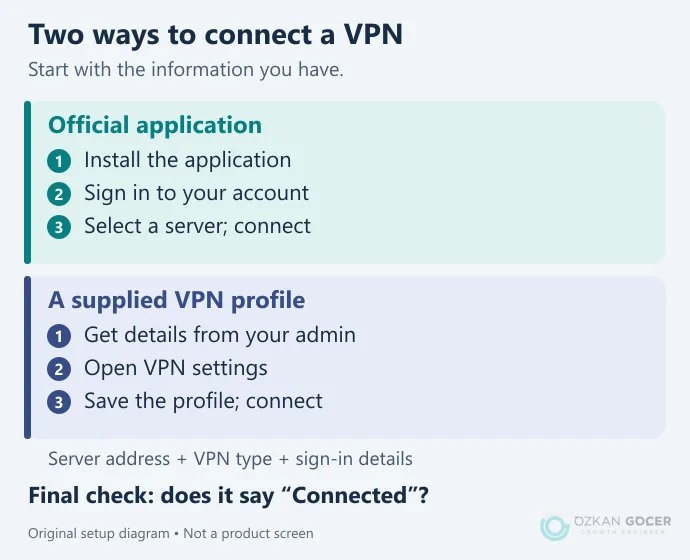
Windows 11 and 10 feature a native client to configure a virtual private network without third-party software. In my own practice, relying on the built-in Windows client works best for dedicated corporate connections to access internal resources, while commercial providers usually require their own desktop applications. To configure the native client, navigate to Settings, select Network & Internet, and click on VPN. You will need to enter the connection name, server address, and your login credentials provided by your network administrator.

Security standards from organizations like SANS recommend using strong encryption protocols like OpenVPN or WireGuard instead of outdated protocols like PPTP. Once configured, click the network icon in your taskbar to establish a secure connection.

Using a VPN on Android

Mobile devices constantly switch between untrusted public Wi-Fi networks, making a private network connection necessary for data protection. Download your chosen provider's app directly from the Google Play Store to avoid modified malicious packages. Open the app, log in, and tap the connect button to route your internet traffic through a secure tunnel.

Android also supports manual configurations under Settings, Network & internet, and VPN. Manual setup requires entering server details and choosing a secure protocol. I prefer the app-based approach for daily use because it handles IP leaks and server switching automatically.

Using a VPN on iPhone

iOS manages virtual private connections through dedicated profiles that you can control directly from the settings menu. Installing an official app from the App Store automatically configures these profiles on your device. After installation, iOS will prompt you for permission to add VPN configurations; tap allow and enter your passcode to authorize the change.

Toggle the connection status directly in your main Settings screen or within the app interface. Active encryption protects your private data from interception on public networks. Remember that using vpns can reduce battery life and slightly decrease internet speed depending on server distance.

Does a VPN Change Your Location?

A virtual private network (VPN) alters your digital location by routing your internet traffic through a remote server. When you establish a connection, the software encrypts your data and masks your actual IP address, replacing it with an IP address from the server's location. Websites and online platforms read the new address instead of your physical coordinates. In my own practice managing international SEO campaigns, I rely on this mechanism to test localized search engine results pages across different regions. The target website sees the server's location, granting you access to region-specific content. The shift allows you to view localized ad placements and regional pricing structures directly.

Using a private network does not alter your physical GPS data if your device shares location services through hardware sensors. Most mobile applications bypass the virtual private tunnel by requesting direct GPS access, which reveals your true coordinates. To maintain absolute privacy, you must disable location permissions on your device. Security remains the primary driver for using these tools. A secure connection prevents local network administrators and internet service providers from monitoring your browsing history.

Your data travels through an encrypted tunnel, shielding sensitive information from interception on public Wi-Fi networks. DNS leak protection must also be active to prevent your default network from exposing your actual location queries.

Different vpns offer varying levels of speed and privacy protocols. Choosing a reputable provider ensures your internet activity is not logged or sold to third parties. Many businesses deploy a dedicated private network to allow employees secure access to internal company resources from remote locations. Such configurations keep corporate assets off the public web. While a vpn provides a strong layer of security, it cannot protect against phishing attacks or voluntary data sharing. Security requires a multi-layered approach. You must combine location spoofing with robust browser hygiene, cookie clearing, and multi-factor authentication to achieve true digital anonymity.

Free vs Paid VPN (and Cost)

Operating a global virtual private network infrastructure requires substantial capital for server maintenance, bandwidth, and IP address rotation. Free vpn providers must monetize their operations, often by logging and selling user browsing data to third-party advertisers or injecting tracking scripts into your internet traffic. In my own practice auditing client network security, I frequently observe free services leaking DNS queries, exposing the user's actual location despite an active secure connection.

Free tools also impose strict bandwidth caps, throttle connection speeds, and limit server locations, making them unreliable for consistent professional use. You essentially pay with your privacy when the service costs nothing.

Paid vpns operate on a subscription model, typically ranging from $2 to $12 per month depending on the contract length. Subscription revenue funds robust encryption protocols, zero-logs policies verified by independent audits, and high-speed server networks across multiple countries. Investing in a paid virtual private service grants access to dedicated IP addresses, obfuscated servers that bypass strict firewalls, and split-tunneling features.

You gain a stable, private network environment where your internet data remains encrypted without performance degradation. The investment secures your digital footprint across public Wi-Fi and private home connections alike. Reliable providers offer kill switches that instantly block traffic if the connection drops, preventing accidental exposure.

Feature Free VPN Services Paid VPN Services
Average Cost $0 (Monetized via ads/data) $2 - $12 per month
Data Limits Often capped (2GB - 10GB/month) Unlimited bandwidth
Connection Speed Throttled, high latency High-speed, optimized servers
Security Level Basic encryption, potential leaks AES-256 encryption, secure protocols

Downsides of Using a VPN

Routing your internet traffic through an encrypted virtual private network tunnel introduces unavoidable latency. Every packet of data must travel to the VPN server before reaching its final destination, which reduces connection speeds. In the projects I have managed, remote team members frequently experienced dropped VoIP calls and slow file transfers when forced to use a high-encryption private network protocol.

Heavy encryption algorithms require significant processing power from your device, compounding the performance drop on older hardware. You trade raw bandwidth for a secure tunnel. Such a trade-off becomes highly visible during bandwidth-heavy tasks like video conferencing or large database queries.

Many web platforms actively block known VPN IP addresses to prevent fraud and spam. You will frequently encounter endless CAPTCHA challenges or find yourself locked out of banking portals and streaming services that restrict access based on geographic location. Some platforms flag virtual private connections as suspicious, forcing you to constantly switch servers to regain access. Constant disruption breaks your workflow. Security algorithms on e-commerce sites often trigger automatic account suspensions when they detect rapid shifts in login locations. Resolving such false positives requires submitting identity verification documents, wasting valuable time.

Choosing a low-quality provider exposes your data to the very risks you seek to avoid. Free vpns often log your browsing history and sell it to advertising networks to fund their operations. In my own practice, auditing client network security has revealed that cheap or free tools often leak DNS requests, exposing the real IP address despite showing a secure status. A virtual private network only shifts trust from your local internet service provider to the VPN operator.

If that operator maintains poor security standards, your private data remains vulnerable. You must also manage the complexity of split tunneling to keep local network devices, like office printers, accessible while the secure connection is active.

VPN Types and Protocols

Organizations deploy a virtual private network to establish a secure connection over the public internet. Remote access VPNs allow individual users to connect to a corporate private network from any remote location. In my own practice setting up secure remote work environments, I configure remote access systems to route user traffic through an encrypted tunnel, protecting sensitive company data from exposure on public Wi-Fi.

Site-to-site VPNs, by contrast, connect entire networks in different physical locations, such as a branch office to a headquarters. Implementing a site-to-site architecture relies on dedicated gateway routers to maintain a permanent, private link between both locations without requiring individual client software.

The underlying protocols determine the speed and security of a virtual private connection. OpenVPN remains an industry standard due to its strong encryption capabilities and compatibility across diverse operating systems. WireGuard represents a newer, lightweight alternative that uses cleaner code to deliver faster speeds without compromising data protection. For mobile users, IKEv2/IPsec offers excellent stability because it quickly re-establishes the secure tunnel when switching between cellular data and Wi-Fi networks. Selecting the right protocol requires balancing the need for raw throughput against the processing overhead of heavy encryption.

Protocol Primary Use Case Security Level Speed Profile
OpenVPN General purpose security High (AES-256) Moderate
WireGuard High-speed streaming & gaming High (Modern Cryptography) Very Fast
IKEv2/IPsec Mobile device connections High Fast
L2TP/IPsec Legacy network compatibility Moderate Slower

Security administrators configure these protocols to control how data packets travel across the internet. Different VPNs offer varying levels of encryption, which directly impacts network performance. Your choice depends on whether you prioritize maximum data privacy or low-latency access to remote resources. Legacy protocols like PPTP still exist but suffer from known vulnerabilities, making them unsuitable for modern business use.

How to Choose a Good VPN

Selecting a virtual private network (VPN) requires auditing the provider's logging policy and encryption standards. In my own practice auditing remote work setups, I always prioritize providers that undergo independent, third-party security audits. Look for WireGuard or OpenVPN protocols. Older protocols like PPTP expose your internet traffic to vulnerabilities. A virtual private connection must utilize AES-256 encryption to protect sensitive data from interception on public Wi-Fi networks. Avoid providers based in Five Eyes alliance countries if absolute private browsing is your primary goal.

Server distribution directly impacts your connection speed and ability to bypass regional restrictions. Top-tier vpns maintain thousands of RAM-only servers, which wipe all operational data upon reboot. RAM-only hardware prevents physical seizure of logs. When you use a private network provider, test the latency across multiple regions. High-bandwidth activities require a network that does not throttle speed or limit server switching. I analyze server density to ensure users do not crowd onto a single node, which degrades performance during peak hours.

Protocol Encryption Speed Security Level Best Use Case
WireGuard Very Fast High (Modern) Streaming and gaming
OpenVPN Moderate High (Audited) General privacy and bypass firewalls
IKEv2/IPSec Fast High Mobile devices switching networks

Free services often monetize your browsing history by selling it to advertisers. Paying $3 to $10 monthly for a reputable vpn secures your digital footprint without compromising integrity. Verify the software includes an automatic kill switch. Kill switches immediately halt internet access if the secure connection drops, preventing accidental data leaks. Rely on technical specifications rather than marketing promises to make your final choice.

FAQ

Frequently Asked Questions

Quick answers for readers who skipped to the end.

What does VPN stand for and what is it?
VPN stands for Virtual Private Network, a technology that secures your internet connection by routing your data through an encrypted tunnel. I recommend using one to mask your IP address and protect your personal information from ISPs or hackers, especially on public Wi-Fi. Your actual level of security depends on the provider's logging policy and the specific encryption protocols they implement.
How does a VPN work?
When you activate a VPN, it routes your internet traffic through an encrypted tunnel to a secure remote server operated by the provider. Your real IP address is masked by the server's IP, making it appear as though you are browsing from a different location. I have seen that the resulting encryption prevents your internet service provider and local network administrators from monitoring your online activities. The actual speed and security level you experience will depend on the specific protocol and server distance you choose.
How do I use a VPN properly?
To use a VPN properly, I recommend choosing a reputable paid service instead of a free option that might log and sell your browsing data. You should always enable the "kill switch" feature in your application settings to prevent your real IP address from leaking if the connection drops. I have seen the best results when users manually select the WireGuard protocol, though your optimal setup ultimately depends on your specific speed and security needs.
How much does a VPN cost per month?
You can expect to pay between $10 and $15 for a month-to-month VPN subscription, though committing to a multi-year plan can lower your monthly cost to around $2 to $5. I have seen prices vary depending on the provider's server network and encryption protocols, which is why I recommend looking for annual deals to save money. Free options exist, but they often limit your data and speed, making a paid tier the better choice for consistent security.
Can I use a VPN for free?
You can use free VPNs, but I recommend exercising caution because many providers monetize your browsing data or restrict your bandwidth. Reliable services like ProtonVPN offer basic free tiers with no data caps, while other options limit your monthly usage to a few gigabytes. If you require consistent speeds and robust security, investing $3 to $10 per month in a premium subscription is usually the best approach.
What is the downside of using a VPN?
I have seen that the primary drawback of using a VPN is a noticeable drop in your connection speed, which varies depending on server distance and encryption strength. Some websites and streaming platforms actively block known VPN IP addresses, forcing you to constantly switch servers to gain access. You must also avoid free services that compromise your privacy by logging and selling your browsing data, meaning a reliable setup usually requires a paid subscription.
What is a VPN used for?
I have seen clients use a VPN primarily to encrypt their internet traffic and mask their IP addresses, protecting sensitive data from hackers on public Wi-Fi networks. You can also use a VPN to bypass geographical restrictions on websites and streaming services by routing your traffic through a server in another country. Your final connection speed and access success will vary depending on the specific VPN provider and server load.
Does a VPN change your location?
A VPN alters your virtual location by routing your internet traffic through a secure server in another region, masking your actual IP address. I have seen clients successfully bypass geo-restrictions using this method, but your physical GPS location on mobile devices remains unchanged. Your success in fully hiding your location depends on the quality of the VPN provider and the sophistication of the tracking systems used by the websites you visit.
How do I set up a VPN on Windows?
To set up a VPN on Windows, I recommend downloading your chosen provider's native app, running the installer, and logging in with your credentials. If you prefer a manual setup, you can navigate to Settings > Network & internet > VPN, click "Add VPN", and enter your provider's server details. Your connection speed and stability will vary depending on the protocol you select during this setup process.
Is a VPN safe to use?
Your safety depends entirely on the provider you choose, as free services often log and sell your browsing data to third parties. I recommend investing in a reputable, paid service with a verified no-logs policy, which typically costs between $3 and $12 per month. I have seen many users compromise their security by trusting unverified free apps, so you must research the jurisdiction and privacy policy of any tool before installation.
What are the types of VPN?
I categorize VPNs into three main types based on your specific needs: remote access VPNs for connecting individual users to a secure network, site-to-site VPNs for linking entire office locations, and personal VPNs which you likely use to protect your daily browsing privacy. Depending on your business setup, you might also require a mobile VPN to maintain stable connections across shifting networks. I recommend choosing the architecture that matches your technical infrastructure rather than buying a one-size-fits-all solution.
Is using a VPN legal?
I have seen that using a VPN is completely legal in most parts of the world, including the US and Europe, as long as you do not use it to commit illegal acts. Your geographic location dictates the exact rules, as countries like China, Russia, and North Korea heavily restrict or outright ban unauthorized VPN services. I recommend checking your local laws before connecting, because using a VPN to bypass government censorship or download copyrighted material can still result in fines or prosecution.
Summarize:
Özkan Göçer profile photo

Özkan Göçer

Growth Engineer & Digital Marketing Specialist

Özkan Göçer is a Growth Engineer and Digital Marketing Specialist with over 15 years of field experience and 200+ completed projects. He incorporates over 15 years of experience working with web technologies, modern development stacks, and digital infrastructures into this content.


Scroll to top