A blog illustration allows different freedoms from a product photograph. Inventing objects can be appropriate in a fictional scene; changing the colour, button or connector of an item for sale can mislead a buyer. Make that distinction before choosing a tool or generating a large collection of alternatives.
Which AI Image Generator Should You Choose?
This comparison uses official feature and usage documentation checked on October 4, 2026. It is not a ranking based on an identical-prompt quality test. Models, account access and plan conditions can change.
Scroll sideways to read every column. Keyboard: focus the table and use the arrow keys.
| Tool | Task to Consider It For | Check Before Choosing |
|---|---|---|
| ChatGPT | Developing an idea in conversation, using references and refining a selected image | Image access, account limits and the details an edit must preserve |
| Gemini | Generating from text or an uploaded image; changing composition or style | Account access, rendered text and product or personal details |
| Adobe Firefly | Image production that continues through Adobe workflows | The selected model, feature, credit consumption and applicable terms |
| Midjourney | Exploring visual directions and compositions within a generation workflow | Subscription, generation time and privacy requirements |
| Canva | Adding generated imagery to a presentation, poster or social layout | AI allowance, other asset licences and the final export |
To narrow the options, choose a sample from your own work. Give each tool the same required details, inspect results at the same size and record the corrections needed to finish. Comparing a provider's best gallery example with your first attempt in another tool does not produce a useful evaluation.
Can You Generate Images for Free?
Free starting options exist, but free access does not mean unlimited generations, every model or unrestricted rights. Check what your ChatGPT, Gemini or Canva account currently provides. Adobe's Firefly plans also distinguish free access from paid options. A trial, an ongoing free plan and a temporary promotion are different offers.
The Midjourney plans reviewed are subscriptions. Its plan documentation limits Stealth privacy to Pro and Mega; do not assume a basic subscription provides private generation. Running a model locally is another route, but its licence, GPU memory requirements, setup and electricity costs still matter. Local availability does not automatically make a model open source, cost-free or unrestricted for commercial work.
If you plan to arrange the generated image with text in Canva, consider the free plan, Pro and export requirements together. Compare the time needed to produce a usable final file, not just the number of generations included.
How to Write a Useful Image Prompt
Treat the prompt as a short creative brief. Specify the subject, purpose, composition, style and details that must remain unchanged. Replace vague strings of words such as “amazing, professional, high quality” with requirements you can check in the result. The message and hierarchy decisions used in graphic design apply here too.
For a plant-care article, you could start with:
A horizontal 2:1 blog cover. One green potted plant on the right side of a table against a pale wall. Clearly defined leaves, with soft daylight coming from the left. Keep the left third plain and empty so I can add a headline later. A realistic photographic style; no people, words or logos.
The number of plants and the empty area are now testable requirements. Writing “4K” does not guarantee a 4K file; inspect the tool's output dimensions and aspect-ratio controls too. The original diagram below connects the prompt's requirements to their positions in an image.
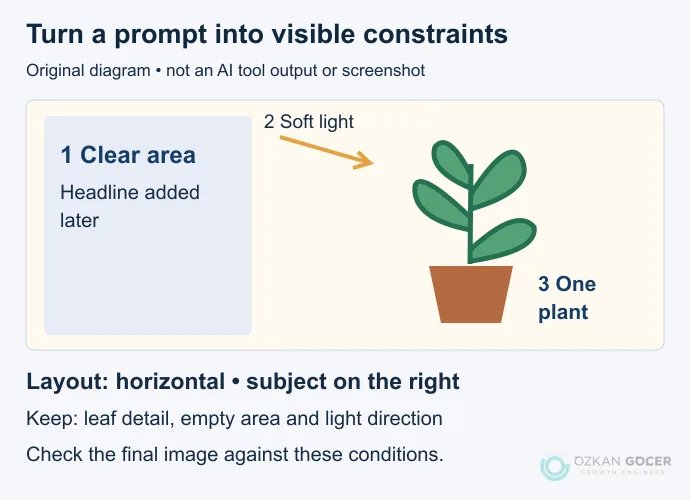
If the first result fills the left side, request a targeted revision: “Keep the plant and lighting; remove objects from the left third.” Changing several unrelated features at once makes it harder to identify what improved the result. With multiple references, explain which supplies the subject and which provides style guidance.
What Should an Image Edit Preserve?
Make sure you have permission to use the uploaded image. Separate the part that should change from the details that should remain: “Make the background light grey; preserve the product's shape, label, colour and lettering.” That instruction is not a guarantee. Compare the output with the original photograph.
A bag's zip, a phone's camera count or warning text on packaging can change unnoticed. Where product accuracy matters, a masked background edit or conventional retouching may provide more control. Generating a new rendition of a photograph is different from preserving all its original pixels.
Five Checks Before Publishing
- Meaning: Does the image support the subject? Could an illustrative scene be mistaken for a real event, client result or product feature?
- Detail: Check object counts, anatomy, connections, reflections and shadows. Read every word separately; do not assume a brand name or number is correct.
- Layout: Is the requested headline area actually clear? Will the subject or explanation survive a mobile crop?
- Rights and privacy: Check permission for references, faces, logos and other material. Do not upload confidential client information into a generation service.
- File: Verify actual pixel dimensions, file size and format. For the web, prepare an appropriately sized, optimised export rather than publishing an unnecessarily large source. Give meaningful images descriptive alternative text.
For a poster where the headline and price must be exact, adding them afterwards as editable text often makes checking easier. Never present a generated screen as an actual software interface or test result. Explain a setting with a real capture or a drawing clearly labelled as a diagram.
Is Commercial Permission the Same as Copyright?
No. There are three separate questions: whether the service permits your intended use, whether the output infringes someone else's rights and what rights you can hold in the result. Paying for a subscription does not answer all three.
Adobe describes licensed and public-domain training material for its Firefly models. That does not establish zero copyright risk for every output. If another provider's model is selected within Firefly, read the terms for that model separately. Canva's AI terms also place responsibility for assessing an output on the user and explain that other users may receive similar results.
The US Copyright Office's 2025 statement says that prompts alone do not establish human authorship, while creative human arrangement or modification may be considered. This is not a universal rule for every jurisdiction or clearance for a particular image. Brand, likeness and valuable commercial uses need rights assessment for their actual market and purpose.
Keep a Record of How the Image Was Made
Save the tool, date, model name where available, prompt, references and human edits with the project. Add clear disclosure where the audience needs to understand that the image was generated. Visible marks, file metadata and invisible watermarking such as SynthID are different mechanisms; the presence or absence of one does not prove the status of the others.
When you need to depict an actual place, event or product, your own photograph or a carefully licensed stock image source may be a better fit. Consider AI for illustrative scenes, concept exploration and controlled edits. Choose the final image for what it communicates, before judging how impressive it looks.