WHAT IS CANVA AND WHAT IS IT ACTUALLY FOR? A 2026 GUİDE

What Is Canva and What Is It Actually For? A 2026 Guide

Canva is a browser-based design tool built on templates and drag and drop. It spread quickly because it lets a non-designer produce a publish-ready graphic in minutes. Yet most Canva content online either gives outdated plan information or never touches the thing that matters most, which is licensing. Below we cover what Canva is for, the 2026 plan lineup and Turkish pricing, the commercial-use licence, the logo trademark trap, and where Canva is not enough, relying only on verifiable sources. Prices and contract clauses are given with the date they were accessed.

What Is Canva and What Is It Actually For?

Canva's core promise is to offload design knowledge onto a template: you pick a template, swap the text and images, and export. In practice the workflow is those three steps for most users, and the learning curve is low. In 2026 Canva is not a single graphics editor; Presentations, Docs, Sheets, Whiteboards, Websites, Video, a PDF Editor, Forms, Email Design and print products sit under one roof. The company's 30 October 2025 announcement was its broadest launch to date, positioning the product as a single creative operating system. For scale, use the dated official figure: according to Canva's official year-in-review of 16 December 2025, the number of people using Canva every month reached 260 million in 2025 and company revenue reached $3.5 billion. The honest positioning should be set from the start: Canva is a tool for speed, templates and accessibility, and it was not built to create an original visual language from scratch. For a general tool-by-tool comparison and the web-based versus desktop question, see our design programs article.

The 2026 Plan Lineup: Teams Is Closed, Business Arrived

The most important update, and the one most sources miss, is structural. With its official announcement of 30 October 2025 Canva introduced the Canva Business plan and, in the same announcement, closed Canva Teams to new sign-ups and upgrades. The 2026 lineup is therefore Free, Pro, Business and Canva for Enterprise, so any content still framing the decision as Free versus Pro versus Teams is out of date. Business is not a rename of Teams; it is a separate plan sitting between Pro and the enterprise tier. Its launch price, as of the October 2025 announcement, was $20 per person per month in the US, with the seat minimum removed, so even one-person teams can use it. Existing Teams subscribers are protected: in Canva's own words they keep their current pricing and all their features, even when adding new members. The top tier, Canva for Enterprise, publishes no public list price and the page only routes you to the sales team.

Turkish Pricing and the Annual-Billing Maths

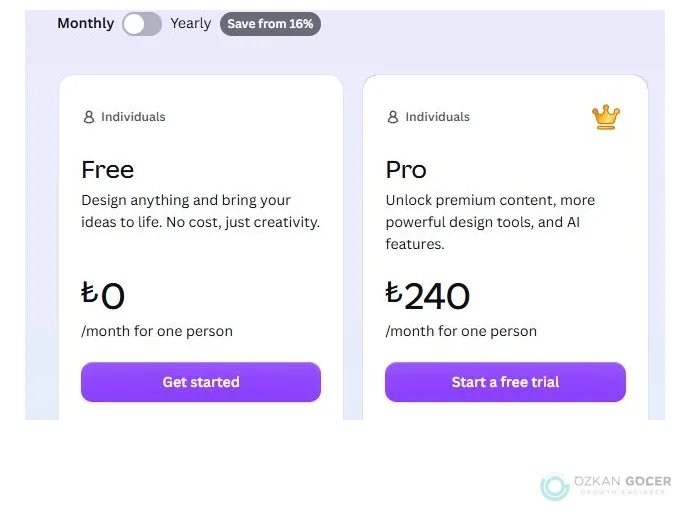
The list prices seen on Canva's official Turkish pricing page on 16 July 2026 were: Free 0 TL, Canva Pro 240 TL per month or 1,920 TL per year for one person, Canva Business 340 TL per month or 3,400 TL per person per year, and Canva for Enterprise by quote. The benefit of annual billing varies by plan, and the badge on the page can mislead on its own: by our own arithmetic on the listed prices, Pro at 1,920 TL a year against twelve monthly payments of 240 TL (2,880 TL) is roughly a 33% saving, while Business at 3,400 TL against 4,080 TL is roughly 16%. Avoid quoting a dollar price: because Canva sets currency by location, no official dollar figure is visible from Turkey, and the dollar amounts circulating on blogs contradict each other. Under the Fair Regional Pricing item of Canva's Pricing Promise, the TL price is not converted from dollars but set according to local conditions, so the common dollar-times-exchange-rate calculation gives the wrong answer. On tax, Canva states that in regions including Turkey the advertised price includes sales tax, and that business customers who provide a valid tax ID at purchase receive an invoice without VAT. An important warning is needed: no VAT on the invoice does not mean your tax obligation disappears, since for services bought from abroad the duty to declare can shift to the business, so confirm your situation with your accountant. Prices are updated over time, so verify the current amount on the official page.

The Teams Price Controversy and Canva's Pricing Promise

There is a concrete reminder that a subscription tool's price is not fixed. According to TechCrunch's report of 3 September 2024, Canva announced it would end the early-adopter Teams pricing of $119.99 a year for five people and move to standard pricing of $10 per person per month with a three-user minimum, taking a five-person team to $500 a year, with a 40% discount for the first twelve months. The change did not affect Pro or enterprise plans. The much-repeated 300% increase headline only makes sense once you see the whole calculation, because $119.99 was not a single-person fee but a five-person allowance. After the backlash, Canva announced on 10 October 2024 that early Teams adopters would keep their original pricing for their existing teams, and published a five-point Pricing Promise: always affordable pricing, a value-packed product, at least 60 days advance notice of price changes, fair regional pricing, and no hidden fees. It was a partial climbdown rather than a full reversal, since standard pricing remained in force for new customers.

AI: The Magic Studio Name Is Gone, the Real Limit Is Usage

Canva no longer uses the Magic Studio name, introduced in October 2023 and named one of TIME's Best Inventions of 2024, on its current product pages. A check in July 2026 found the old Magic Studio address returns a 404, the AI hub is now at canva.com/canva-ai/, and the menu carries Canva AI and Magic Layers. A more consequential change is in the access model. Magic Eraser, Magic Edit, Magic Grab and Background Remover all still exist, but on the current pages in Canva's Help Center the old Pro-only condition no longer appears; instead the pages point you to a page about understanding your AI usage. The practical consequence is that in 2026 the real constraint is not feature access but the monthly AI usage allowance granted to your plan. Older articles listing which tools are Pro-only are therefore no longer reliable, and your decision should follow your usage volume rather than a feature list.

AI Top-Ups Cannot Be Bought From Turkey

There is a concrete limit for users in Turkey that is documented nowhere else. According to Canva's Help Center, AI top-ups are a one-time purchase that does not renew automatically, and each top-up grants a block equal to the monthly AI allowance of the Canva Business plan; it must be used within 30 days of purchase, unused allowance does not roll over, only one top-up can be active at a time, and the purchase cannot be cancelled. The critical point is access: Canva states that top-ups are offered only to Canva Business users who subscribed online, and only in Australia, Canada, France, Germany, Italy, Japan, Spain and the United Kingdom. Turkey is not on the list, so as of 16 July 2026 a Canva Business user in Turkey who exhausts the monthly allowance cannot buy a top-up. The country list can be updated by Canva, so check the current position on the help page. Note also that top-ups unlock no new features, they only grant more usage, and they do not cover tools such as Magic Write and AI Voice that do not share the monthly allowance.

Licensing and Commercial Use: What You Actually Own

The most common misconception is that you cannot do commercial work on the free plan. Under Canva's Content License Agreement, the licence attaches to the content category rather than the subscription tier: section 2 grants a perpetual, non-exclusive and non-transferable licence for Free Content, and section 5 lists advertising and promotional projects, printed materials and product packaging among the permitted uses, with no reproduction quantity limit. Even so, saying all free content is open to commercial use is too broad: Branded Content is for personal use only, Education Content is non-commercial, and items marked Editorial Use Only are restricted. The rule in section 1 governs: the most restrictive category applies to the entire design. The counterintuitive core is that Free Content is freer than Pro Content. Section 6 grants only Free Content the right to be used in more than one design, downloaded on a standalone basis, and used in templates distributed or sold to third parties, and it states plainly that you cannot do these things if your design contains any Pro Content.

Pro Content is defined in section 3 as a One Design Use License, limited to a single Canva design, and copying, downloading or distributing Pro Content as a standalone item is prohibited. Under section 4, using the same element in a new design requires a new licence, and a design that has been Magic Resized counts as a new design; to correct a common misreading, subscribers are automatically issued a new licence at no extra cost on each export, so paying per design concerns free users only. For online publications, the 480,000-pixel limit in section 5A applies only to Pro Content, only to online use, and per content file; print is not subject to it, and designs published through the Canva Website endpoint or hosted and embedded by Canva are exempt. Note that the limit is framed for un-edited content while the agreement never defines edited, so relying on having edited the content carries uncertainty. If you do client work, section 4A is critical: you cannot transfer content on a standalone basis, you may only transfer the design containing it to a single client, you must have a written agreement with that client, and you remain responsible for their compliance. Because the agreement publishes no effective date, cite your access date; the fact that the trademark and pixel clauses are identical in the 18 September 2025 archived version shows those clauses have at least been stable since then.

The Logo and Trademark Trap

If you plan to make a logo in Canva and register it as a trademark, this is the most important section here. The prohibited-uses list in section 9 of the Content License Agreement states in its second bullet that content may not be used as part of a trade mark, design mark, trade name, business name or service mark, and the only exception in the text is fonts. Note the scope is wider than logos: your trade name and business name are included. There is a genuine discrepancy here: Canva's help pages add simple shapes and lines to the exception, yet that wording does not appear in the binding agreement. Since the contract is the instrument that binds the parties, the safe path is to use only Canva fonts and original artwork you upload yourself. Enforcement is real: section 10 allows suspension or termination, loss of all rights to content and designs, and forfeiture of fees paid. Can you buy exclusive rights? Canva's help page is explicit: it does not offer exclusive rights to a library graphic, and recommends reaching out to a designer instead. No Canva plan, neither Pro nor Business, sells you the exclusivity a trademark requires, so for a logo headed to registration, professional graphic design is not an alternative but a requirement, and we covered the process in our logo design article. Finally, keep two separate questions apart. The first is what the contract prohibits, covered above.

The second is whether the mark is registrable, which is decided not by Canva but by the competent office such as TÜRKPATENT under its own law, and that office does not examine your Canva licence. Using a licensed element does not by itself destroy the distinctiveness of a mark assessed as a whole, but it gives you no exclusive right over that element and narrows the scope of protection. In Turkey the concrete mechanism is Article 6(6) of the Industrial Property Law: if the mark applied for contains another party's copyright or any intellectual property right, the application is refused upon the right holder's opposition. It is a relative ground, not examined on the office's own motion, so a registration may issue and still remain exposed to opposition or invalidation. Consult a trademark attorney before deciding.

Print: Where Canva Is Not Enough

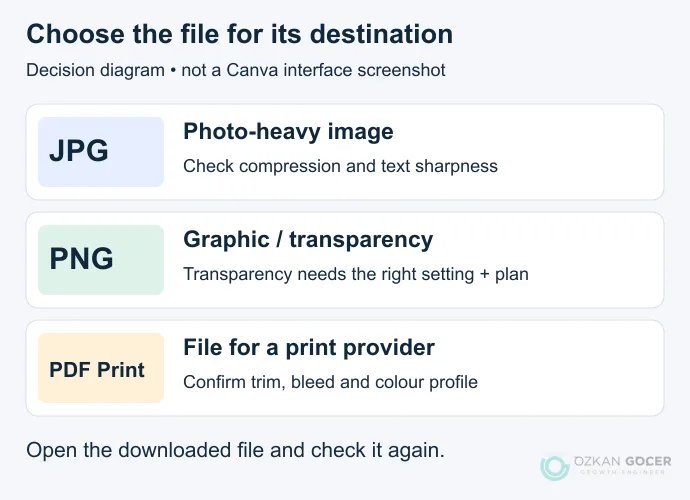
Strong on screen, Canva hits its limits in real print production. According to Canva's official download documentation, the PDF options are limited to PDF Standard (96 dpi), PDF Print (300 dpi, with bleed, crop marks and a choice of RGB or CMYK colour profile) and Compress PDF; the list contains no ICC profile selection and no print standards such as PDF/X-1a or PDF/X-4. The CMYK colour profile option is not available on the free plan and is reserved for Pro and above. On colour, Canva's print colours page discusses only two colour models, RGB and CMYK; Pantone or spot colours cannot be defined, and the official documentation offers no separate spot channel or plate. When a design is sent to print, colours are automatically converted from their RGB values to the closest possible CMYK equivalent, which means you do not determine the exact colour. One common claim deserves correction: it is not accurate to say Canva is purely hex-based, because CMYK values can be entered directly into Brand Kit colour palettes. The conclusion is that for corporate identity, packaging and non-white substrates, where the brand colour must land exactly on every print run, Canva alone is not enough; such work needs a production tool capable of colour management, and a designer.

The Affinity Escape Hatch: Canva's Free Professional Arm

Canva announced its acquisition of Affinity in an official post on 26 March 2024, covering the Affinity Designer, Affinity Photo and Affinity Publisher apps and a 90-person UK team. Be aware that the roughly $380 million figure widely repeated in the press is not Canva's official statement: it originates with Bloomberg, Canva's co-founder described the deal to Bloomberg as several hundred million pounds, and Canva has never published the amount on any official page, so it should be attributed to the press and qualified as approximate. The development that actually matters to users is more recent: according to the official announcement of 30 October 2025, the three separate apps were replaced by a new Affinity that merges them into one and is completely free for everyone. The practical consequence is that for the vector and print-focused work Canva cannot handle, there is no extra licence fee to pay: you can move to the same company's professional tool. Because the new Affinity is a rewrite, we recommend confirming its current feature set and print capabilities from its own official page, since carrying over feature lists from the old three-app era would be wrong.

Canva or Adobe Express? The IP Indemnity Question

Canva's real rival is not Photoshop, as many articles assume, but Adobe Express, which targets the same job; for a tool-by-tool comparison and the which-tool-for-which-job question, see our design programs article. The one structural difference here is intellectual-property indemnity, and it is often overstated. Adobe states that its Firefly models are trained on licensed content and public-domain content whose copyright has expired, and that customer content is not used in model training. Enterprise customers can purchase a right that includes contractual IP indemnity for selected Firefly outputs; the indemnity is not automatic, it requires a separate purchase and a new agreement, and it excludes features that run on non-Adobe models as well as those marked beta. What matters is this: IP indemnity is not a structural advantage unique to Adobe, since Canva also states on its own page that it offers indemnity for eligible enterprise customers under Canva Shield. So choose between the two not on the indemnity myth but on which ecosystem your team already works in and what kind of output you need.

Brand Kit and Escaping the Template Look

The most visible weakness of work produced in Canva is that it all looks alike, and the cause is not the tool but how it is used. Treat the template as a skeleton rather than a finished design: once you replace the typography, colours and imagery with your own assets, the template look largely disappears. The leverage point is the Brand Kit, where you define your colours, fonts and logo so the team uses the same system in every design, turning Canva from a design tool into an implementation tool. That is also the most valuable usage pattern: the corporate identity and visual language are built by a designer, while Canva opens the daily production of that system to non-designers. Handing the team a set of ready brand templates for social media graphics, presentations and internal documents is both faster and cheaper than routing every request to a designer. Working with your own original artwork has a second benefit: artwork you upload yourself is not subject to the licence restrictions applied to library content.

Who Should Use What: A Decision Guide

The free plan goes further than you think, and there is no licensing barrier to commercial use, so a small business can produce its social media graphics and presentations on the free plan. The real triggers for moving to Pro are these: needing CMYK print output, regularly exhausting your monthly AI usage allowance, leaning on the Brand Kit for brand consistency, and buying per-design Pro content licences as a free user, since past a certain volume a subscription is cheaper.

Business makes sense at the point where several people work on the same brand system and the need for administration and approval appears. If a logo headed for registration, packaging, or colour-critical printing is involved, the call is clear: Canva alone is not enough, so work with a designer and move to Canva's free Affinity app where needed. In short, Canva is excellent for accelerating the daily production of a properly built brand system, and inadequate for building and legally owning that system in the first place.

FAQ

Frequently Asked Questions

Quick answers for readers who skipped to the end.

Is Canva free, and can I do commercial work on the free plan?
Yes, you can. Under Canva's Content License Agreement the licence attaches to the category of the content you use rather than to your subscription plan. Section 2 grants a perpetual, non-exclusive licence for free content, and section 5 lists advertising and promotional projects, printed materials and product packaging among the permitted uses with no reproduction quantity limit. Even so, you cannot say all free content is unrestricted: Branded Content is personal use only, Education Content is non-commercial, and items marked Editorial Use Only are restricted. Under section 1, the most restrictive category applies to the entire design.
How much does Canva Pro cost in Turkey, and what is the dollar price?
The amounts seen on Canva's official Turkish pricing page on 16 July 2026 were: Canva Pro 240 TL per month or 1,920 TL per year for one person, Canva Business 340 TL per month or 3,400 TL per person per year, and the free plan 0 TL. Quoting a dollar price would be wrong, because Canva sets currency by location and no official dollar amount is visible from Turkey. Under Canva's Fair Regional Pricing principle the TL price is not converted from dollars, so the dollar-times-exchange-rate calculation seen on blogs gives the wrong answer. Prices change, so confirm the amount on the official page.
Is annual billing really worth it?
It is, but the rate differs noticeably by plan, so do not decide by looking at a single badge on the page. Working from the listed prices, Canva Pro at 1,920 TL a year compared with twelve monthly payments of 240 TL, which is 2,880 TL, means roughly a 33% saving. For Canva Business, 3,400 TL a year compared with 4,080 TL works out to roughly 16%. In other words the benefit of paying annually is close to twice as large on Pro as it is on Business.
Why can't I subscribe to Canva Teams?
With its official announcement of 30 October 2025 Canva introduced the Canva Business plan and, in the same announcement, closed Canva Teams to new sign-ups and upgrades. So in 2026, users wanting to start a new team subscription are directed to Business. Business is not a rename of Teams; it is a separate plan positioned between Pro and the enterprise tier, and because there is no seat minimum, even one-person teams can use it. Sources still framing the decision as Free versus Pro versus Teams are out of date.
What happens to my existing Canva Teams subscription?
When Canva closed Teams to new sign-ups it explicitly stated that nothing changes for existing subscribers. In the company's words, existing Teams subscribers keep their current pricing and all of their features, even when adding new members to their team. The point to watch is that if the subscription is cancelled you cannot return to the Teams plan, because it is closed to new sign-ups. Confirm the current position on Canva's help page before deciding.
Can I register a logo I made in Canva as a trademark?
Using a logo that contains graphics, illustrations or photos from the Canva library as a trademark breaches the agreement. The prohibited-uses list in section 9 of the Content License Agreement bars using content as part of a trade mark, design mark, trade name, business name or service mark, and the only exception in the text is fonts. The safe path is to use only Canva fonts and original artwork you upload yourself. Remember that registrability is a separate question decided not by Canva but by the competent office such as TÜRKPATENT under its own law, so consult a trademark attorney before deciding.
Is there a difference between Canva's help pages and its agreement?
Yes, and it matters. In the binding Content License Agreement the only exception to the trademark prohibition is fonts. Canva's help and licensing-explained pages add simple shapes and lines to the exception, yet that wording does not appear in the agreement itself. The document that binds the parties is the agreement; the help pages are explanatory. In practice the safest approach is to follow the narrower wording of the agreement, relying only on fonts and your own original artwork for work headed to a trademark.
Can I buy exclusive rights to a graphic from Canva?
No. Canva's help page states explicitly that it does not offer exclusive rights to a graphic in its library and recommends reaching out to a local graphic designer or artist instead. As a result no Canva plan, including Pro or Business, sells you the exclusivity a trademark requires, because the licences in the agreement are non-exclusive. The same element continues to be licensed to other users. If you need an exclusive visual identity, the only route is commissioning original design.
Which is freer, free content or Pro content?
It is counterintuitive, but the answer is free content. Section 6 of the Content License Agreement grants three additional rights to free content only: using it in more than one design without an additional licence, downloading it on a standalone basis, and using it in templates distributed or sold to third parties. The same section states plainly that you cannot do these things if your design contains any Pro content. Pro content is defined in section 3 as a One Design Use License, limited to a single design, and it cannot be downloaded or distributed as a standalone item. So if you plan to sell templates or reuse an element across several jobs, free content is more accommodating.
Do I pay again every time I use Magic Resize?
Not if you are a subscriber. Under section 4 of the Content License Agreement, using the same Pro element in a new design requires a new licence, and a design that has been Magic Resized counts as a new design. However, the same section states that subscribers are automatically issued a new licence on each new export, at no extra cost. Paying per design concerns only non-subscribers who buy a one-off Pro content licence at download.
Can I design in Canva for a client and hand over the file?
You can, but there are conditions and most agencies skip them. Under section 4A of the Content License Agreement you cannot transfer or sub-license the content on a standalone basis; you may only transfer the design containing it to your client. To do so you must enter into a written agreement with your client stating that their use is limited to their own use and must comply with Canva's terms. You also remain solely responsible for your client's compliance, and a design incorporating content can only be transferred to a single client.
Does the 480,000-pixel limit affect me?
It does not affect most users, because its scope is narrow. The 480,000-pixel limit in section 5A of the Content License Agreement applies only to Pro content, only to use in online publications such as web pages and blogs, and per content file. Print use is not subject to it, and there are two exemptions: sites published through the Canva Website publish endpoint, and Canva-hosted designs embedded on a third-party website. Note the limit is framed for un-edited content while the agreement never defines edited, so relying on having edited it carries uncertainty.
Does Canva produce print-ready CMYK output?
Yes, in a limited way. According to Canva's official download documentation, the PDF Print option gives 300 dpi output and includes bleed, crop marks and a choice of RGB or CMYK colour profile, while PDF Standard is 96 dpi. The CMYK colour profile option is not available on the free plan and is reserved for Pro and above. However, the documentation lists no ICC profile selection and no print standards such as PDF/X-1a or PDF/X-4. On colour-critical work those gaps become decisive, because you cannot set up colour management to the standard your printer expects.
Can I use Pantone or spot colours in Canva?
No. Canva's print colours page discusses only two colour models, RGB and CMYK; Pantone or spot colours cannot be defined, and the official documentation provides no separate spot channel or plate. When a design is sent to print, colours are automatically converted from their RGB values to the closest possible CMYK equivalent, so you do not determine the final colour. One common claim deserves correction: it is not accurate to say Canva is purely hex-based, because CMYK values can be entered directly into Brand Kit colour palettes. For packaging and corporate work where the brand colour must match exactly on every run, Canva alone is not enough.
Are the Magic tools available only on Canva Pro?
Not any more, and older lists are unreliable on this. Magic Eraser, Magic Edit, Magic Grab and Background Remover all still exist, but on the current pages in Canva's Help Center the old Pro-only condition no longer appears; the pages point you instead to a page about understanding your AI usage. So in 2026 the real constraint is not feature access but the monthly AI usage allowance granted to your plan. Base your decision on your monthly usage volume rather than a feature list, and check the current allowance table on the official page.
Can I buy an AI top-up from Turkey?
As of 16 July 2026, no. According to Canva's Help Center, AI top-ups are offered only to Canva Business users who subscribed online, and only in Australia, Canada, France, Germany, Italy, Japan, Spain and the United Kingdom; Turkey is not on the list. So a Business user in Turkey who exhausts the monthly allowance cannot buy a top-up. The other conditions are worth knowing: a top-up is one-time, does not renew, must be used within 30 days, does not roll over, only one can be active at a time, and the purchase cannot be cancelled. The country list can be updated, so check the help page.
Summarize:
Özkan Göçer profile photo

Özkan Göçer

Growth Engineer & Digital Marketing Specialist

Özkan Göçer is a Growth Engineer and Digital Marketing Specialist with over 15 years of field experience and 200+ completed projects. Having delivered over 200 corporate identity and logo projects using Adobe Illustrator, InDesign, and Photoshop, he draws on extensive field practice to shape this guide.


Scroll to top