Consider an event poster. The illustration can be striking, yet the poster still fails if nobody can read the date. A polished logo does not provide a complete brand system either, and an attractive screen does not establish a usable customer journey. Looking at the problem and the deliverable makes these distinctions easier to see.
What Does a Graphic Designer Do?
A designer clarifies the assignment, explores visual directions, develops the selected option, incorporates feedback and prepares usable files. The US Bureau of Labor Statistics occupational profile includes discussing scope, creating layouts and checking errors before publication among these duties. Its education and employment information describes the US market, not universal hiring rules.
A coffee shop menu provides a useful example. The designer groups the drinks, makes prices unambiguous and separates product names from descriptions. The printed menu and its mobile version need separate readability checks. Simply shrinking the print file may leave all the words present but too small to use.
Where Is Graphic Design Used?
Specialties overlap. These categories help you identify the work and the deliverable; they are not a fixed, universally agreed number of branches.
Scroll sideways to read every column. Keyboard: focus the table and use the arrow keys.
| Area | Typical Deliverable | Question to Resolve |
|---|---|---|
| Brand identity | Logo system, colour and type guidelines | How will the brand stay consistent across applications? |
| Publication and print | Book, catalogue, brochure or poster | What is the reading order, and how will the file be printed? |
| Packaging | Label and package surface layout | Where do the product name, contents and required information belong? |
| Digital communication | Social series, advertising asset or presentation | How does the message survive different screen sizes and ratios? |
| Motion graphics | Animated title or explanatory sequence | In what order should information appear over time? |
| Information and wayfinding | Infographic, map or signage | How does someone find the information or direction they need? |
Illustration and photography can contribute to any of these areas; original drawing is not required in every assignment. The components of a visual identity explain the wider system, while the logo design process focuses on developing a mark. When reviewing packaging and label examples, compare the information structure as well as the visual style.
The Same Information in Two Posters
The original teaching example below uses the same pottery workshop details in both layouts. The first gives almost every line similar emphasis. The second changes three decisions: 1) the event name becomes dominant, 2) date and venue form a group, and 3) the booking action stands apart. It is an illustration of visual hierarchy, not a client case or a conversion experiment.
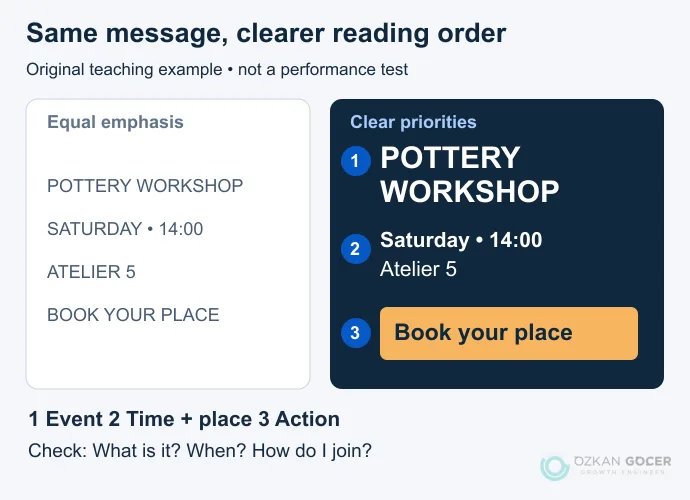
The useful question is whether someone can identify the event, its timing and how to join. Show the design to a person who has not seen it before and ask those questions. Missing or incorrect answers suggest where to revise. One person's response is not representative research, but it provides a more concrete starting point than “I prefer the blue version.”
Decisions That Make a Layout Work
Hierarchy: Establish a difference between the headline, supporting detail and action. Typography: Size, weight, line length and spacing work together; these font selection and usage examples explain the distinction. Alignment and spacing: Put related items together and separate different groups. Empty space can make the relationship between elements visible.
Colour: Start with readable text and clear distinctions. Avoid assuming that a colour has one fixed meaning across every culture and context. Imagery: A picture should support the message and leave room for the information. Figma's explanation of graphic design also treats type, colour and space as connected elements. Use these ideas to question a layout rather than to decorate it with every technique you know.
Which Software Should You Learn?
Choose a deliverable first. Illustrator and the free, open-source Inkscape are options for vector drawing. InDesign handles multi-page publication layouts. Photo editing, motion work and interface prototyping introduce different requirements. There is no need to learn every application at once.
For applying an established identity to social graphics or presentations, creating a design in Canva may be a practical starting point. Original brand marks, specialist print production and editable source-file delivery can require a different workflow. Being fluent in a program does not establish that the message, hierarchy or image choice is right.
From Brief to Delivery
- Define the assignment. Identify the audience, one main message and where the work will appear. Agree dimensions, content, budget, delivery and the person responsible for approval. A design brief makes these decisions explicit.
- Organise the content. Resolve missing product information, uncertain dates and unapproved copy before polishing the final artwork. Check rights for photos, typefaces and other assets.
- Choose a direction. Compare information order and practical use as well as colour. Give feedback such as “the headline disappears on a small screen.”
- Check the intended application. Read the design on a phone or arrange a print proof where appropriate. Verify names, numbers, URLs and contact details independently.
- Complete the handover. Separate approved exports, agreed source files, licensing notes and usage instructions. Define revision scope and what counts as a new request before production starts.
A logo, a long catalogue and multilingual packaging cannot be priced or scheduled as equivalent assignments. A useful quote identifies pages or products, concepts, content preparation, print checks and file formats. A price without a defined scope is difficult to compare.
How to Start Learning Graphic Design
Pick different information problems: a poster, a menu and a short publication. Work on the black-and-white layout before introducing colour and imagery. Keep a record of what you changed and why. Develop editing, image selection and export skills alongside your knowledge of the application.
A portfolio should show the objective, constraints, your role and the reasoning behind the finished work. Label student and self-initiated projects honestly. Education requirements vary by employer and country; a strong portfolio does not cancel the requirements of every vacancy. The roadmap to becoming a graphic designer provides a more detailed learning sequence.
Graphic Design, UX/UI and AI
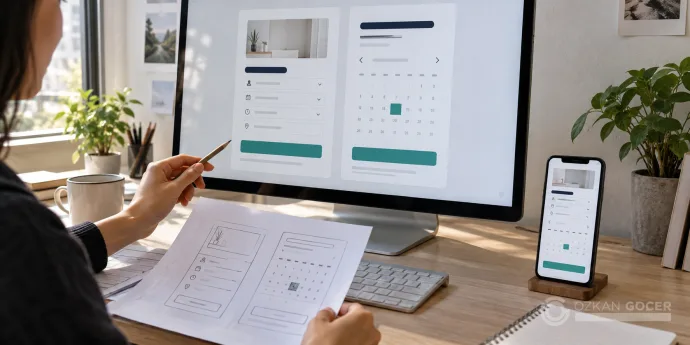
Organising a poster and designing an application's registration flow are different assignments. An interface benefits from graphic design skills, while user research, task flow and interaction are addressed through UX and UI work. One person may cover several roles in a small team, but the decisions remain distinct.
AI can assist with sketches, image variations and editing. Someone still needs to catch incorrect product information, check usage rights, validate production files and understand what the client needs. A useful first goal is to explain why you designed a message in a particular way, rather than to produce as many visuals as possible.