VECTOR VS PİXEL DESİGN: WHAT'S THE DİFFERENCE?

Vector vs Pixel Design: What's the Difference?

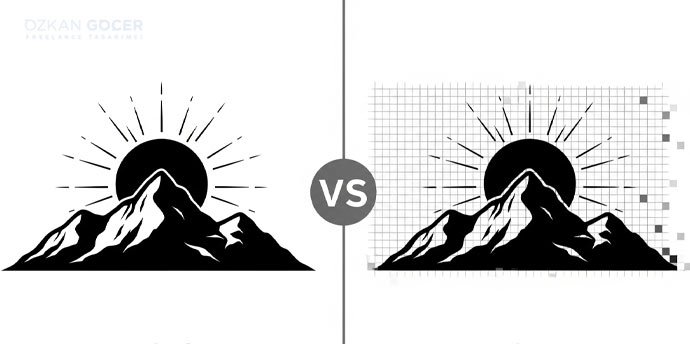
Vector designs rely on mathematical formulas to scale infinitely without losing quality, whereas pixel-based designs use a fixed grid of colored squares that pixelate when enlarged. In my years of managing digital assets, I have seen how choosing the wrong format slows down your website load times or ruins your print materials. You will learn how to identify which format suits your specific project needs, how to optimize them for the web, and how to avoid costly design mistakes.

What Are Pixel (Raster) Graphics?

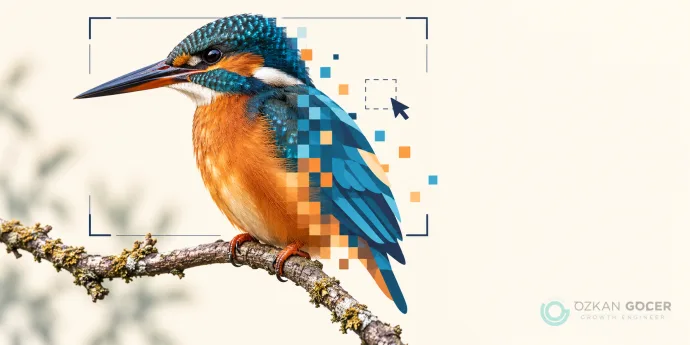
Pixel graphics, commonly known as raster images, consist of a grid of individual colored squares called pixels. Every digital photograph you capture with a camera or phone relies on this grid format. Zooming in close on a raster file reveals these individual squares, causing pixelation and a drop in visual quality. The total number of these grid points determines the resolution of the image, which directly limits how large you can print or display the file before it degrades. Common formats include JPEG, PNG, and GIF.

In the projects I have managed, choosing between raster vs vector formats determines the entire production workflow. Vector graphics use mathematical formulas instead of pixels to define shapes, lines, and curves. Mathematical calculations allow vector files to scale infinitely without losing any quality. Designers use Adobe Illustrator to create vector graphics, making it the standard tool for logo design and typography. Raster files remain the standard for complex color transitions, such as digital paintings or photographs, where vector math becomes too heavy to process.

Managing web assets requires a clear understanding of when to deploy each type. Web browsers render raster formats quickly, making them ideal for standard website images and detailed product photography. Forcing a low-resolution raster file into a large banner display will result in blurry edges and visible artifacts. You must export raster files at the exact dimensions needed for your layout to maintain sharpness. Matching the graphic format to the specific output medium prevents rendering errors and keeps your web pages loading fast. For example, a hero image on a desktop screen typically requires a width of 1920 pixels, whereas a mobile screen needs only 768 pixels to look sharp.

What Are Vector Graphics?

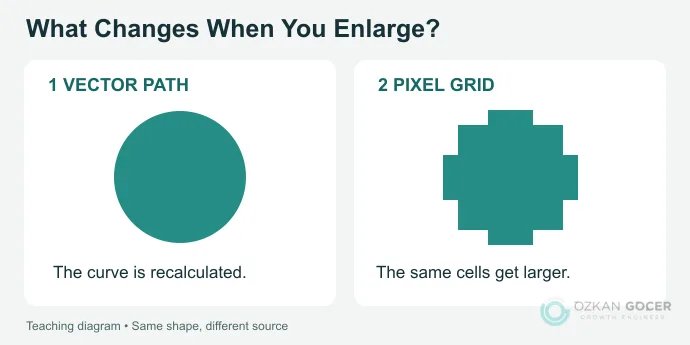
Vector graphics use mathematical formulas to draw shapes, lines, and curves on a coordinate grid. Unlike raster images that rely on a fixed grid of pixels, a vector file retains its crisp quality at any scale. You can stretch a vector graphic infinitely without losing resolution. In my own practice, I always request vector formats for brand logos because scaling a pixel-based image for a billboard results in visible blurriness. The math recalculates the coordinates automatically, keeping edges sharp on any screen size.

Designers create these assets using specialized software like Adobe Illustrator. The resulting file formats, such as SVG or EPS, store geometric instructions rather than color values for individual pixels. When comparing raster vs vector formats, the main difference lies in adaptability. Standard graphic design workflows rely on vectors for typography, icons, and technical illustrations where clean edges are mandatory. A single file serves both a tiny website favicon and a massive physical print run.

Web performance optimization depends heavily on the strategic use of these assets. Replacing heavy PNG images with lightweight SVG vector graphics reduces page load times, directly improving user experience and search engine rankings. You get sharp visuals on high-density displays without sacrificing site speed. Choosing the right format for each visual asset prevents rendering issues across different devices. In my projects, switching to vector-based icons has consistently resolved mobile scaling bugs while keeping the codebase clean.

Vector vs Pixel: Comparison Table

Feature Vector Graphics Pixel Images
Scalability Infinite without quality loss Quality degrades when enlarged
File Format SVG, EPS, AI PNG, JPEG, WEBP
Primary Software adobe illustrator Adobe Photoshop
Best Use Case Logos, typography, responsive icons Complex photographs, digital painting

Resolution and Scalability

Vector graphics rely on mathematical formulas to draw paths, lines, and curves. Scaling a vector file up or down does not impact the visual quality because the math recalculates instantly. In my own practice, I always demand SVG format for brand logos to ensure they remain sharp on high-resolution screens. A pixel vs vector comparison highlights how resolution defines quality.

Pixel-based images contain a fixed grid of colored pixels. Stretching raster images beyond their original resolution forces the software to guess new pixel values, resulting in blurriness and pixelation. Modern responsive design requires assets that adapt to various screen sizes, making vectors the standard choice for user interface elements.

File Size

Vector files maintain small file sizes because they store mathematical instructions rather than individual color coordinates. A massive billboard design saved as a vector remains lightweight, often under a megabyte. Raster files grow exponentially as resolution and dimensions increase.

High-resolution photographs require millions of pixels, which inflates the file size and slows down page load times. I regularly audit client websites where uncompressed pixel images degrade performance; converting simple graphics to vector formats resolves this speed bottleneck.

Editing and Detail

Editing a vector image in adobe illustrator allows you to manipulate individual anchor points and paths without altering the surrounding elements. Working with paths makes vector design highly flexible for iterative branding projects.

Pixel graphics excel at rendering complex color transitions, shadows, and continuous tones found in real-world photography. You cannot easily replicate these organic details in a vector format without creating millions of complex paths, which defeats the purpose of the medium. Choose your format based on the visual complexity your project demands.

File Formats

Vector Formats (SVG, AI, EPS, PDF)

Vector graphics rely on mathematical formulas rather than a grid of pixels to render shapes. Scalability defines this category; you can enlarge an SVG or AI file infinitely without losing image quality. In my own practice managing website migrations, serving SVG files for logos and icons keeps the design sharp on high-resolution screens while reducing page load times. Designers build these assets in Adobe Illustrator, preserving editable layers and precise anchor points.

Exporting vector files requires choosing the correct format for the destination. EPS remains a standard for professional print workflows, while PDF serves as a universal distribution format that locks layout, vector curves, and embedded font files together. Web browsers render SVG natively, allowing developers to manipulate the code directly with CSS for animations.

Raster Formats (JPG, PNG, GIF)

Raster images map color values to a fixed grid of pixels. Each individual pixel holds specific color data. Scaling up a raster file degrades quality, resulting in visible pixelation when the resolution limit is exceeded. JPG files use lossy compression to keep file sizes small, making them ideal for complex photographic graphics where subtle color gradients matter. PNG files offer lossless compression and support transparency, which is necessary for overlaying design elements on varied backgrounds.

Choosing raster vs vector depends on the complexity of the visual asset. GIF files limit the color palette to 256 colors, restricting their use to simple animations or low-resolution web graphics. In the projects I have managed, auditing image formats regularly prevents heavy raster files from degrading mobile page speed.

Use Cases

Vector: Logos, Icons, Illustrations

Scalability dictates the choice of format for brand assets. When I build brand identity systems in my own practice, I rely on vector graphics to ensure a logo looks sharp on a smartwatch screen and a highway billboard alike. Mathematical formulas define vector files, allowing you to scale the design infinitely without losing quality. You avoid the risk of blurry edges during large-format printing.

Using Adobe Illustrator remains the industry standard for creating clean vector paths. Illustrator handles typography and complex geometric shapes with precision, exporting to SVG or EPS file formats that developers can easily manipulate. If your design requires crisp lines and infinite scalability, vector is the only logical choice.

Pixel: Photos, Digital Painting, Web Images

Raster graphics excel at capturing the chaotic detail of the real world. Every digital photo consists of a grid of individual pixels, where each pixel holds specific color data. High-resolution images require millions of these tiny squares, making the file size grow significantly as dimensions increase. You must balance visual depth with loading speed.

Web browsers render pixel-based formats like JPEG, PNG, and WebP to display complex imagery quickly. Unlike vector graphics, stretching a raster image beyond its native resolution causes visible pixelation and blurriness. Choosing pixel vs vector depends entirely on whether your project demands realistic color gradients or mathematical scalability. Match the format to your medium.

Pros and Cons of Vector Graphics

Vector graphics rely on mathematical formulas rather than a fixed grid of pixels. In my own practice, I select vector formats for brand assets because they retain crisp quality at any scale. You can stretch a logo from a mobile screen to a giant billboard without losing resolution or clarity. Software like Adobe Illustrator allows you to build clean geometry that keeps the final file size remarkably small. Low file sizes directly speed up website loading times, improving user experience and search engine rankings. Fast loading is a direct ranking factor.

Complex images with intricate color gradients or photographic details do not translate well to vector paths. The raster vs vector debate highlights that photographs require millions of individual pixels to capture realistic light and shadow. Forcing a highly detailed image into a vector format results in massive file sizes and sluggish rendering speeds. Designers use raster formats for photos and reserve vector files for icons, typography, and clean layout design. Choose your format based on the visual complexity of the asset.

Usability studies by the Nielsen Norman Group emphasize that clear visual hierarchy and fast-loading graphics improve user engagement. Implementing scalable vector graphics for user interface elements ensures that icons remain sharp on high-density displays. Auditing your design assets ensures you use the correct format for the right job. Balancing vector graphics with raster images keeps your digital products both fast and visually appealing. Testing your site speed after implementing new graphics prevents performance bottlenecks.

Pros and Cons of Raster Graphics

Raster graphics map individual pixels to specific color values, making them the standard choice for complex photographic images and digital paintings. In my own practice, I select raster formats like PNG or WebP when a design requires intricate color gradients, shadows, and photorealistic textures. Every pixel holds distinct data, allowing for pixel-level editing that vector graphics cannot replicate. High-detail rendering makes raster files indispensable for web publishing and digital photography, where capturing subtle real-world lighting is mandatory.

Scaling a raster file introduces significant limitations. Unlike vector graphics, which use mathematical formulas to scale infinitely, raster images suffer from resolution dependency. Enlarging a raster image stretches the existing pixels, causing visible pixelation and a sharp drop in quality. When comparing raster vs vector workflows, vector tools like Adobe Illustrator or Figma maintain crisp lines at any scale. Raster files also demand substantial storage space; high-resolution assets quickly bloat web page load times, directly impacting search engine optimization performance.

Choosing between formats depends entirely on your project requirements. For complex web layouts, I often combine both formats, using vector assets for user interface icons and raster files for hero photography. Balancing both methodologies prevents slow load times while preserving visual fidelity across different screen sizes. Designers must evaluate the end-use case before committing to a specific file format.

Feature Raster Graphics Vector Graphics
Primary Unit Pixels Mathematical paths
Scalability Resolution dependent (loses quality) Infinitely scalable
Best Use Case Photographs, complex shading Logos, typography, icons
Common Software Adobe Photoshop Adobe Illustrator, Figma

When to Use Each

Choose raster graphics when your project demands complex color blending, such as digital photography or detailed digital paintings. Every pixel in a raster file stores specific color data, making it ideal for a continuous-tone image. In my own practice, I always opt for raster formats when processing product photos for e-commerce platforms where realistic textures dictate conversion rates. You must define the resolution from the start. Scaling up a raster design later ruins the quality by stretching the existing pixels, resulting in a blurry output.

Select vector graphics for brand assets, logos, typography, and illustrations that require infinite scalability. Because vectors rely on mathematical formulas rather than a fixed grid of pixels, a single vector file scales from a tiny website favicon to a massive highway billboard without losing sharpness. Industry standard tools like Adobe Illustrator allow you to build clean paths that keep file sizes small. In the projects I have managed, maintaining a master vector asset library prevents rendering issues across different print and digital mediums.

Deciding on raster vs vector depends entirely on the output medium. Web design often requires a mix of both formats, serving SVG files for UI elements and compressed WebP images for photographs. The table below outlines the standard use cases for each format.

Project Type Recommended Format Primary Tool
Brand Logos Vector Adobe Illustrator
Web Photos Raster Adobe Photoshop
UI Icons Vector Illustrator / Figma

Is SVG Vector? Is Canva Vector or Pixel?

SVG (Scalable Vector Graphics) is a true vector format. Unlike raster files that rely on a grid of colored pixels, SVG files use mathematical formulas to draw lines, curves, and shapes. In my own practice managing website migrations, serving SVG files for logos and icons prevents the blurry rendering common with PNG or JPEG formats on high-resolution screens. SVG files maintain sharp quality at any scale because the browser calculates the geometry in real-time. Industry resources like Smashing Magazine frequently highlight how SVG code can be manipulated directly via CSS and JavaScript, making it highly adaptable for modern web design.

Canva operates as a hybrid platform rather than a pure vector editor like Adobe Illustrator, making the raster vs vector distinction highly relevant to your workflow. When you create a design in Canva, you work with both vector graphics and pixel-based images. The platform allows you to import and export SVG files, but many of its native elements, templates, and exported PDFs handle vector data differently depending on your subscription tier. Exporting a design as a PNG or JPG converts the vector elements into static pixels, locking the resolution and risking quality loss when stretched.

Choosing between Canva and professional tools depends on your final output needs. For complex logo creation or print layouts requiring infinite scalability, Adobe Illustrator remains the standard because it generates clean, editable vector paths. Canva serves quick digital marketing assets well, but you must use the correct export settings, such as PDF Print or SVG, to preserve vector properties. Relying solely on raster exports for large-scale print jobs often results in visible pixelation, destroying the professional look of your physical marketing materials.

Vector vs Pixel Art for Games

Choosing between vector graphics and pixel art dictates your entire game development pipeline, rendering performance, and visual scaling. Vector design relies on mathematical formulas to draw shapes, lines, and curves. Industry-standard software like Adobe Illustrator generates these assets, allowing you to scale images infinitely without losing quality. In my own practice managing game asset pipelines, I opt for vector formats when targeting multiple screen sizes, from mobile phones to 4K monitors. The file size remains tiny because the game engine calculates the curves on the fly instead of loading heavy raster grids. Mathematical rendering ensures crisp edges at any magnification level.

Pixel art operates on a fixed grid where individual pixels hold specific color values. Raster approaches bind your graphics directly to a target resolution. Scaling a low-resolution pixel image upward requires specific sampling filters to prevent unwanted blur, which alters the intended aesthetic. Game developers use pixel art to evoke nostalgia or achieve precise, grid-aligned collision boxes. While vector assets scale dynamically, pixel designs require manual redrawing for different detail levels to maintain visual clarity. Creating animations in pixel art means drawing every frame frame-by-frame, whereas vector skeletons allow for smooth, bone-based interpolation.

The choice of pixel vs vector art ultimately depends on your programming workflow and target platforms. Vector files reduce memory overhead but demand more CPU processing during real-time rendering. Pixel assets load instantly but consume more RAM as texture sizes grow. Analyze your hardware constraints and art pipeline before committing to a format.

Converting Raster to Vector

Raster images rely on a grid of colored pixels. Scaling a raster file up degrades the quality, resulting in visible pixelation and blurry edges. In my own practice, I often receive low-resolution logos that fail during large-scale print production because of this limitation. Converting raster files into vector graphics solves the scaling issue. Vector designs use mathematical formulas instead of pixels, allowing you to scale the image infinitely without losing sharpness. The conversion process preserves design integrity across all platforms.

Automated tracing tools in software like Adobe Illustrator convert pixel data into anchor points and paths. Manual tracing yields better results for complex graphics. Designers use the Pen tool to redraw the shapes, ensuring clean lines and precise curves. The final vector file, typically saved as EPS, SVG, or PDF, remains sharp on a business card or a massive billboard. Choosing the right file format prevents rendering errors during the production phase.

Choosing raster vs vector depends on your project requirements. Photographs require the rich color depth of pixels, whereas logos and typography demand vector scalability. Converting your assets ensures your design remains versatile across digital and print mediums. High-resolution source files save time and prevent costly reprints. In the projects I have managed, establishing a vector-first rule for brand assets eliminated format compatibility issues entirely.

Feature Raster Image Vector Graphic
Composition Pixels Mathematical paths
Scaling Quality degrades Infinite scaling
File Formats PNG, JPEG, GIF SVG, EPS, AI, PDF
Primary Use Photography, web images Logos, typography, icons
FAQ

Frequently Asked Questions

Quick answers for readers who skipped to the end.

What is the difference between a pixel and a vector?
Pixels are tiny, color-filled squares arranged on a grid to form a raster image, which means they lose clarity and become blurry when you enlarge them. Vectors rely on mathematical formulas to define points, lines, and curves, allowing you to scale the graphic infinitely without any loss in quality. I recommend using pixel-based formats like PNG or JPEG for complex photographs, while vector formats like SVG or EPS are essential for logos and brand assets that require frequent resizing.
What are vector graphics?
Vector graphics are digital images constructed through mathematical formulas that define points, lines, curves, and shapes. You can scale vector files infinitely without losing image quality, making them highly versatile for responsive web design. I recommend choosing formats like SVG or EPS for your logos and brand assets to ensure your designs remain perfectly crisp on both mobile screens and massive print banners.
What are raster (pixel) graphics?
Raster graphics, commonly known as pixel images, consist of a grid of tiny, individual colored squares that combine to form a complete visual. I have seen many clients struggle with blurry logos because raster files, like JPEGs or PNGs, lose quality and become pixelated when you try to scale them beyond their original dimensions. You should use them primarily for detailed photographs and complex digital paintings where smooth color gradients are necessary, rather than scalable brand assets.
Is SVG a vector or pixel format?
SVG stands for Scalable Vector Graphics and is a pure vector format. I recommend using it for website logos, icons, and illustrations because you can scale the graphics to any size without losing quality. Unlike pixel-based formats like PNG or JPEG, your browser renders SVG files using mathematical equations rather than a fixed grid of colored squares.
Is Canva vector or pixel?
Canva operates as a hybrid platform combining both vector and pixel elements. You can work with vector graphics like fonts, shapes, and uploaded SVGs, which scale infinitely without losing quality. Photos and standard exports like PNG or JPG rely on pixels, meaning your final output quality depends heavily on the export settings you choose. I recommend exporting your designs as PDF Print or SVG if you need to preserve vector scalability for high-quality printing.
Which is better, vector or pixel?
Neither format is universally superior: the right choice depends entirely on your project requirements. I recommend using vector graphics for logos, typography, and illustrations that require infinite scaling without losing quality. For detailed imagery, digital paintings, and complex photographs, you must rely on pixel-based raster formats to capture rich color gradients and fine details.
What are the disadvantages of vector art?
Vector art struggles with photorealism because representing complex, organic textures and subtle color gradients requires millions of individual mathematical paths. I have seen designers waste hours trying to trace a photograph into a vector format, only to end up with a flat, unnatural result. Compatibility can also become a headache for you if clients do not own specialized vector editing software to open and modify the native files.
Why should a logo be a vector?
I recommend designing your logo as a vector because mathematical formulas define its lines and curves, allowing infinite scaling without any pixelation or loss of quality. You can resize a vector logo to fit a tiny website favicon or a massive highway billboard using the exact same master file. Pixel-based logos will blur and distort when enlarged, which often forces you to pay a designer to recreate the asset from scratch later.
What file formats are vector vs raster?
I recommend using SVG, EPS, PDF, and AI formats when you need scalable vector graphics that retain their crispness at any size. For pixel-based raster images, you will typically work with JPEG, PNG, GIF, and TIFF formats to display complex color gradients and photographs. Choosing the right format depends on your specific project needs, as using a raster format for a logo can ruin scalability, while using vectors for complex photos is practically impossible.
Vector or pixel art for games — which is better?
Choosing between vector and pixel art depends entirely on your game's target platforms, aesthetic goals, and animation budget. I recommend pixel art if you want to evoke retro nostalgia or need precise, grid-aligned collision boxes, though animating it frame-by-frame can consume significant time. Vector art excels when you need assets to scale infinitely across 4K screens and mobile devices without losing crispness, allowing you to use skeletal animation tools to speed up your workflow.
Can I convert a raster image to vector?
You can convert a raster image to a vector format using auto-tracing tools in software like Adobe Illustrator or free alternatives like Inkscape. I have seen mixed results with automated tracing: clean logos convert almost perfectly, while complex photographs usually turn into muddy, abstract shapes. For high-quality professional results, I recommend manually redrawing the image using the pen tool rather than relying solely on automated converters.
Why are vector files smaller in size?
Vector files maintain a small footprint because they store mathematical formulas describing lines, points, and curves instead of saving individual color data for millions of pixels. I have seen web projects load significantly faster when you replace heavy raster images with lightweight SVG files that contain only a few lines of XML code. Scaling a vector graphic up does not add to the file size because your browser simply recalculates the math rather than rendering new pixels.
Summarize:
Özkan Göçer profile photo

Özkan Göçer

Growth Engineer & Digital Marketing Specialist

Özkan Göçer is a Growth Engineer and Digital Marketing Specialist with over 15 years of field experience and 200+ completed projects. Having delivered over 200 corporate identity and logo projects using Adobe Illustrator, InDesign, and Photoshop, he draws on extensive field practice to shape this guide.


Scroll to top