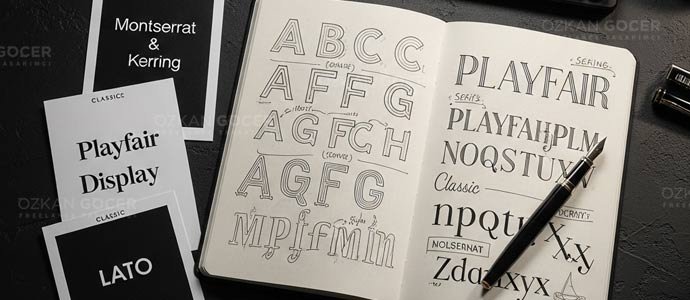
Font selection briefs usually open with vague requests like "I want something clean" or "make it feel cute." Such subjective goals yield inconsistent, unfocused design. I compress the selection process here into 7 concrete steps proven in the field. Learn the basics first at what is a font, or construct a complete framework via typography system. I isolate the selection process alone here.
Why Does Font Choice Matter So Much?
Typography acts as your brand's spoken tone. Logos establish visual identity and color schemes convey personality, but your typeface dictates the actual delivery of your message. A consumer-perception study published in Nature proves that typography dictates more than 70% of how people perceive a brand. Font selection is not a decorative afterthought. It drives strategy.
Consider a cafe chain that has run Comic Sans across its signs and menus, then rebrands onto a humanist sans-serif. The coffee and the service stay identical, yet the same business starts to read as one that feels modern and looks more trustworthy, because the typeface delivers brand tone before anyone reads a word.
The 7-Step Font Selection Process
1) Audience Analysis
Identify your reader profile through age, education, culture, and digital habits. Futuristic geometric sans-serifs like Eurostile or Orbitron connect with an 18-25 audience. Humanist sans-serifs such as Open Sans and Lato work better for audiences over 50 due to superior legibility. High-education B2B targets respond best to classical serifs like Source Serif or IBM Plex Serif, which establish immediate professional authority.
2) Brand Personality Definition
Define your brand voice by scoring its character across five distinct axes:
- Bold ↔ Calm: Display typography projects boldness, while lighter weights establish a calm tone.
- Classic ↔ Modern: Serif options represent classic values, whereas geometric sans-serifs feel modern.
- Professional ↔ Warm: Neo-grotesque styles like Inter signal professional distance, but humanist faces like Lato feel warm.
- Luxury ↔ Accessible: High-contrast serifs like Bodoni communicate luxury, while low-contrast designs like Roboto offer accessible utility.
- Traditional ↔ Innovative: Old-style serifs like Garamond honor traditional roots, while variable fonts like Recursive drive innovative aesthetics.
3) Sector Competitor Mapping
Analyze the typography of 5 to 10 direct competitors in your market. You will find clear industry patterns: banks favor neo-grotesque, luxury brands select Didone, and children's products rely on humanist styles. Align with these choices to build instant sector trust, or break the mold to stand out. Both approaches work. The real danger lies in drifting into accidental conformity or extreme divergence without a clear plan.
4) Classification Narrowing
Completing the initial phases leaves you with one or two target classifications, such as a geometric sans-serif combined with a transitional serif. Your selection pool shrinks from millions of options to a manageable list of 50 to 100 candidates. Write down these parameters before moving forward. Skipping this step leads to endless, aimless browsing.
5) Font Pairing Test
Limit your brand palette to two or three fonts: one for display, one for body text, and an optional accent face. Use established pairing formulas to achieve visual balance:
- Serif headline + sans-serif body: Blends traditional and modern tones. Examples include Playfair Display with Lato, or Lora paired with Source Sans Pro.
- Two different sans-serifs (different weights): Delivers a clean, modern aesthetic. Try Montserrat Bold with Inter Regular, or Poppins SemiBold alongside Open Sans.
- Display headline + serif body: Combines high impact with readability. Pair Bebas Neue with Merriweather, or Anton with Lora.
- Same superfamily (font + slab combo): Guarantees structural harmony. Match Roboto with Roboto Slab, or IBM Plex Sans with IBM Plex Serif.
I rely on specific tools to speed up validation. Browse the free font library on Google Fonts, use Fontpair.co to explore proven combinations, test typographic hierarchy on Typescale.com, and run direct layout tests using Figma plugins like Fontea or Typograph.
6) Legibility Check
Execute a strict quality check: write a 120-character paragraph and render it at 10, 12, 14, 16, 18, and 24px. Review the layout on an iPhone 12 using a 360x800 viewport. Verify that the characters remain legible on low-contrast setups, such as light gray text on dark backgrounds, and run tests through vision simulators. Your body font requires a generous x-height and balanced ascenders and descenders to prevent eye strain.
7) License + Performance Validation
Verify the commercial licensing terms for your selected typography. Options range from Google Fonts under the SIL Open Font License for free commercial use, to Adobe Fonts within your Creative Cloud subscription, or premium foundries like Hoefler, Klim, and Commercial Type requiring one-time fees. Optimize web performance by using the WOFF2 format, loading 2-3 weights max, and applying the font-display:swap property. For deeper performance detail, see the loading section of my what is a font guide.
Field Recommendation: Which Fonts Work in 2026?
Generic recommendations carry little value because typography depends entirely on your product context. Real-world testing shows clear performance and aesthetic winners. Here are 8 fonts that work well in 2026:
- Inter: The dominant choice for web UI. You get a variable font with 9 weights and high legibility, favored by Stripe, Figma, and Notion.
- Roboto Flex: Google's upgraded variable typeface. It offers over 1700 variations, making it the default standard across the Android ecosystem.
- Manrope: A geometric sans-serif. The clean geometry provides high readability for modern brands.
- Source Sans 3: Adobe's open-source humanist sans-serif. It balances classic structure with modern utility.
- Recursive: A multi-axis variable font. You can switch between sans, mono, and casual tones using a single asset file.
- Playfair Display: A high-contrast display serif. It delivers a classic magazine-headline feel for editorial brands.
- IBM Plex (Sans/Serif/Mono): IBM's superfamily. The technical aesthetic fits B2B and tech brands perfectly.
- Geist: Vercel's 2024 release. Developers and designers now treat it as the default choice for modern tech sites.
5 Common Mistakes (From Practice)
- Starting from personal taste: Demanding a specific style simply because it looks appealing is the most common opening error. You cannot select typography without analyzing your target audience and brand positioning first.
- Chasing trends: Copying Apple and using SF Pro makes no sense unless your brand identity matches theirs. Blindly following design trends dilutes your unique positioning.
- Picking 4+ fonts: Combining display, body, caption, accent, and extra styles creates visual noise. Limit your project to a maximum of 3 fonts. Keep it clean.
- Not testing Turkish characters: Omitting "ş," "ğ," or "ı" causes rendering errors that break your layout. You must verify Latin Extended subset support before licensing.
- Not testing at usage size: Approving a typeface at 120pt on a presentation slide leads to disaster when the actual body copy runs at 14pt. Readability issues appear only after launch. Test early.
Finding the Font That Speaks for Your Brand, Quick Exercise
Start by answering five questions with a single sentence each:
- Imagine your brand as a 30-year-old individual; what is their identity? (bold designer, calm academic, or entrepreneur)
- Which industry rivals do you need to differentiate your business from?
- What emotion must a visitor experience during their first 5 seconds on your page? (trust, excitement, luxury, or ease)
- Define your primary brand color; typography must complement the chosen palette. (cool tones with serifs project a classic feel; warm tones with geometric shapes look modern)
- Will your budget limit you to Google Fonts, allow for Adobe Fonts, or support a custom type foundry?
Your answers quickly filter the options down to a shortlist of 50-100 fonts in under 5 minutes. Select 3-5 finalists. Run a 5-day A/B test to let real user data make the final decision.
Next Step: A Full Typography System
Choosing a font is only the first step: you need a structured framework. That framework spans five distinct layers: font family, hierarchy, line-height, letter-spacing, and vertical rhythm. Details matter. Read my typography system guide for the full implementation steps; check my 15 impressive writing styles archive for creative execution. If you need to master basic terminology first, learn what is a font; then connect it to your broader corporate identity. Visual harmony requires matching your type with the right palette: colors and their meanings explains the psychological connection.
Delegate the design of your brand's typographic structure to an expert. You can review my workflow and collaboration terms on the graphic design services page.
Send a font selection brief using the form in the bottom-right corner: the process takes three short steps, and I will reply within 24 hours.