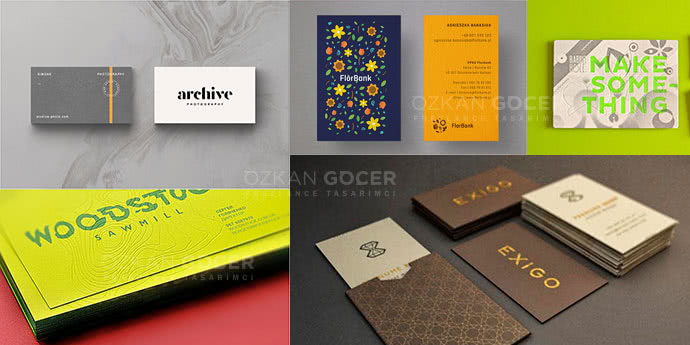
Why a Great Business Card Still Matters
Digital fatigue dominates modern networking. While LinkedIn connections and email exchanges happen in seconds, they lack physical permanence. A tangible business card bridges the gap between a brief handshake and a lasting professional relationship. A card handed over in person stays in a pocket long after a quick digital contact swap has been forgotten. A physical card forces a moment of undivided attention, anchoring your brand in the recipient's memory through tactile feedback.
High-quality design transforms a simple piece of paper into a functional marketing tool. Choosing the right layout, typography, and paper stock dictates how prospects perceive your operational standards. Selecting specific colors, such as those offered by the design platform colors, establishes immediate visual alignment with your digital assets. Cheap, flimsy cards suggest a business that cuts corners. Investing in premium materials and clean typography signals stability and attention to detail, which directly influences trust before a single business proposal is read. You want a card that feels substantial when held, prompting the recipient to pause before putting it away.
To make your card effective, match the physical specifications to your industry standards. Standard digital printing works for high-volume distribution, but premium finishes serve high-ticket client acquisition better.
Scroll sideways to read every column. Keyboard: focus the table and use the arrow keys.
| Card Feature | Standard Option | Premium Option | Impact on Perception |
|---|---|---|---|
| Paper Weight | 300 GSM | 450+ GSM / Cotton | Conveys durability and authority |
| Finish | Matte / Gloss | Spot UV / Foil Stamping | Highlights specific design elements |
| Color Accuracy | Standard CMYK | Pantone Matching System (PMS) | Ensures exact brand consistency |
Planning your card layout requires balancing white space with essential contact details. Overcrowding the layout with social media icons and multiple phone numbers dilutes the primary call to action. Keep the focus on your name, core service, and a single, direct channel of communication. Adding a clean Quick Response (QR) code on the back can bridge the physical-to-digital gap, directing prospects to a specific landing page without cluttering the front design.
What Makes a Good Business Card?
A high-performing business card functions as a physical extension of your digital footprint, bridging the gap between offline handshakes and online conversions. Cards that fail to establish a clear visual hierarchy get discarded almost immediately. A successful design prioritizes readability over excessive decoration. You must limit the typography to two complementary typefaces and ensure the font size for contact details never drops below 8 points. Standard dimensions of 3.5 by 2 inches remain the industry benchmark; deviating from this norm often prevents the card from fitting into standard wallet slots, reducing its lifespan.
Paper stock weight dictates the recipient's immediate perception of your brand authority. Opting for a minimum of 350 GSM (grams per square meter) prevents the card from feeling cheap or flimsy. Professional graphic design aligns the layout with your brand identity, using negative space to guide the eye directly to your primary call to action, such as a custom QR code or a direct phone number. I recommend using matte finishes to eliminate glare under office lighting, which makes scanning digital contact details much easier. High-contrast color schemes, specifically dark text on a light background, guarantee legibility under diverse lighting conditions.
To make your business cards work as active lead-generation tools, you should exclude non-essential social media handles and focus on a single, trackable URL. Utilizing an Urchin Tracking Module (UTM) parameter behind a QR code allows you to measure the exact return on investment from networking events. Modern business demands that physical cards integrate with digital Customer Relationship Management (CRM) workflows.
Selecting premium finishes like spot UV or foil stamping can highlight your logo, but these embellishments must never compromise the readability of your essential data. Keep the back of the card blank or lightly textured; this space remains highly useful for prospects to write down specific notes about your conversation.
The Best Business Card Examples by Category
Minimal and Professional
Clean layouts rely on generous white space and high-contrast typography to deliver information instantly. Reducing visual clutter makes contact details easier to locate and remember. Streamlined layouts align with usability principles documented by the Nielsen Norman Group, which emphasize that users scan content in predictable patterns. A minimalist business card uses a single dominant typeface, a neutral color palette, and clear hierarchy to guide the eye directly to the email and phone number.
Creative and Bold
Unconventional formats break the standard rectangular mold to command attention. You can use die-cut shapes, transparent plastics, or interactive folding mechanisms to make your card memorable. Bold design choices work best when the physical form reflects the brand identity directly, such as a camera-lens cutout for a photographer. Keep the functional text legible on a flat surface so the recipient can still read the data easily.
Luxury (Foil, Emboss)
Tactile finishes establish premium positioning before the recipient reads a single word. Heavy paper stock, typically 400 gsm or higher, provides a substantial weight that conveys authority. Metallic foil stamping and blind embossing add physical depth to logos and borders. Pairing a matte finish with spot UV gloss creates a sensory contrast that cheap paper cannot replicate.
Colorful and Playful
Vibrant color palettes and custom illustrations inject personality into a brand. Using edge painting, where the thick sides of the card feature a bright accent color, adds a surprising detail when stacked. Select high-saturation tones that match your digital brand assets to maintain consistency across physical and online touchpoints.
By Industry (Lawyer, Designer, Realtor)
Different professions require distinct design languages to establish trust. Lawyers benefit from heavy cotton paper, dark blue or forest green tones, and classic serif typography to project stability. Designers should treat their business cards as a miniature portfolio, utilizing experimental layouts or custom illustrations that showcase their technical skills. Realtors need high-durability cards, often incorporating a professional headshot and a quick response (QR) code that links directly to active property listings.
What to Include on a Business Card
A business card must convey your professional identity in seconds. Too many layouts cram a 3.5 by 2-inch canvas with excessive social media handles and secondary phone numbers. Stick to the essentials. Your full name, functional job title, company name, a single direct phone number, and a professional email address form the core. Adding a physical address is optional today; replace it with a clean website URL or a QR code pointing to a landing page if your business operates primarily online.
Visual hierarchy dictates how a recipient processes your information. Your name or company logo requires the largest font size, while contact details should sit at a readable 8pt to 10pt size. White space prevents visual fatigue; leave at least 20% of the card surface empty. When I design business cards for my networking events, I use Figma to map out the grid system and test different color contrasts. Using vector software allows you to export high-resolution print-ready PDF files with proper bleed margins, ensuring the physical cards match your digital layout exactly.
Modern business cards often bridge the physical and digital worlds through dynamic QR codes. Generating a QR code that links to a curated portfolio or a vCard file allows prospects to save your contact details instantly without typing. Select a heavy paper stock, preferably 350 grams per square meter (GSM) or higher, to convey durability. Flimsy paper damages your brand perception before the conversation even starts. Focus on clean typography and high-contrast color schemes to make your card readable under any lighting conditions.
Best Business Cards for Small Businesses
Physical networking still drives high-value business acquisitions. Selecting the right business card requires balancing paper weight and finish to establish immediate authority. Standard 300 grams per square meter (GSM) paper feels flimsy and cheap; aiming for 350 to 450 GSM uncoated or matte-coated stock provides a premium tactile experience. Avoid high-gloss finishes unless your brand relies heavily on vibrant photography, as gloss attracts distracting fingerprints and prevents people from writing quick notes on the card during face-to-face meetings.
Creating a professional design no longer requires hiring expensive agencies. You can use professional design suites like Adobe Illustrator to build vector-based layouts that scale without pixelation, or leverage browser-based tools to make custom layouts from templates. Keep the layout clean by limiting fonts to two families and leaving at least 30% of the card as white space. A cluttered business card gets thrown away because the recipient cannot quickly find your contact details, email address, or phone number.
Printing a short first run tests the physical layout and color accuracy before you commit to bulk quantities. Online printers charge anywhere from $20 to $150 per batch depending on custom features like foil stamping, painted edges, or rounded corners. Adding a dynamic QR code on the back allows you to track scans and update your landing page link without needing to reprint your entire stock of business cards. Using a dynamic code saves budget while keeping your digital touchpoints current.
Scroll sideways to read every column. Keyboard: focus the table and use the arrow keys.
| Card Type | Paper Weight (GSM) | Best Use Case | Estimated Cost (per 100) |
|---|---|---|---|
| Standard Matte | 300 - 350 | High-volume distribution, events | $20 - $40 |
| Premium Uncoated | 350 - 450 | B2B networking, executive cards | $50 - $90 |
| Specialty (Foil/Edge) | 400+ | Luxury brands, creative agencies | $100 - $180 |
2026 Business Card Trends
Physical networking assets are evolving into hybrid digital nodes. A physical card now works as the initial trust anchor before the digital handshake. The current landscape prioritizes ultra-minimalist layout choices combined with embedded Near Field Communication (NFC) chips. You no longer print hundreds of cheap business cards; instead, you invest in a single premium card made of recycled ocean plastic or sustainably sourced wood that triggers a digital profile upon contact. Design choices lean heavily toward high-contrast typography and tactile debossing rather than cluttered color schemes.
Industry analysis from design authorities like Smashing Magazine highlights a return to tactile authenticity. Modern professionals use heavy 600 GSM cotton paper to make a lasting physical impression during high-value meetings. Physical touchpoints must bridge the gap to your online ecosystem. A clean Quick Response (QR) code on the back of the card should lead to a personalized landing page rather than a generic homepage. Using textured finishes, spot UV gloss, or metallic foil accents helps establish immediate sensory feedback. Optimizing this post-scan user journey converts far better than pointing the code at a standard social media link.
Budgeting for your networking assets requires a shift from quantity to quality. Expect to spend $2 to $5 per premium physical card, or up to $30 for a single high-end smart card. The goal is to make every interaction count. Keep the card layout clean by removing unnecessary details like physical addresses or fax numbers. Focus solely on your name, core value proposition, and a single scan action. Your business card is no longer a directory; it is a physical call-to-action that initiates a digital relationship. Implementing minimalist design principles ensures your brand remains memorable without overwhelming the recipient.
How to Design a Business Card (Tools)
Selecting the right software determines the final print quality of your physical assets. Vector-based programs like Adobe Illustrator remain the industry standard for business card artwork because they prevent pixelation at any scale. Illustrator allows you to set precise bleed lines, typically 0.125 inches, and work directly in the CMYK (Cyan, Magenta, Yellow, Key/Black) color profile.
Using CMYK prevents color shifting when the design moves from your screen to the printing press. For those without vector experience, Figma and Canva offer accessible alternatives with pre-made templates, though you must manually verify that your export settings support high-resolution PDF outputs of at least 300 DPI (dots per inch).
Scroll sideways to read every column. Keyboard: focus the table and use the arrow keys.
| Tool | Best For | Export Formats | Learning Curve |
|---|---|---|---|
| Adobe Illustrator | Professional print-ready layouts | PDF, EPS, SVG | Steep |
| Figma | Collaborative digital-first drafts | PDF, PNG, SVG | Moderate |
| Canva | Quick template-based creation | PDF Print, PNG | Low |
To make cards that look professional, configure your canvas to the standard US dimensions of 3.5 by 2 inches before adding any visual elements. Keep critical text like your phone number, email, and job title at least 0.125 inches away from the trim line to avoid accidental cropping during the cutting process. Avoid cluttered layouts; restrict your font selection to two families maximum to maintain readability.
When you finalize the card design, convert all text layers to outlines or paths. Converting text ensures the printing shop can open your file without needing to install your specific custom fonts, preventing layout distortion. Always request a physical proof from your printer before ordering a batch of 500 or more business cards.
Printing and Cost
Calculate the total cost per card before finalizing a design. Digital printing serves short runs of 100 to 500 cards efficiently, costing roughly $20 to $50. Offset printing requires a higher upfront setup fee but drops the unit price significantly on runs over 1,000 units. Paper stock thickness, measured in Grams per Square Meter (GSM), directly dictates the final price. Standard cards use 350 GSM, while premium options reach 450 GSM or higher, adding 20% to 40% to your production bill. Choosing standard dimensions also prevents custom trimming fees at the print shop.
Special finishes like spot UV, foil stamping, or custom die-cut shapes elevate a business card but double the printing invoice. You must balance the visual impact against your distribution volume. If you hand out thousands of cards at trade shows, a basic 350 GSM matte card keeps your budget sustainable. Save the heavy 600 GSM cotton paper with painted edges for high-value sales meetings where you hand-deliver each card to a warm lead. Planning your distribution strategy first helps you make smart decisions about paper weight and finish options.
Scroll sideways to read every column. Keyboard: focus the table and use the arrow keys.
| Card Type | Paper Weight | Run Size | Est. Cost Range | Best Use Case |
|---|---|---|---|---|
| Standard Digital | 350 GSM | 250 pcs | $20 - $40 | High-volume networking |
| Premium Offset | 400 GSM | 1,000 pcs | $80 - $120 | Daily business operations |
| Luxury Specialty | 600 GSM+ | 100 pcs | $150 - $250 | Executive meetings |
Digital and QR Code Business Cards
Traditional paper business cards often end up in the trash within a week. Transitioning to digital alternatives solves waste issues while keeping contact details dynamic. A modern digital business card relies on a Quick Response (QR) code or Near Field Communication (NFC) technology to transmit data instantly to a smartphone. Digital versions shorten the gap between meeting someone and following up. You no longer need to manually type phone numbers or email addresses; a simple scan of the card triggers an automatic contact save action on the recipient's device.
Creating a digital asset requires a shift in how you approach design. Instead of cramming physical space with small text, the layout must prioritize the QR code itself. You can make a hybrid card that features a clean physical design on the front and a high-resolution QR code on the back. Online generators and design platforms allow you to link the code to a dynamic landing page containing your portfolio, social media links, and direct messaging channels. Dynamic hosting means you can update your contact information or job title in real time without printing a single new card.
Scroll sideways to read every column. Keyboard: focus the table and use the arrow keys.
| Feature | Traditional Paper Cards | Digital / QR Code Cards |
|---|---|---|
| Cost per update | Reprinting fees ($20 to $100 per run) | $0 (Instant dashboard updates) |
| Data capacity | Limited to physical card dimensions | Unlimited (Links to portfolios, videos, socials) |
| Interaction tracking | Impossible to measure | Trackable scan rates and click-throughs |
Adopting QR-enabled cards also provides measurable marketing data for your business. Every scan can be tracked through UTM parameters, giving you exact metrics on how many people interact with your profile at a specific networking event. When you design your next batch of cards, integrating a QR code bridges the gap between offline encounters and digital Customer Relationship Management (CRM) systems.