
A low advertised rate can look different when it requires 48 months upfront or leaves daily backups to a higher tier. Reading the price screen alongside the plan terms shows what you are paying for and how long the commitment lasts.
How We Compared the Providers
We reviewed the eight providers’ public product and help pages on October 2, 2026. The shortlist covers Turkish-market services, international shared hosting and managed WordPress. It is not an exhaustive market ranking; the aim is to match a plan to the work a website needs it to do.
- Plan evidence: We checked contract terms, renewal rates, backups and resource limits in provider documentation. We captured the relevant Hostinger, SiteGround and Veridyen screens in our own browser; numbered excerpts below explain what to look for.
- Our calculation: We multiplied the advertised monthly rate by the prepaid term to check the initial total. Taxes, domain renewals and optional extras are excluded.
- Measurement limits: We did not open accounts or buy plans, and did not measure performance under load, backup restoration or support resolution times. A listed feature establishes the provider’s stated offer, not an independently verified service outcome.
Match the Hosting Type to Your Website
First name the application: WordPress, a PHP application, ASP.NET or plain HTML/CSS files. A plan suitable for WordPress will not necessarily run everything else. If the distinction is unclear, review what hosting provides before buying a package.
Scroll sideways to read every column. Keyboard: focus the table and use the arrow keys.
| Requirement | Starting point to evaluate | What should decide it? |
|---|---|---|
| Small business site or new blog | Shared hosting with adequate resources | Supported software, HTTPS, backups and the actual renewal cost. |
| WordPress with less maintenance work | Managed WordPress hosting | Which updates, restores and migration tasks are included? |
| Store processing orders | Adequately resourced shared, managed or server-based hosting | Uncached cart/checkout demand, database capacity, backup interval and incident response. |
| Custom services or server configuration | VPS or managed server | Who maintains the operating system and security? |
“Cloud” can describe how resources are delivered; it does not automatically mean managed service or unlimited capacity. Buying a more powerful server can add administration work. If you have not chosen a platform, settle on a website-building approach before specifying hosting.
Eight Hosting Providers to Compare
The suggested use cases are editorial judgments. Features differ between plans from the same company, so put the exact plan name in your comparison. Do not extend one package’s inclusions to the provider’s entire range. Turkish providers remain relevant here for readers serving that market or seeking Turkish-language service.
Scroll sideways to read every column. Keyboard: focus the table and use the arrow keys.
| Provider | When to consider it | Verified feature and purchasing check |
|---|---|---|
| Hostinger | Small sites considering a long initial contract. | Premium lists weekly backups; the higher Unlimited tier lists daily backups. Compare introductory and renewal charges separately. |
| SiteGround | Buyers comparing daily backups and testing environments. | StartUp includes daily backups. Staging (a separate test copy) and on-demand backups require consideration of higher plans such as GrowBig. |
| Bluehost | WordPress-oriented shared hosting shoppers. | Starter lists weekly backups and live chat. Phone support is not included in that entry plan. |
| Kinsta | WordPress users wanting integrated maintenance tools. | MyKinsta includes staging, backup and CDN management. Check storage, bandwidth and the selected billing model. |
| Natro | Buyers considering Turkish infrastructure and Linux/Windows options. | Lists Istanbul infrastructure and cPanel/Plesk options. Confirm the current PHP version or other runtime your chosen plan supports. |
| Turhost | Linux users comparing cPanel plans with specified resources. | Lists cPanel, LiteSpeed and CloudLinux for Linux hosting. Verify CPU/RAM, email quotas and backup schedules per plan. |
| Güzel Hosting | Buyers seeking Turkish-language service and panel choices. | DirectAdmin and cPanel options have different prices; weekly backups are listed. Assess whether that interval suits frequently changing data. |
| Veridyen | cPanel/LiteSpeed users comparing stated resource limits. | Plans specify CPU, RAM and inode limits. Unlimited disk or traffic does not mean unlimited processing capacity. |
For a WordPress-based decision, examine the technical differences in WordPress hosting. If you need server-level control, compare VPS providers against the relevant requirements. A single price league table combining shared hosting, VPS and managed WordPress obscures what you are buying.
Compare Upfront Payment and Renewal Costs
The USD examples reflect promotions displayed on Hostinger’s US page and SiteGround’s World page on October 2, 2026, excluding taxes. Different contract lengths are different offers. Checkout terms, extras and currency conversion can change what you pay.
Scroll sideways to read every column. Keyboard: focus the table and use the arrow keys.
| Example plan | Introductory price shown | Main prepaid term | Renewal price shown |
|---|---|---|---|
| Hostinger Premium | $2.99/month for 48 months | 48 × $2.99 = $143.52 | $10.99/month |
| SiteGround StartUp | $2.99/month for 12 months | 12 × $2.99 = $35.88 | $17.99/month |
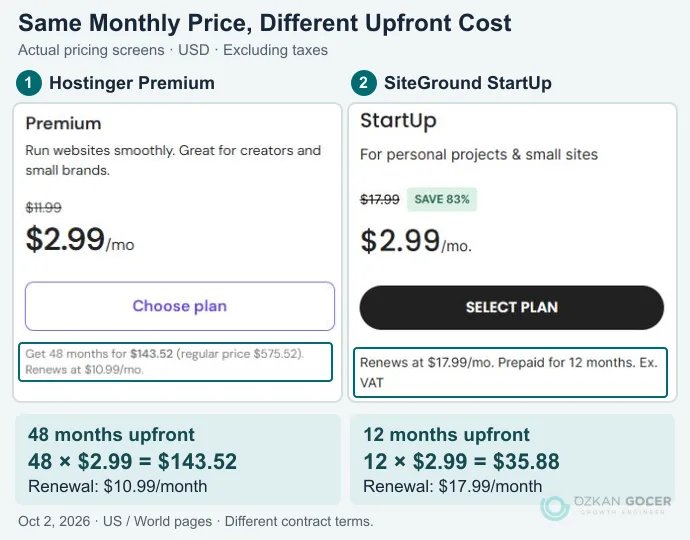
The monthly labels match, but the initial payments and commitments do not. Read free-month and domain promotions separately; include future domain, email and license renewals in your budget. A renewal expressed per month does not necessarily offer monthly billing.
Record the initial payment, months covered, next-term total for the same scope, taxes, domain renewal, required extras and cancellation terms. Evaluate domain registration separately from the hosting agreement. An inexpensive first term is less helpful if the next one forces an unplanned migration.
Six Checks Before Choosing a Web Host
Resource Limits and Software Compatibility
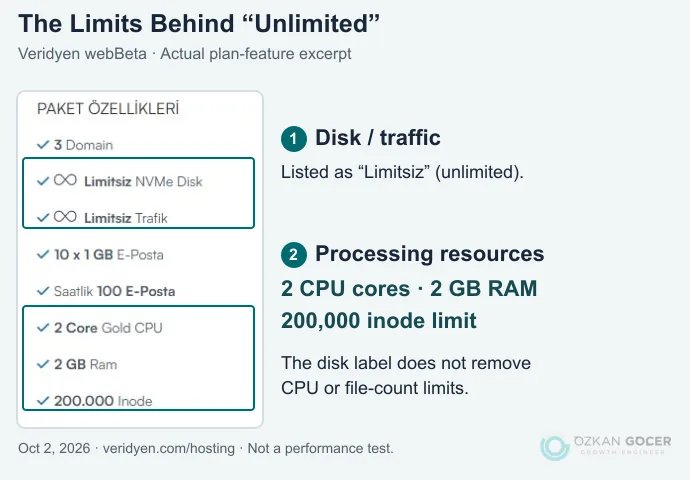
SSD or NVMe storage alone does not determine site speed. CPU, RAM, concurrent processing limits and the inode quota limiting file counts also matter. Current WordPress recommendations include PHP 8.3 or newer, MariaDB 10.11 or MySQL 8.0 or newer, and HTTPS. Check your application’s compatibility too; an old PHP version being available is not a reason to select it.
For a concrete example, Veridyen webBeta lists unlimited disk and traffic alongside 2 CPU cores, 2 GB RAM and 200,000 inodes. Read markers 1 and 2 together. An application with many files or heavy processing cannot be judged on storage capacity alone; published quotas are not a measured speed result.
Recovery as Well as Backup Frequency
How often is a backup taken, how many copies are kept, and does it cover files and databases? Check restoration and downloading separately: “backups included” can describe quite different services.
Scroll sideways to read every column. Keyboard: focus the table and use the arrow keys.
| Plan | Documented scope | Detail That Changes the Decision |
|---|---|---|
| Hostinger Premium | The product card lists weekly backups. | The Unlimited card on the same page lists daily backups. Do not assign that feature to the entry plan. |
| SiteGround StartUp / shared hosting | Daily backups; the Site Tools documentation describes up to 30 daily copies and restore options. | Free manual backup slots start at GrowBig; downloading backup archives requires Premium Backups. Website Builder uses a separate system. |
| Veridyen webBeta | The product card lists weekly backups; the page describes three retained copies and restoration through cPanel. | Decide whether that interval is acceptable for your order and form-submission records. |
Sources: Hostinger plan cards, SiteGround’s Site Tools backup documentation and Veridyen’s product page. These are provider-stated terms, not backups we created or restored in a customer account.
A worked decision: Suppose your last successful backup was Monday at 02:00 and data was lost on Thursday at 14:00. The gap is 84 hours. Without another current copy, records created during that gap will not be recovered from the Monday backup. The hypothetical calculation makes the risk of weekly backups concrete. Daily backups do not promise zero data loss either; the interval must suit your order volume and restoration must actually work.
What Support Actually Covers
“24/7 support” does not mean every application fault will be fixed for free. Before purchasing, ask about your runtime version, migration and restoring a backup. A clear answer is useful evidence, but one quick response does not establish a permanent resolution time.
Location and Visitor Experience
A nearby location with suitable network connectivity can help visitors in your target market. The provider’s home country does not establish the location of every plan. Check the data center and trial terms, then measure response and loading times for your own site over different connections.
Uptime Terms and Incident Handling
Read the measurement period, exclusions and compensation conditions behind an uptime figure. A service-level agreement (SLA) does not promise that failures never happen. Find out where incident notices appear and which channel handles urgent problems.
For example, Hostinger’s status page publishes the provider’s component and incident notices. It helps you inspect those reports, but is not our independent uptime measurement and should not be assumed to include every customer-specific outage.
Portability and Account Ownership
You should be able to download files, databases and email backups and access the domain account. When switching providers, test a copy in the new environment before changing DNS. Keep the old account until data and email are verified. An independent current backup and a domain account you control also preserve your options if a provider closes or changes ownership.
What Can an External Speed Test Prove?
Putting a provider’s marketing URL into PageSpeed Insights tests that page. The marketing site may use different infrastructure or a CDN from the shared plan you are buying. Its result cannot establish the speed of every hosting package that company sells.
Google’s PageSpeed documentation distinguishes laboratory tests from real-user data. Where enough samples exist, the field section covers the previous 28 days and may describe the individual URL or the whole origin (site-wide scope). Time to First Byte (TTFB) also includes stages such as DNS lookup, connection setup and network latency; it is not a CPU benchmark.
We did not find a comparable public demo whose selected plan and configuration we could verify for this review, so we assign no speed scores. A meaningful follow-up comparison needs the same WordPress version, theme, plugins and data; named plans and data centers; and a consistent test location and device profile. Keep cached and uncached runs separate, repeat at different times, and report the median alongside the range. Successful restoration, support quality and long-term availability require their own checks.
How Does Hosting Affect SEO?
Repeated downtime and slow server responses can hinder visitors and crawling. A more expensive plan alone does not produce better rankings. Oversized images, heavy plugins and page structure may leave the original problem unresolved. Google’s Core Web Vitals guidance explains that good page experience does not guarantee top rankings. Compare the same pages with technical SEO and performance checks before and after a hosting change.
Reduce the shortlist to two or three suitable plans. Verify software compatibility and recovery options, then compare total charges over equivalent periods. That gives you a service you can operate, rather than a long feature list you may never use.