Before choosing a theme, decide what a visitor should do: view your work, request a quote or buy a product. A clear purpose makes it easier to reject plans and plugins you do not need.
Choose a website builder, WordPress or custom development
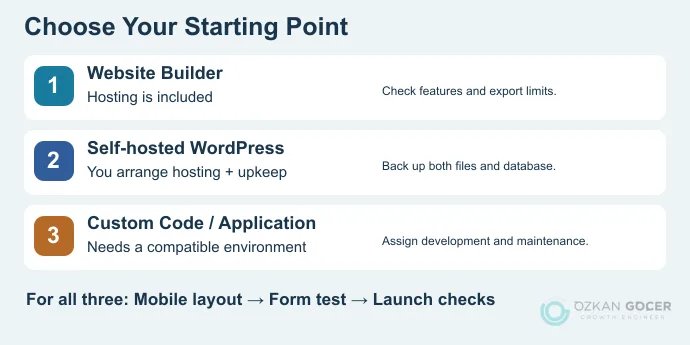
A builder may be enough for a portfolio. WordPress is worth considering when you want to publish regularly and manage your own hosting and migration options. A member-only calculator or a connection to your business software may call for custom development.
Scroll sideways to read every column. Keyboard: focus the table and use the arrow keys.
| Approach | What it simplifies | What to check |
|---|---|---|
| Website builder | Editing, hosting and publishing come through one service. | Custom domains, payments, export options and renewal terms. |
| Self-hosted WordPress | You can choose your host, theme and plugins. | Who handles updates, backups and technical problems? |
| Custom code or application | Supports requirements that standard tools cannot meet. | Runtime requirements, source-code ownership and ongoing maintenance. |
Hiring a designer is not a separate hosting model: you can get professional help with any of these approaches. Compare ready-made websites and custom design to work out whether you need a different platform or help using the one you have.
What to prepare before you start
- A page list: A consultant might need a home page, services, about and contact. Give every page a clear purpose.
- Real content: Service details, contact information, a logo and images you have permission to use. Remove the template’s sample testimonials.
- An address: Start with a platform-provided address or register a domain. Keep the registration account and recovery email under your control.
- Required functions: Check whether the plan supports your contact form, booking system or checkout before building around it.
A domain name is the address people use; hosting provides the environment for files or an application. You do not have to buy them from the same company. Check what a builder includes before purchasing separate hosting. For self-hosted WordPress, compare hosting plans against your actual requirements.
How to make a website for free
Google Sites is a starting point for a simple project, class assignment or informational page. Google’s site-creation instructions use a computer:
- Open Sites with your Google account and choose a blank site or template.
- Name the site and replace the sample headings, images and text.
- Add the pages you need. Make sure the navigation reaches each one.
- Preview the narrow-screen layout and fix text that overflows or becomes difficult to read.
- Choose who can view the published site. For a public website, do not leave it restricted. Select Publish and set its address.
- Visit the published address in a signed-out window. A working editor preview does not prove that everyone can access the site.
Work and school accounts can have different permissions; Google documents the distinction in its publishing and access settings. You can also connect a custom domain to Google Sites, although registering and renewing that domain is a separate expense.
Wix offers another free starting point. Its free website plan includes hosting and a Wix-provided address; connecting a custom domain requires a paid plan. Free services do not all have identical design, address or commerce limits. If you need checkout or an extensive content archive, evaluate those functions before committing to a platform.
How to set up self-hosted WordPress in seven steps
These steps cover WordPress.org software running with your chosen host. WordPress.com includes hosting in its service; the responsibilities differ between the two models. If you are new to the software, start with what WordPress does as a content management system.
1. Connect the domain and hosting
Confirm that your plan meets current WordPress requirements and supports HTTPS. Point the domain to the DNS records supplied by your host. If the domain already handles email, preserve its MX and verification records; keep a copy of the existing DNS settings before changing nameservers.
2. Install WordPress at the intended address
If your host provides an installer, select the domain and installation directory carefully. Avoid accidentally adding a folder such as /wordpress/ when you want the site at the main address. Check that installation will not overwrite existing files or a database. For manual setup, download from the official source, prepare a database and follow the WordPress installation instructions.
3. Set up administrator access and basic settings
Use a strong, unique password and an administrator email you can access. Check the site name, language and time zone in the dashboard. Once the certificate is active, open the site over HTTPS and check that images and links do not still point to old HTTP addresses.
4. Start with a suitable theme and essential functions
Choose a theme from the Appearance area. Assess navigation, text size and the mobile layout using your real content. Before adding form, backup or cache plugins, check what your host and theme already provide. Installing several tools for the same job adds work without necessarily improving the site.
5. Create pages and choose the home page
Add your home, service and contact content in Pages. For a fixed home page, select it under Settings → Reading; you can assign a separate page to the blog feed. The Reading settings documentation explains these options. Remove sample pages and empty navigation links.
6. Complete a visitor’s task yourself
Open a service page on your phone, tap the contact button and send a test message. Does it arrive? What happens when a required field is missing? For a store, use the payment provider’s test environment to check orders, notifications and cancellation separately.
7. Make a backup and check publishing restrictions
A WordPress backup needs both the files and the database, not just your uploaded images. When the site is ready, review the search-engine visibility setting under Reading. “Discourage search engines from indexing this site” is not an access-control mechanism; use proper access restrictions for private material.
What does building a website cost?
First-term total = setup/design + domain + hosting or platform subscription + required extras. Calculate domain, subscription, license and maintenance renewals separately. A headline monthly price may require 12 or 48 months of payment upfront.
For a purely hypothetical example, suppose annual domain registration costs $20, hosting $120 and a required license $60. The total is $200 before design work and taxes. If hosting renews at $240 while the other figures stay unchanged, the next year costs $320. These are example inputs, not market quotes.
A completion date also depends on what is ready. Publishing an informational page is a different task from checking products, payments and notifications in a multilingual store. If you are hiring design or development help, list the scope items that affect a website budget before comparing offers.
Pre-launch checks and basic SEO
Scroll sideways to read every column. Keyboard: focus the table and use the arrow keys.
| Check | What to do |
|---|---|
| Access | Open important pages while signed out. Check for unwanted passwords, maintenance screens or noindex settings. |
| Titles and content | Give each page a descriptive title, main heading (H1) and description. Remove placeholder copy. |
| Mobile use | Try the menu, forms and buttons on a phone, including pages beyond the home page. Check the responsive layout when fixing problems. |
| Images | Upload appropriate dimensions, add descriptive alternative text (ALT) where meaningful and reduce unnecessarily large files. |
| Upkeep | Assign responsibility for backups, updates and renewal notices. |
Verify site ownership in Google Search Console and monitor the indexing status of important URLs. Google’s SEO Starter Guide recommends clear titles, accessible content and understandable links; publishing does not guarantee indexing or rankings. Use a technical SEO review to investigate crawling, canonical or performance problems.
A useful first release does not need every possible feature. Visitors should understand what you offer, find the right page and complete the task you built the site for.