
Start with a simpler decision: should this particular URL appear in search? A thank-you page, redirected old address or parameterized duplicate may correctly stay out. Focus on the final page you actually want a visitor to find.
Check the Exact Address and the Actual Problem
Paste the address into URL Inspection. Compare the protocol, www variant, language path and parameters. Inspecting a similar address does not establish the status of the intended one. If access has not been configured, begin with Search Console setup and property scope.
“URL is on Google” is different from ranking prominently for your chosen query. If the page is indexed but receives no clicks, investigate relevance, content and competition rather than assume an indexing failure. Google’s explanation of Search separates indexing from serving results.
Why Can the Indexed Record and Live Test Disagree?
The initial inspection shows Google’s recorded information. A live test examines the page available now. Read each result with its date. Otherwise, an old record can make a corrected problem look current, while a passing live test can be mistaken for inclusion in the index.
On 14 November 2026, we inspected a real URL from our own site. The recorded result said “Crawled - currently not indexed” and showed a last crawl on 25 June. A live test of the same URL on 14 November reported a successful fetch with crawling and indexing allowed. That establishes technical access at the time of the test, not that the page has been indexed.
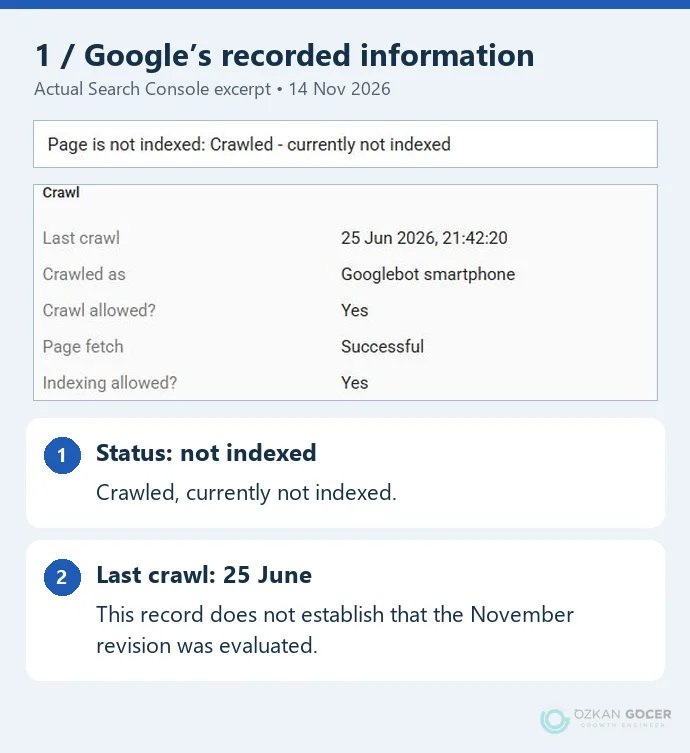
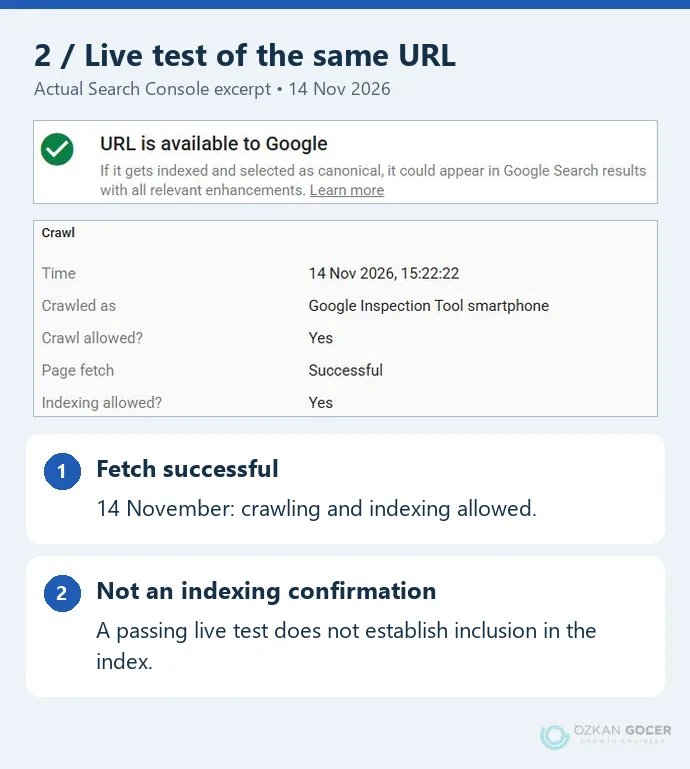
We removed the account and URL fields from these excerpts. The English interface is the original capture; the colored annotations are ours. We did not submit an indexing request during the test or establish a subsequent indexing outcome.
The URL Inspection documentation explains that live testing does not cover every possible quality, manual-action or removal issue and does not predict Google’s selected canonical. A green result can therefore leave other questions unresolved.
Discovered or Crawled: Which Investigation Comes Next?
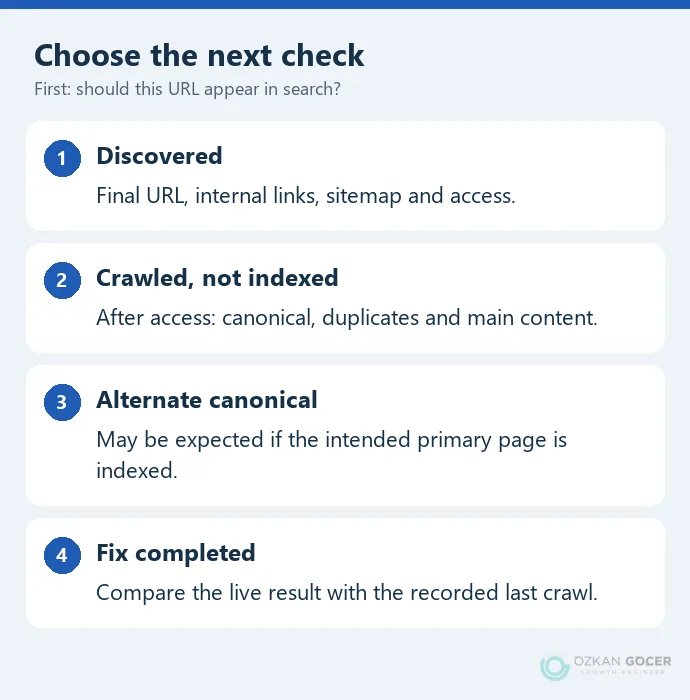
Discovered - currently not indexed: Google knows the address but has not crawled it. Check whether the final URL is in the sitemap, reachable through relevant published pages and served reliably. The label alone does not diagnose poor content.
Crawled - currently not indexed: Google fetched the page without indexing it. After access checks, compare similar pages, canonical selection and the main content a reader receives. The Page indexing report documentation says this is not necessarily an issue requiring action. Not every excluded URL needs to enter the index.
Alternate page with proper canonical tag: If your intended primary address is indexed, the alternate being excluded may be correct. It does not mean the primary content has disappeared.
Separate Response Codes, robots.txt and noindex
A page opening in your browser can still respond differently to other clients. If the live fetch fails, inspect the server response and security layer. A login redirect, 403, 404 and temporary 5xx response require different investigations. Google’s HTTP status documentation distinguishes their effects.
robots.txt controls crawling access. noindex tells supporting search engines not to index the content. Check both robots or googlebot meta tags in the HTML and X-Robots-Tag in the HTTP response. A single CMS checkbox may not reveal every source of the instruction.
Google’s noindex documentation explains that a crawler blocked from accessing the page cannot read its noindex rule. Combining a robots.txt block with noindex is therefore not a guaranteed removal method. Conversely, do not open private content merely to reduce an exclusion count. Change access only when that page should actually be public.
What If Google Selects Another URL?
Compare the user-declared canonical with Google’s selected URL, then open the selected page. Is it a genuine duplicate, an old address, the wrong language or a different product? Decide which page should represent the content before trying to index every copy.
Check that the canonical tag, redirects, sitemap and internal links support the same preference. Canonicalization methods communicate signals; Google can choose another address. Pointing unrelated articles at one service-page canonical does not meaningfully consolidate different content.
What Should You Examine Once Access Works?
Inspect the main text in the tested HTML and screenshot where available. Does Google receive an empty template, a heading without products or content requiring a login? Is that the page you intend to show? Carry broader rendering problems into a technical SEO review.
Then read the two nearest existing articles beside the candidate page. What separate question does this URL answer? A new heading attached to essentially the same explanation may not create a useful new destination. Separating setup from troubleshooting can help; genuinely redundant pages may need a considered consolidation plan. Do not merge URLs or add redirects without reviewing their purpose and dependencies.
Add the missing example, screenshot or comparison that lets a reader finish the task. Padding paragraphs to reach a word count does not establish usefulness. Use the SEO content preparation checklist to compare the title’s promise with the actual answer.
What Should You Check After Making a Fix?
Record the change, date and expected result: a noindex rule removed, an incorrect canonical corrected or an empty main-content area made available. Run a live test to check that the specific problem has changed. Request another crawl when appropriate; for multiple new URLs, review the current sitemap.
Google’s recrawl guidance allows for days or weeks and says repeated requests do not speed up crawling. On the next inspection, compare the last crawl date with your edit date. An old crawl record does not establish that the revised copy has been evaluated.
If several important pages share the same obstacle, investigate their template or server configuration before expanding each article. Our SEO review can compare the URLs, recorded states and live results to identify which correction should come first.