
A new site may have an empty report, while an established one may have hundreds of exclusions. In either case, check the property and date range before working through the reports. The setup and diagnostic sequence below gives each action a purpose.
1. Add the Right Website Property
Sign in to Search Console with your Google account and choose Add property from the property selector. These instructions concern websites. If someone already manages the property, requesting the appropriate access may be easier than repeating the setup.
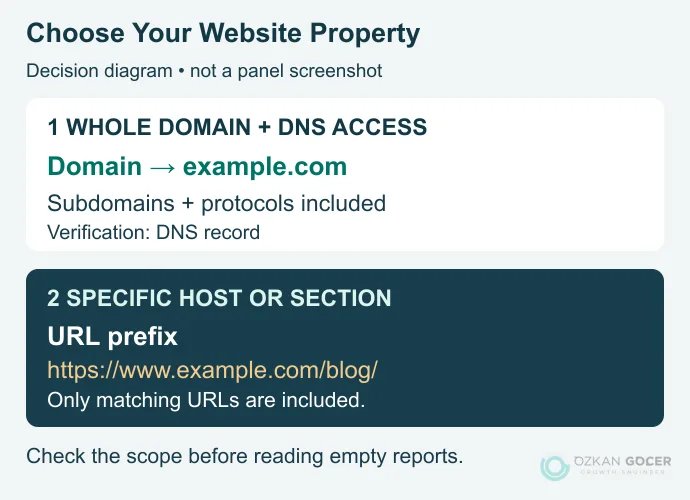
Scroll sideways to read every column. Keyboard: focus the table and use the arrow keys.
| Option | Example Input | Scope and Verification |
|---|---|---|
| Domain | example.com | Subdomains and protocols together; DNS verification. |
| URL prefix | https://www.example.com/blog/ | The specified protocol, host and path prefix; an eligible verification method. |
A Domain property suits a whole-site view when you control DNS. A URL-prefix property can suit a specific section or a setup without DNS access. As Google's property examples show, the choice of http://, https://, www and subfolder determines what is included.
2. Verify Ownership
- DNS: add the record supplied by Search Console at your authoritative DNS provider. Add the verification record without replacing the site's A records or email MX records. Use Verify after propagation.
- HTML tag: for an eligible URL-prefix property, place the supplied tag in the homepage's
<head>. Check that it appears in the published source. - HTML file: upload the supplied file to the location specified by the panel without changing its name or contents. Confirm it is accessible without signing in.
See the official verification instructions for access requirements and alternatives. Keep the tag, file or DNS record after verification because Google checks it again. Removing it does not mean all search data disappears immediately, but it can lead to losing property access.
3. Submit Your Sitemap if You Have One
Find the actual sitemap address produced by your CMS. It need not be named sitemap.xml. Enter the address in Sitemaps; if the interface already supplies a URL prefix, do not duplicate it. After submitting, open the status row to investigate any parsing or fetch error.
Success in the Sitemaps report means the file was fetched and read, not that every listed page is indexed. You provide its location on your site rather than upload the file to Google. Include the final URLs you want to appear in search. XML is common, but other supported sitemap formats exist.
Turn the Performance Report Into a Decision
In Performance → Search results, you could begin by comparing the last 28 complete days with the preceding equal period. That is an editorial starting point, not a Google requirement; it reduces the temptation to react to a few noisy days on a small site. For seasonal businesses, examine the comparable period in the previous year as well. Google Trends can provide context about demand; it cannot establish the cause of a traffic loss by itself.
Scroll sideways to read every column. Keyboard: focus the table and use the arrow keys.
| Metric | What It Describes | Do Not Confuse It With |
|---|---|---|
| Clicks | Recorded clicks from Google results. | GA4 sessions or sales. |
| Impressions | Appearances counted under the rules for that result type. | Total keyword search volume. |
| CTR | Clicks ÷ impressions × 100. | A universal success threshold for every query. |
| Average position | The average of highest result positions within the selected grouping. | A fixed position everyone sees right now. |
With the metric definitions in mind, select an address in Pages, then switch to Queries. Narrow country and device to the audience you are investigating. Google's Performance setup documentation explains filters and date selection.
Example: Many Impressions, Few Clicks
Suppose a fictional page receives 1,000 impressions and 10 clicks in a period: its CTR is 1%. That number alone does not diagnose a bad title. If most queries express purchase intent but the page only defines a term, investigate the search intent mismatch first. If the page has low positions for suitable queries, examine the answer's coverage and competing results before assuming a title rewrite will solve it.
When the page meets the right need and retains visibility for comparable queries, check whether its title, H1, description and opening make the same promise. Follow the content revision workflow without changing a URL merely because its title changes. Record what you changed and when, so the later comparison has a meaningful reference point.
Search Console supplies keyword ideas from your existing visibility, not market-wide search volumes. Extend the list through keyword research. When you need scheduled location and device checks, rank tracking tools address that separate need.
Account for Missing and Preliminary Data
The newest days can be preliminary, so check the update time and data status. Google's data explanation also describes differences between property and page aggregation. Privacy omissions and table limits affect query totals too. Treat the query table as an incomplete view, not a log of every search.
Use the Separate Report for AI Impressions
The generative AI performance report covers AI Overviews and AI Mode impressions. It supports page, country, device and date breakdowns; do not read it as query-level rank tracking or a sales report. If it is absent, your site may not have enough AI impressions. Read general performance and AI reporting separately to understand where a page gains visibility.
What Should You Fix in Page Indexing?
Not every excluded URL in the Page indexing report is an error. An old redirected address or an intentionally noindexed page may correctly remain outside the index. Identify the important pages you actually want people to find.
- Discovered, currently not indexed: Google knows the address but has not crawled it yet. Check access, internal links and server health. The label alone is not a quality penalty.
- Crawled, currently not indexed: the content was fetched but is not indexed. Examine similar pages, canonical settings and distinctive reader value without treating the label as a single confirmed diagnosis.
- Page with redirect: inspect the final destination rather than expecting the old URL to be indexed. Point relevant sitemap entries and internal links at the intended destination.
Review how search engines crawl and index pages if the stages are unclear, or use the technical SEO checks for a broader infrastructure investigation.
URL Inspection: Indexed Version or Live Test?
Enter the full URL in the inspection field. The initial view reports Google's indexed information. Test live URL helps examine the page's current accessibility. As the URL Inspection documentation explains, read Google's selected canonical in the indexed view; the live test cannot predict that selection.
After a fix, use the live test to check the relevant issue, then request indexing if appropriate. Neither a successful test nor an indexing request guarantees indexing or a particular ranking. Compare the result and later crawl date instead of repeatedly pressing the request button.
GA4 Linking and the Other Reports
Search Console describes the search side; GA4 helps analyse on-site behaviour and key events according to your measurement setup. In GA4, open Admin → Product links → Search Console Links and select the property and web data stream. Linking requires the Editor role in GA4 and verified ownership in Search Console. You may need to publish the report collection from Library.
The integration does not create a visitor-level log connecting every search query to a sale. The query and landing-page reports support different dimensions and metrics. Evaluate business outcomes with the appropriate landing-page and on-site measurements.
Core Web Vitals evaluates URL groups with enough real-user data. Use the LCP, INP and CLS explanation to interpret the measures. The Links report is a sampled view, not a complete backlink inventory. Do not disavow every unfamiliar referring domain: Google says most sites do not need the disavow tool. Manage team access through user permissions instead of sharing a password.
What Should Your First Review Produce?
Choose one page and record the period, country, device, symptom, supporting report, proposed change and measure you will revisit. Write “investigate purchase-intent queries reaching a definition page” rather than simply “change the title”. If traffic has fallen, use the organic traffic improvement approach to separate possible causes. A useful Search Console review ends with a reasoned next action, not an arbitrary list of edits.
If you would like help assessing the technical and content work identified in your reports, review the scope of SEO consulting.