As an archive grows, suitable destinations are easy to overlook. Put blog posts, service pages, products and categories in one inventory instead of checking only the few articles you remember. Similar titles and descriptions can identify candidates; reading both pages is what turns a candidate into a sound editorial choice.
Internal Links, External Links and Backlinks
A link from your guide to your service page is internal. A link from your guide to an official document leaves your website. A different publication's link to your guide is a backlink from your perspective. Keeping the direction clear separates work you control on your website from another publisher's decision to cite you.
You can edit the source passage, destination and anchor text of your internal links. Use that control to answer the reader's next question, rather than inserting the same commercial destination into every article.
How Internal Links Help SEO
Google's link guidance describes internal links as a way to discover pages and understand their content. Menus, categories and contextual links create routes for visitors and crawlers. Descriptive anchor text also helps a reader predict what clicking will reveal.
Adding a link does not ensure that the destination will be indexed or rank higher. Check whether the page is noindexed, points elsewhere with a canonical tag or fails to answer its intended question. Internal linking belongs alongside technical SEO checks and work on the content itself.
Helping somebody reach useful information is valuable; a longer session alone is not proof of a ranking improvement. Nor should every navigation problem on a small blog be diagnosed as exhausted crawl budget. Google's crawl-budget guidance is aimed particularly at large or frequently updated websites.
Combine Blog and Service Pages in One Inventory
A sitemap export may not tell the whole story. Drafts, old addresses and pages missed by a crawl can exist in different sources. Compare CMS records, the sitemap and crawl output. Keep published destinations distinct from drafts so that readers are not sent to pages they cannot access.
Scroll sideways to read every column. Keyboard: focus the table and use the arrow keys.
| Field | Purpose |
|---|---|
| URL, page type and language | Assess posts and service pages together, while separating language versions. |
| Title, H1 and description | Shortlist pages by topic and promise. |
| Reader need and relevant passage | Establish whether shared wording reflects an actual relationship. |
| Response status, canonical and robots | Send readers to the intended, accessible final destination. |
| Incoming and outgoing internal links | Identify access gaps without duplicating existing connections. |
| GSC queries, period and edit date | Retain existing demand and keep a record of changes. |
A Python script or spreadsheet filter can compare concepts in titles, headings and descriptions. The word “web” appearing in both a WhatsApp Web article and a web design guide does not make them natural companion pages. After matching words, check search intent and the actual sentence where a link could belong.
Build Topic Groups Around the Reader's Task
In an illustrative website setup group, the main guide helps readers choose an approach. A domain guide explains registration and DNS, a hosting comparison covers plan conditions, and a service page explains hiring someone to do the work. Each page owns a different question; links provide the transitions between them.
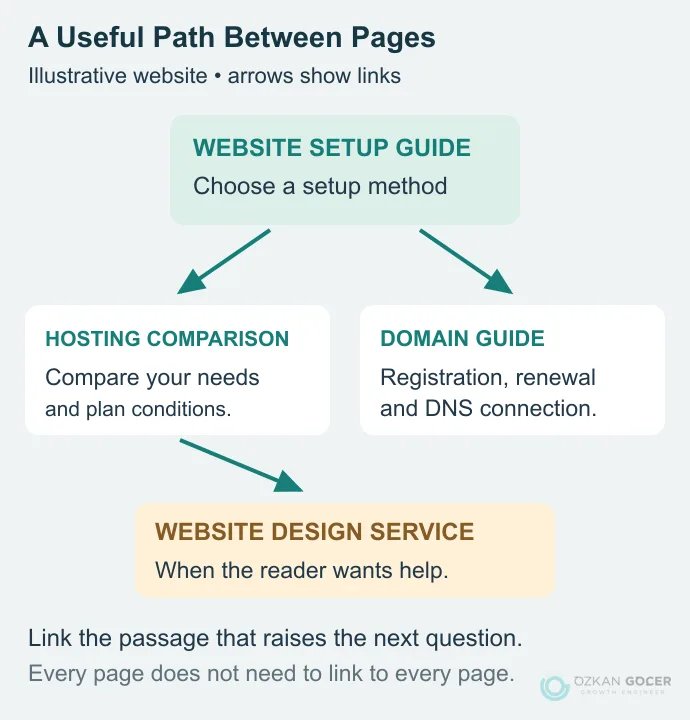
You may call the broad guide a pillar page and the supporting material a topic cluster. The labels are optional. What matters is that the pages do not repeatedly target the same need. If two articles answer the same question at the same depth, assess whether to separate their purposes or consolidate them before simply linking them together.
High impressions on a source and low traffic on a destination are not enough to justify a link. The source passage should raise a question the destination answers well. Apply the same test to commercial pages: a reader seeking help with the implementation may have a reason to inspect the scope of an SEO service.
Choose Natural Anchor Text
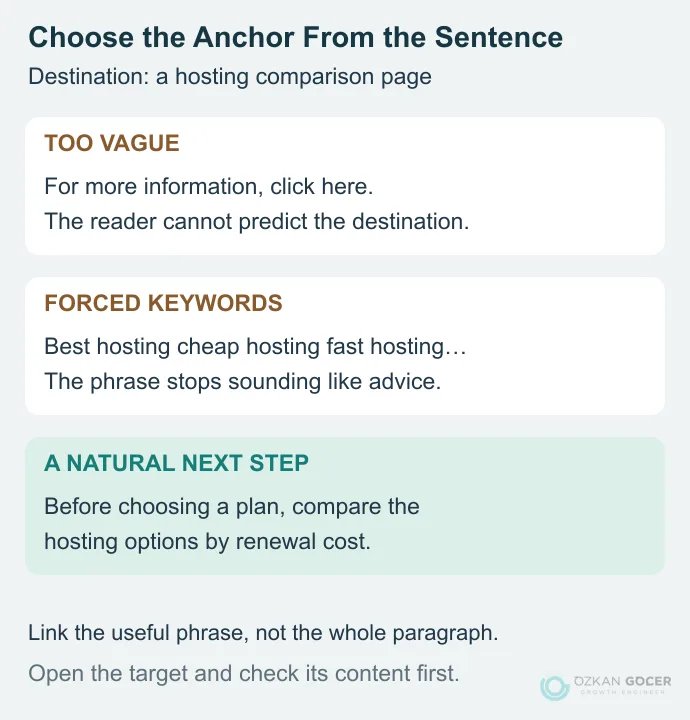
Anchor text is the clickable wording of a link. Read the sentence without a link first, then select a concise phrase that conveys the destination's promise. An exact keyword can sound natural in one sentence and awkward in another. There is no need to impose a ratio of exact-match, brand and bare-URL anchors.
Scroll sideways to read every column. Keyboard: focus the table and use the arrow keys.
| Source passage | Natural anchor | Destination | Decision |
|---|---|---|---|
| Choosing a plan in a setup guide | compare hosting options | Hosting comparison | Expands the reader's choice. |
| Domain ownership in a hosting guide | register the domain in your own account | Domain guide | Answers an ownership question. |
| Choosing colors in a palette guide | best hosting | Hosting comparison | Unrelated; omit it. |
| Plan selection in a Turkish setup guide | hosting seçeneklerini karşılaştırın | Turkish hosting comparison | Preserves the reading language. |
Prefer wording that describes the destination over a vague “click here.” Avoid linking an entire paragraph or turning adjacent words into a chain of separate links. The surrounding sentence should provide context. If the main answer is incomplete, fix the article's structure first; a link cannot compensate for an answer the page never gives.
Add the Link and Check Its Destination
Often, only a sentence or short paragraph in the source article needs editing. You do not need to rebuild the whole article to add a useful reference. Confirm that the destination is published, choose its current URL in the appropriate language, and link the descriptive phrase in the editor.
A basic HTML example is:
<a href="/blog/hosting-comparison/">compare hosting options</a>The path is illustrative; replace it with a real address on your website. The URL belongs in the href attribute of an a element. Do not assume a button that relies only on a JavaScript click event will be discovered in the same way.
Use the address consistent with your canonical preference. Link directly to the final destination instead of adding campaign parameters or unnecessary redirect hops. Do not add nofollow to ordinary links between your published pages merely to “retain authority.” Nofollow is not a reliable crawl or indexing block.
In WordPress, select the phrase and add the real URL through the link control. Open an automatic suggestion before accepting it. Check the rendered page after saving, including the target language, mobile readability and any section fragment.
Find Orphan Pages and Check Click Depth
A page can be orphaned when it cannot be reached through the website's normal internal link paths. Two pages that link only to each other in a disconnected group can have the same problem. Compare the crawl with your CMS, sitemap and GSC URL lists; a crawler following links cannot report an address it never discovers.
Screaming Frog's orphan-page method uses additional URL sources for that reason. Absence from a crawl does not prove that a page is orphaned, however. Crawl settings, JavaScript and access restrictions can also explain the omission. Appearing in GSC does not demonstrate easy on-site access either: Google may know the address through another route.
Click depth is the shortest link path from the starting page to a destination. Give important pages clear, reasonably short routes. There is no Google cutoff saying that a page beyond three clicks cannot rank. A large catalog and a small consultancy website need different navigation choices.
What to Check After Adding Links
Record the source, destination, anchor, edited passage and date. Then recrawl to check that the link is present, the target serves the expected content and no unnecessary redirect remains. On a large archive, the crawl and link reports in SEO analysis tools can make this practical.
- Access: Can visitors reach the destination through the site? Are disconnected pages or broken links still present?
- Reader behavior: If you measure link use, are people following the route and able to complete the expected task?
- Search performance: Compare complete periods for the same page and relevant query group in Search Console. Do not count partial days as zero.
- Content fit: If the destination's title or scope changes, does the old anchor still describe it?
A one-week increase may not be enough evidence to attribute the result to internal links. Record content revisions, seasonal demand and other concurrent changes. Keep the same distinction when reviewing wider organic traffic.
Start with one page. Find a few genuinely relevant sources in the inventory, read their passages and add only the connections that help. Once the recording and checking process works for that small set, extend it to the rest of the archive.