
A working new homepage is not proof of a completed move. An old product link might reach an unrelated category, an English guide might land on the Turkish homepage, or an image might return 404. Organize the checks around each old address and its intended replacement.
Identify the Type of Migration
Scroll sideways to read every column. Keyboard: focus the table and use the arrow keys.
| Change | Main Task | Search Console Change of Address |
|---|---|---|
| New hosting, identical URLs | Test the new server and monitor DNS and traffic. | Not used. |
| HTTP to HTTPS | Permanently redirect to the correct HTTPS equivalent and update annotations. | Not used. |
| www to non-www, or the reverse, on the same domain | Establish the preferred address with redirects and consistent signals. | Not used. |
| New paths on the same domain | Map old and new paths by content. | Not used. |
| A different domain or subdomain | Map URLs, configure redirects and check the new site. | Use after the move and redirects, when the tool's requirements are met. |
Google's Change of Address tool does not install redirects. Ownership and access for the new location need to be ready first. Registration, hosting changes and URL changes are different tasks; the domain registration and renewal guide covers control of the name itself.
Build the URL Inventory and Capture a Baseline
Do not restrict the inventory to menu links. CMS records, sitemaps, crawls, server logs and Search Console can expose different addresses. A PDF or image linked from another website belongs in the migration plan even if it is absent from the navigation.
Give each row an old URL, language, content type, intended destination, expected response and owner. Prioritize pages with clicks, conversions or useful external links, without omitting low-traffic pages. Understanding how to assess backlinks helps identify old addresses that other websites still use.
Export the latest complete GSC week, a comparable previous week and a longer baseline. Keep page and query breakdowns together. After launch, you can then check whether the same search need reaches the replacement page instead of watching only total clicks. The Search Console reporting and URL Inspection walkthrough explains where to begin.
Choose the Destination by Content
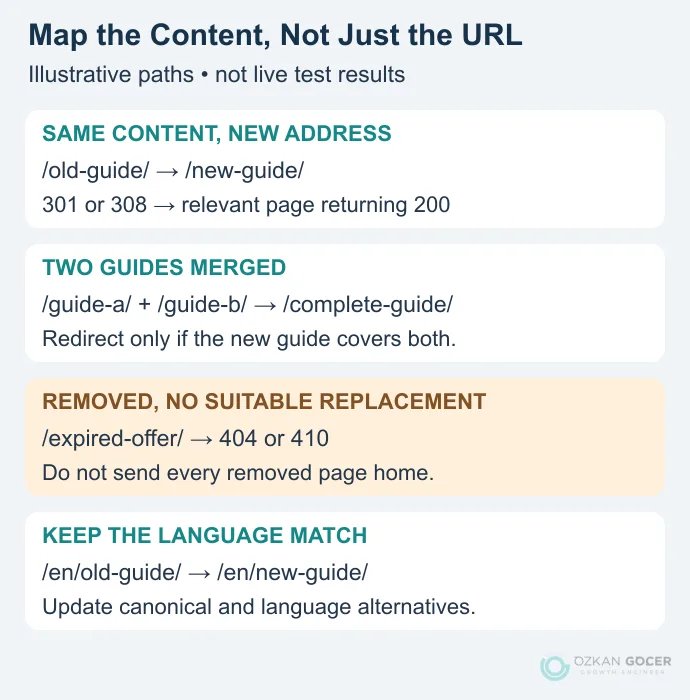
A visitor following the old link should find the content they expected. If pages have been merged, the new guide must actually cover the old subjects. Sending every removed URL to the homepage or nearest category is not a substitute for finding a suitable replacement. Google's site-move documentation warns that irrelevant redirects can be treated as soft 404s.
Scroll sideways to read every column. Keyboard: focus the table and use the arrow keys.
| Old Path | Decision or Destination | Expected Check |
|---|---|---|
/domain-basics/ | /domain-guide/ | 301 or 308 to 200; same subject. |
/dns-a/ and /dns-aaaa/ | /dns-records/ | The combined page covers both subjects. |
/expired-offer/ | Permanently removed; no suitable replacement. | 404 or 410, not a forced homepage redirect. |
/en/old-guide/ | /en/new-guide/ | English content with correct language alternatives. |
These are teaching examples, not results from a client migration. Add query parameters, case sensitivity and trailing-slash behaviour to your own mapping. Do not merge two similar-looking URLs with one pattern if the application uses them for different purposes.
Choose between Redirects and Canonical Tags
Google documents 301 and 308 as permanent redirects, and 302 and 307 as temporary ones. A permanent redirect strongly signals that the destination should become canonical. Temporary redirects do not express that preference as strongly; this should not be simplified into a claim that a 302 can never transfer any signals.
A rel="canonical" annotation does not send visitors elsewhere. It expresses a preference among similar, accessible pages. If the old address is being retired, adding only a canonical tag does not solve the visitor's journey to the replacement. Review canonicalization signals separately from redirect behaviour.
Implement server or CDN rules around the existing configuration. One changed path can use an explicit mapping; a genuinely unchanged structure may support a pattern rule. Keep merged, deleted and language-specific pages in an exceptions list. Redirect old A straight to final C instead of A to intermediate B to C. That removes unnecessary delays and failure points; it does not imply a fixed percentage of SEO value is lost at each hop.
Check the New Environment before Launch
- Content and actions: Do important text, images, downloads, forms, search and checkout flows work?
- Backup and rollback: Are files and databases backed up? Who decides to roll back, and how will records created since the switch be preserved?
- HTTPS: Does the certificate cover the new names, and can the old HTTPS address still serve a redirect? Complete the certificate and mixed-content checks first.
- Crawling and indexing: Will development robots blocks or noindex directives accidentally reach production?
- Annotations and links: Do internal links, canonical tags, hreflang and sitemaps refer to the new locations?
- Measurement and speed: Do analytics, important events and page templates work? Compare Core Web Vitals for equivalent page types.
For hosting changes without URL changes, use Google's infrastructure-move guidance. Test the copy on the new server, then monitor DNS and traffic at both environments. Do not introduce redirects when the address is unchanged. Include email and DNS continuity in the checks.
Keep Turkish and English Pages Aligned
Map each language to its own replacement content first. Sending English guides to a Turkish homepage changes both the topic and the language a visitor expected. Canonical tags should refer to the new preferred addresses, while language annotations should identify real, equivalent versions.
Google's language-alternative documentation requires fully qualified URLs and reciprocal references. Remove annotations still pointing to the old domain. An x-default can identify a language selector or suitable default; it is not an identical requirement for every bilingual site. Include these checks in the wider technical SEO review.
Read a Redirect Test in Four Stages
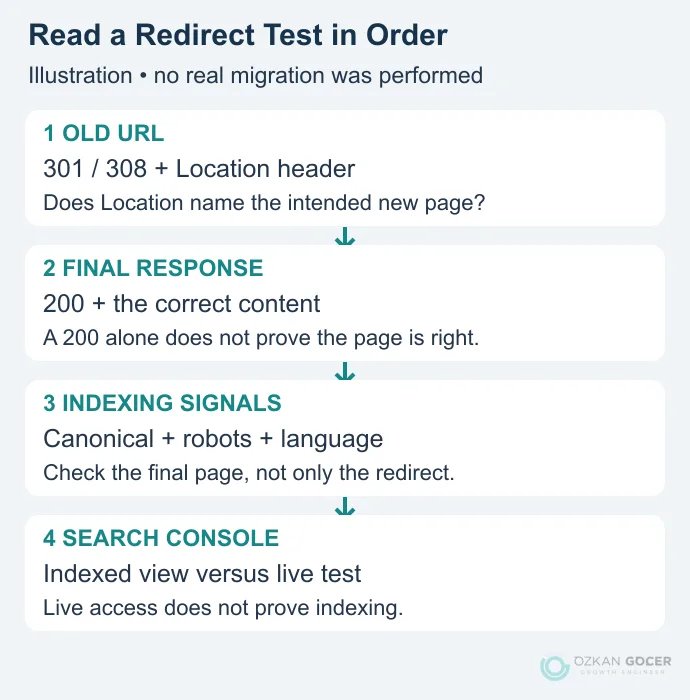
If you use the command line, curl's options let you inspect the first response separately from the followed chain. Replace these example addresses with your own test URL:
curl -I "https://old.example.com/guide/"
curl -I -L --max-redirs 5 "https://old.example.com/guide/"- First response: For a permanent move, check for 301 or 308 and the intended
Locationdestination. - Final page: Inspect the actual content, language, images and important action as well as the successful response. An unrelated homepage returning 200 is not a correct mapping.
- Indexing signals: Read the destination's canonical, robots and language annotations. HTTP 200 alone does not guarantee indexing.
- Google's view: Use URL Inspection to distinguish live accessibility from the indexed version. A live test does not predict Google's eventual canonical selection.
-I sends a HEAD request. If the server handles HEAD and GET differently, inspect the actual page request in a browser too. The five-redirect limit is a chosen test limit for catching problematic chains, not a statement of Googlebot's limit. Start with a homepage, deep page, language pair, file and removed URL, then crawl the full mapping list.
Sequence Change of Address and Sitemap Submission
For an eligible domain or subdomain move, make the new site and redirects work first. Confirm the required ownership verification and tool conditions for the old and new Search Console properties, then use Change of Address. Passing its preliminary checks does not establish that every URL mapping is correct.
You must own both properties through the same Google account. The tool cannot be used on a path-level property and does not automatically move www or other subdomains below the specified domain. Plan verification and, where required, separate submissions for those variants under Google’s current requirements.
Prepare and submit the new sitemap with final canonical URLs. If you retain an old sitemap briefly for comparison, distinguish expected redirected-URL warnings from destination errors. There is no requirement to retain the old sitemap forever. Matching sitemap destinations, canonical tags and internal links makes the configuration easier to inspect.
Investigate Changes after Launch
Check more than the homepage. Server errors, redirect loops and broken critical forms need prompt attention. In GSC, examine the old and new properties together, using comparable query groups and page types. Falling clicks on an old URL are not necessarily a problem if its replacement gains them. Regular ranking checks add context, but one keyword's position is not the whole outcome.
If impressions hold while clicks fall, examine titles and search appearance. If one directory declines, inspect its mappings. If an entire language disappears, check language and canonical signals. A broken analytics tag can look like a traffic loss without being a search loss. Keep those distinctions in your organic traffic analysis, and check concurrent Google ranking-system changes before attributing everything to the move.
Processing takes time; there is no fixed recovery date or ranking guarantee. Google generally recommends retaining redirects for at least a year. Keep the old domain renewed, its HTTPS certificate working and its redirect infrastructure available. Treat the migration record as complete only when the URL map, error checks, measurement notes and responsibilities are all current.