An up-to-date WordPress plugin list does not answer that question. The affected software sits beneath the application. Patches are available as of 23 October 2026; the version table and checks below also show what to ask your hosting provider.
What Is PHP2Shell, and What Does 9.2 Mean?
PHP2Shell is neither a plugin nor the name of a virus. It groups two vulnerabilities: the first PHP advisory concerns corruption when memory runs out; the second concerns invalid memory references left behind by an earlier request. Remote code execution, or RCE, means an attacker can run code on a remote system. Here, the PHP process’s permissions also limit what that code can do. Full administrator control is not an automatic outcome in every installation.
A score of 9.2 is classified as critical. It does not mean your site has a 92% chance of being compromised. Version, execution mode and reachable application paths matter. If the underlying architecture is unfamiliar, how PHP runs on a web server provides the background.
Who Is Affected, and Which PHP Versions Include the Fix?
Whether you use WordPress, Drupal, Joomla or a custom application, check the PHP runtime beneath it. Google Cloud’s advisory distinguishes its own services from PHP applications run by customers. Being hosted in the cloud does not establish that your application’s runtime has been patched.
Scroll sideways to read every column. Keyboard: focus the table and use the arrow keys.
| PHP Branch | Release with the Fix | What to Check |
|---|---|---|
| 8.5 | 8.5.12 | This release or a later security update in the same branch |
| 8.4 | 8.4.27 | “We use 8.4” is not enough detail |
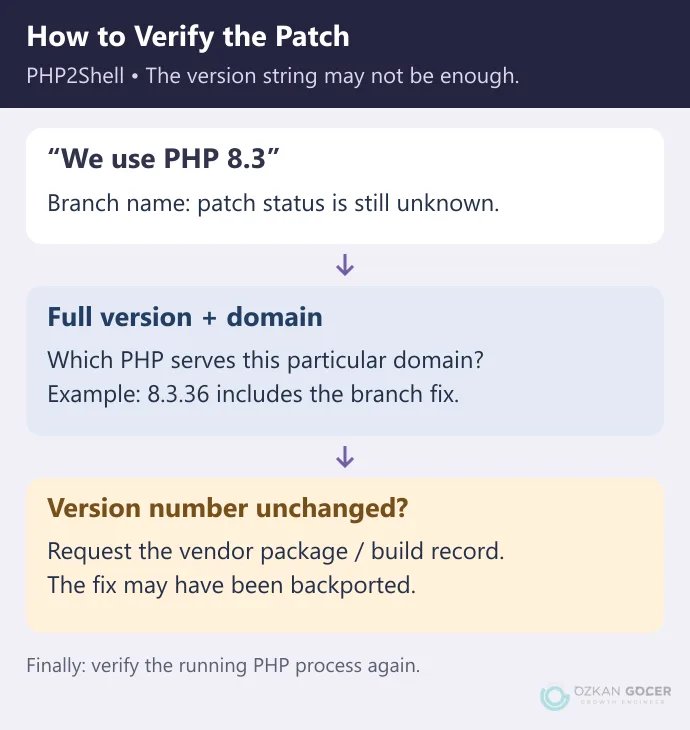
| 8.3 | 8.3.36 | Include the patch number after the final dot |
| 8.2 | 8.2.35 | The fix does not extend the branch’s support lifetime |
| 8.1 and Older | Depends on the Vendor and Package | Verify a backported fix or move to a supported release |
The release numbers come from PHP’s security announcement. Some vendors apply the fix to an older package without changing its upstream version number. For example, Plesk’s Linux packages for 7.4, 8.0 and 8.1 can retain the number while changing the build date. Ask for the package advisory before declaring such an installation patched or unpatched.
Apache with mod_php is a prominent exposure path. Nginx with PHP-FPM is not an automatic exemption: the advisories cover several execution paths, including FPM. Do not skip the update based on the web server’s name.
Where Can You Find Your Site’s PHP Version?
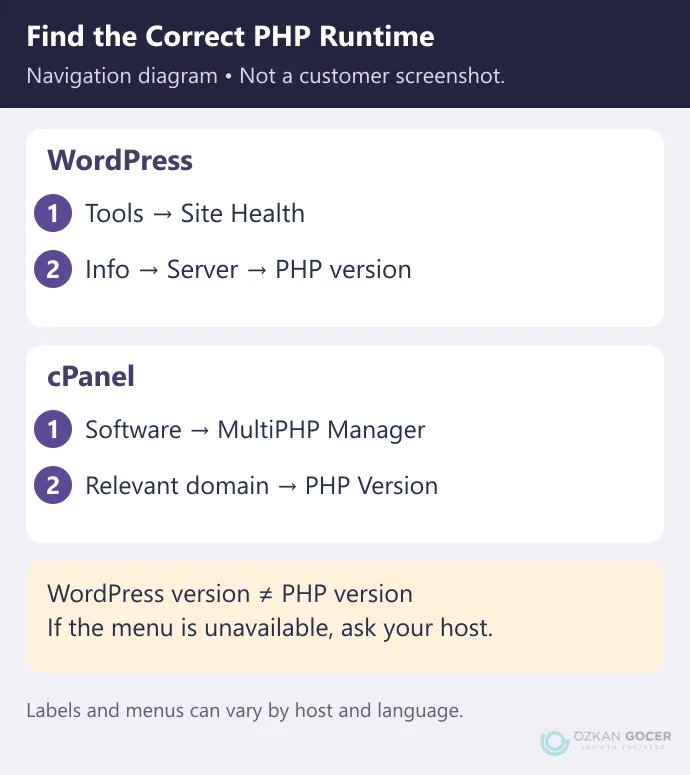
WordPress: Open Tools → Site Health → Info → Server and read the PHP version. The Info tab displays configuration details; it does not install a PHP update. Do not confuse the WordPress version with the PHP version.
cPanel: Open MultiPHP Manager in the Software section and locate the relevant domain. The cPanel documentation explains that different domains can use different PHP versions. If the interface is unavailable, ask your host to confirm the version and patched package assigned to your domain.
Running php -v in a terminal can help, but command-line PHP may differ from the process serving your website. Record the full version, domain and execution mode together. Do not leave a public phpinfo() page behind: its output can expose server paths and configuration details beyond the version you need.
What Should a Site Owner Do Now?
- Identify the installations. Include subdomains, older applications and publicly accessible test sites. Establish which PHP package serves each one.
- Check backups and compatibility. Preserve both files and the database. When moving to a different PHP branch, try essential workflows in a separate test environment. WordPress’s PHP update guidance also calls for reviewing theme and plugin compatibility.
- Update the correct package. Your provider may handle shared hosting. For a server you manage, use the distributor’s security package and confirm that PHP processes are running the updated software.
- Read the result again. Compare the package details before and after the update. Check login, forms, uploads and any checkout flow in a test environment. A working homepage does not verify every operation.
You can ask your host: “Is the PHP package serving my domain patched for CVE-2026-109618 and CVE-2026-109619? Please confirm the package version or build, when the update was applied, and whether the PHP processes were refreshed.”
“We have security protection” does not answer those questions. The technical checks for WordPress hosting can also help establish who handles maintenance under your plan.
What Caused the Vulnerabilities?
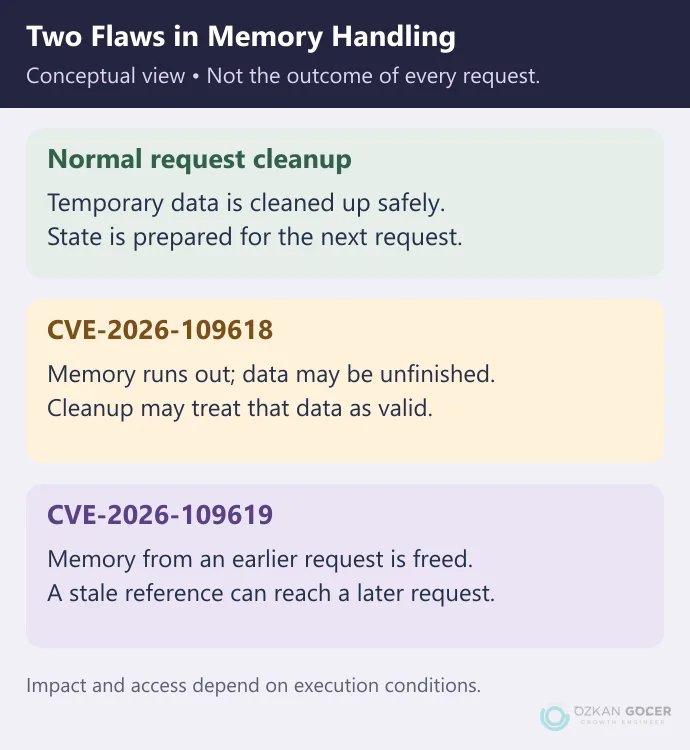
PHP keeps temporary data in memory while processing a request. If execution stops unexpectedly, that data still needs safe cleanup. PHP2Shell involves failures around error handling, cleanup and the transition to a later request.
In CVE-2026-109618, partially initialized data can later be treated as valid. In CVE-2026-109619, old state can continue pointing to memory that has already been released. Wiz’s research explains why these problems sit below application code. Fixing one faulty form does not remove every affected path in the runtime.
How Did AI Help, and Why Was This Not Fixed Earlier?
“AI found the flaw” compresses work by people, tools and validation processes into a headline. Calif’s account describes researchers building on earlier findings and using AI to investigate possible paths. Finding suspicious behavior and proving an exploitable outcome are different stages.
According to the PHP Foundation, signs of the out-of-memory problem were found in 2024. Compatibility, performance and limited engineering resources complicated a fix; research in 2026 clarified the impact. The Foundation also acknowledged failures in its decision process. Neither “it appeared yesterday” nor “the exact same exploit was known for decades” captures that history accurately.
Are Cloudflare, Strong Passwords or Configuration Changes Enough?
A web application firewall, or WAF, filters web requests. Cloudflare released PHP2Shell rules and explicitly says customers should still patch PHP. An enabled security product does not establish that every possible path is blocked.
Strong passwords and multi-factor authentication protect accounts; they do not repair a PHP flaw that can be reached without signing in. Arbitrary memory or upload setting changes are not a permanent fix either. If an immediate update is impossible, the server administrator should choose temporary controls. PHP’s advisory describes them as reducing specific exposures, not making the installation safe.
What Remains to Be Done After Patching?
Applying the fix and investigating earlier compromise are separate jobs. Preserve records and work with your provider if you find unexplained file changes, unknown administrator accounts or unusual processes. Seeing no symptoms is not proof of a clean system. Nothing in this article establishes whether a particular site has been attacked or is secure.
Could a Similar Vulnerability Be Found Again?
Similar vulnerabilities may be found again; their timing and severity cannot be predicted from this incident. Keep an inventory of software and responsible people, follow security announcements and verify that updates were actually applied. The everyday account and device precautions cover another part of that maintenance.
If responsibility for checking your forms, member accounts or store after a PHP update is unclear, we can define the website maintenance and development work together. Share your setup and your host’s patch confirmation so the work can be scoped around the actual need.