
The first-year price tells only part of the story. Check who controls the account, what renewal will cost and what happens if you change providers. You can register a name before your website is ready.
Domain, URL and Hosting: Three Different Things
In https://www.example.com/contact/, https is the protocol, www is a subdomain, example.com is the registered domain and /contact/ is the page path. A complete URL includes the information needed to identify a particular resource, not just the domain.
DNS retrieves records for a name. For web access, those records help a client find the IP address to connect to. Hosting serves the application and its files. Cloudflare's explanation of DNS resolution describes that lookup process. Registration, DNS and hosting can come from one company, but they remain separate responsibilities.
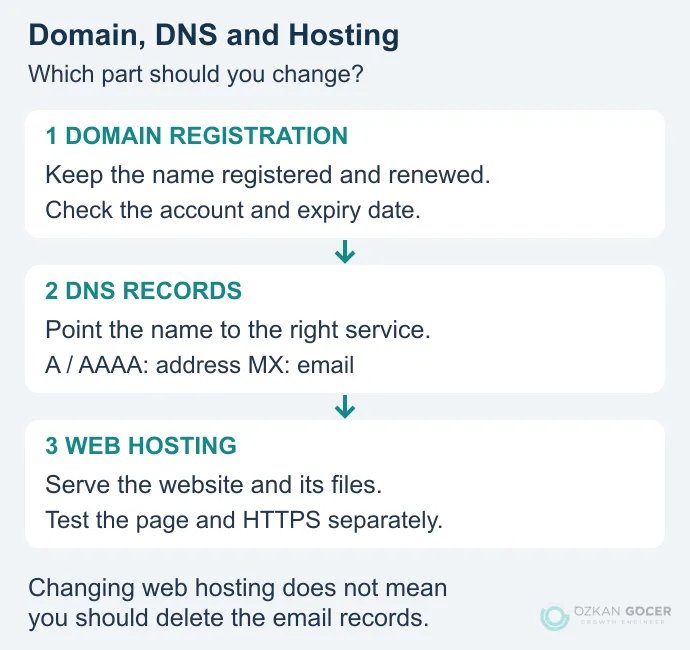
You might register a name with one provider, manage DNS elsewhere and publish through a website builder. If the builder includes hosting, buying another hosting package may be unnecessary. Use the website setup guide to choose the publishing method before adding services to your cart.
Choose a Name and Extension People Can Use
Can someone spell the name after hearing it once? Could a similar brand send them to the wrong site? Try those questions before settling on a long string of numbers or hyphens. Asking a few people to write the name from memory can reveal a problem that is easy for its creator to overlook.
- .com, .net and .org: These are different generic extensions. An extension alone does not establish business credibility or determine every registration requirement.
- .tr and .com.tr: These are options associated with Turkey. Registering one does not automatically register the other.
- Specialist extensions such as .shop: They may suit a project, but compare the initial registration and renewal terms separately.
For a Turkish audience, use current registration information. TRABİS began operating on September 14, 2022; .com.tr, .org.tr and .net.tr registrations moved to a document-free, first-come-first-served allocation process. Apply through a registrar serving the extension. Older instructions naming Nic.tr are not a current application route. Requirements are not identical across every .tr extension.
Six Steps to Register a Domain You Control
- Prepare two or three candidates. Compare spelling, extensions, possible confusion and intended use. Availability is not trademark clearance.
- Check availability at a registrar. Confirm the exact name and extension. Buying an already registered name from its holder is different from registering an unclaimed name.
- Record the initial and renewal costs. Check the registration term, taxes, privacy services, required extras and the next payment. Remove hosting or email products you do not need.
- Use an account you can access. For a business, make the relationship between the account, billing and registrant explicit. Leaving everything in a designer's personal account can create an access problem later.
- Complete the required verification. Keep contact and recovery details current. Enable multifactor authentication where supported, and avoid relying entirely on an email address at the domain you are trying to recover.
- Confirm the term and management access. Check the domain, expiry date and DNS controls in the account. A receipt alone does not demonstrate that you can manage the registration.
A blank web page after payment does not necessarily mean registration failed. Check the registration first, DNS second and website publication third. Treating all three as the same problem can lead to buying services you already have.
Compare Registration and Renewal Costs
A price expressed per month may still require an upfront payment. Domain registrations last for a defined term; check the periods available for your extension and registrar. You are not purchasing permanent ownership. ICANN's renewal guidance explains why expiry dates and communication with the registrar need ongoing attention.
Scroll sideways to read every column. Keyboard: focus the table and use the arrow keys.
| Item | Question to Ask |
|---|---|
| Initial registration | How many years does the payment cover, and are taxes included? |
| Renewal | What does the same extension cost for the next term? |
| Extras | Are email, hosting and privacy separate, and do you need them? |
| Expiry | Are there late-renewal or restoration conditions and charges? |
| Transfer | What charges and timing restrictions apply when changing registrars? |
A free first-year domain may be tied to another purchase. A platform address such as yourproject.platform.example is a subdomain, not a separately registered domain under your control. Free does not automatically mean poor quality or an SEO penalty. Compare control, portability and subsequent charges. Keep domain renewal as a separate line when comparing web hosting packages.
Look Up Existing Registration Data
ICANN Lookup retrieves current registration data using RDAP. Results may include the registrar, dates and status codes. Some personal details can be withheld; a missing person's name does not mean a domain has no registrant.
- Enter the domain alone, such as
example.com. Leave outhttps://and any page path. - Select Lookup. If a record is returned, examine its registrar, expiry date and status fields.
- Check purchase availability separately with a registrar. A registration record is neither a sales listing nor a reservation.
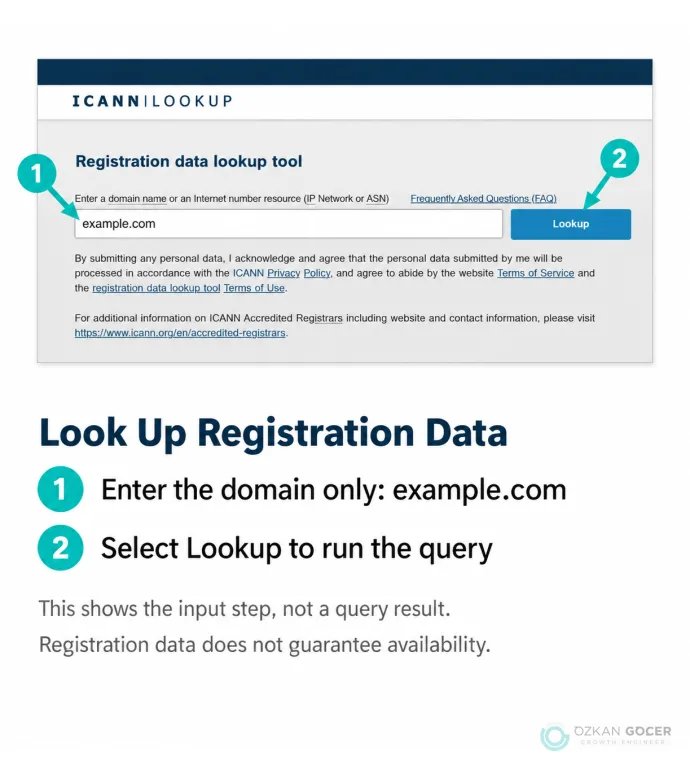
The screenshot uses example.com only to demonstrate the input format; it does not claim the name is available. Use registration data to check your own record and identify the responsible provider, rather than assuming the tool reveals every holder's private details.
Connect the Domain Without Breaking Email
Get the required records from the service that will publish your website. Establish where authoritative DNS is managed; it is not necessarily the company where you registered the name. Export or securely record the current DNS settings before changing them.
Scroll sideways to read every column. Keyboard: focus the table and use the arrow keys.
| Type | Purpose | Check |
|---|---|---|
| A / AAAA | Associate a name with an IPv4 / IPv6 address. | Use the destination supplied by the hosting service. |
| CNAME | Associate a name with another name. | Check the exact destination and the provider's apex-domain support. |
| MX | Identify the servers that receive email. | Do not delete working email records during a website change. |
| TXT | Store text used for verification and email policies, among other purposes. | Add the required record without replacing unrelated existing records. |
As an illustration, an A record pointing www.example.com to 192.0.2.10 helps a client locate that address. It does not install a website or certificate on the server. The IP is reserved for examples; do not copy it into your real configuration. The DNS record reference explains the different roles.
Changing nameservers can move management of the entire DNS zone. Avoid that extra change if updating the web record is sufficient. Visibility of a change depends on caching and TTL conditions, so a universal “it will work in 24 hours” promise is unreliable. Test the main address, www version and email separately. If the site loads with a certificate warning, continue with the SSL installation and troubleshooting checks.
Does the Domain Name Affect SEO?
A clear domain helps visitors recognize the intended destination. An expensive extension or a keyword in the name does not guarantee rankings. Google's SEO Starter Guide supports choosing a useful name rather than treating the domain as a ranking shortcut. Country associations are a separate consideration from price or keyword inclusion.
Changing the domain of an existing site requires more than registering the new name: plan the destinations for old URLs, update links and monitor search visibility. Include canonical, language and internal-link consistency in the technical SEO checks. For a site that has not launched, recognizability and reliable long-term control are more immediate decisions.
Keep Control Through Renewal and Transfers
If automatic renewal is enabled, check that the payment method will work. Keep expiry reminders and recovery details current. Access to the domain account, DNS and backups should survive the end of a relationship with a website contractor.
Changing registrars is not the same as changing the site's domain. ICANN's transfer FAQ covers AuthInfo codes and restrictions associated with initial registration, previous transfers and registrant changes. Check the rules that apply to your extension and current status instead of assuming a transfer is always immediately available. A registrar transfer does not require new website URLs when DNS and hosting remain unchanged.
Before considering the job complete, establish which account manages the registration, when the next renewal is due and which DNS records keep the website and email working. If you are also commissioning the site, include those access and handover responsibilities when defining the web design service scope.