12+ BEST FREE HTML5 FRAMEWORKS (2025 GUİDE)

12+ Best Free HTML5 Frameworks (2025 Guide)

An HTML5 framework is a pre-built set of code for building websites faster and responsively, and most free options are open source. Below you will find what a framework is, how it differs from a template, the best free frameworks (Bootstrap, Tailwind, Bulma), how to choose, where to find free templates, and the pros and cons. A framework is a Lego set; a template is a pre-built house.

What Is an HTML5 Framework?

An HTML5 framework is a pre-built set of code and tools that helps you create websites and interfaces faster, more consistently, and to a standard. In practice, most things called "HTML5 frameworks" are really CSS (and some JavaScript) frameworks, because what shapes the look and layout of HTML5 is CSS. These tools include ready-made components (buttons, forms, menus, cards) and especially a "grid" system.

What do they do? Instead of writing all your CSS from scratch, you use the framework's ready-made classes to build much faster, consistent, and especially responsive (mobile-friendly) sites. So a framework keeps you from reinventing the wheel in web design: it provides common needs (layout, responsive behavior, basic components) ready to go, and you add your own content and customization on top. Most popular frameworks are free and open source; they also speed up the work of a web design specialist.

Framework vs Template: What's the Difference?

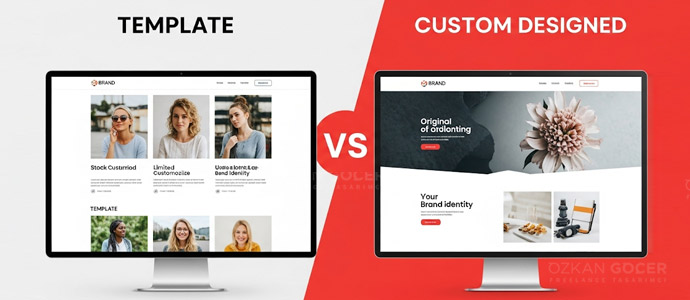
The most common confusion when searching for "free HTML5" is this, so let me clarify. A framework (for example Bootstrap or Tailwind CSS) is a toolkit: it gives you ready-made components and a system (grid, classes), but you build the site from scratch or customized using those tools. A framework is like a Lego set; the pieces are ready, but you assemble the structure.

A template (for example the ready-made sites on HTML5 UP or FreeHTML5) is a pre-designed, nearly finished website; you download it, fill it with your own text and images, and use it. A template is like a pre-built house; you move in and decorate. An important relationship: many ready-made templates are built on a framework (often Bootstrap) under the hood. So the two are not competitors but serve different purposes; a framework gives flexibility and control, while a template gives speed. It helps to decide which you actually need (building from scratch versus wanting a ready design) from the start.

The Best Free HTML5/CSS Frameworks

The most popular free and open-source options group into a few names, and each is strong in a different place.

Bootstrap

Bootstrap is the world's most-used CSS framework; it offers tons of ready components, a powerful grid system, and a huge community and documentation. It is ideal for fast, standard, responsive sites and is one of the easiest starting points for beginners. Its official home is getbootstrap.com.

Tailwind CSS

Tailwind CSS has become hugely popular in recent years with a "utility-first" approach; instead of pre-built components, it gives you full control over design using small helper classes. It is very powerful for custom designs, though the learning curve is a bit different. You can find the details on tailwindcss.com.

Bulma, Foundation, and UIkit

Bulma is a clean, modern, easy-to-learn framework that is pure CSS (requires no JavaScript); its official site is bulma.io. Foundation is a flexible, powerful option often used for advanced or enterprise projects, while UIkit is a sleek, lightweight framework. There are also minimal options (Skeleton, Pure CSS, Milligram) for small, fast projects; for browser-side interactivity, JavaScript libraries step in alongside these. All of them are free.

How to Choose the Right Framework

The right framework depends on your needs and experience; when choosing, weigh these:

  • Project type: a simple, standard site (Bootstrap gets you there fast) or a unique, brand-specific design (Tailwind offers more control)?
  • Experience level: if you are starting out, Bootstrap (with abundant docs) is easier; Tailwind's logic takes some getting used to.
  • Customization needs: if you want to avoid the framework's default look, pick one with high flexibility.
  • JavaScript needs: some include ready JS components (modals, dropdowns), like Bootstrap; others are pure CSS, like Bulma.
  • Performance and community: minimal frameworks won't bloat small projects, and popular ones make troubleshooting easier.

The general recommendation: for beginners wanting speed, Bootstrap is a good start; for design control and a modern approach, Tailwind CSS. The healthiest move is to pick one and try it on a small project; a widely used, actively maintained framework is safer long-term.

Where to Find Free HTML5 Templates

If you would rather use a ready-made template than design from scratch, there are many sources for quality, free HTML5 or Bootstrap templates. HTML5 UP is known for sleek, modern, fully responsive free templates (usually free with an attribution or license requirement); galleries like FreeHTML5, ThemeWagon, Themefisher, Colorlib, and Start Bootstrap host hundreds of free templates. A good place to start is html5up.net.

A few important notes. Check the license: most "free" templates allow personal and commercial use, but some require attribution or restrict commercial use, so read the terms before downloading. For security, download templates only from trusted, official sources; templates from unknown sites can contain malicious code. Finally, fill the template with your own content and adapt it to your brand, or your site will look like many others.

HTML5 vs HTML, and Where to Code HTML for Free

HTML5 is not a separate language from HTML; it is the latest major version of HTML. So "HTML5 vs HTML" really means "modern HTML versus older HTML." HTML5 (the current standard) added many improvements over older versions: native support for audio and video, new semantic elements (like header, nav, article, footer) that make page structure clearer, better form features, canvas for graphics, and more, all of which make it better for modern, multimedia, mobile-friendly websites. In short, HTML5 is the current, improved HTML that essentially everyone uses today.

As for where to code HTML for free, you do not need any paid software. Online editors and sandboxes like CodePen, JSFiddle, CodeSandbox, and the W3Schools "Try it" editor let you code in your browser and see results instantly, with no setup. Free code editors like Visual Studio Code run on your computer, and even a basic text editor (Notepad) can write HTML saved as a .html file and opened in a browser. For learning, free resources like MDN, freeCodeCamp, and W3Schools are ideal; you can start coding HTML right away, for free.

Pros and Cons of Using a Framework

Using a framework has real strengths: ready components and a grid system let you build sites much faster, mobile-friendliness comes largely ready, components are tested and work together, they work properly across browsers, popular frameworks have abundant resources and examples, and most popular ones are open source and free.

The other side of the coin matters too: without customization (especially with Bootstrap), many sites can look alike, unused styles may load and weigh down the page (if not optimized), each framework has its own logic so learning takes time, and relying on a framework without learning the fundamentals (HTML/CSS) can limit you later; for very simple pages, a framework can be overkill. Used well, free frameworks are valuable tools for beginners and professionals (and busy freelancers) alike, especially after you learn the basics and customize to your brand.

FAQ

Frequently Asked Questions

Quick answers for readers who skipped to the end.

What is an HTML5 framework, and is there a framework for HTML?
Yes, there are frameworks for building HTML5 websites. An HTML5 framework is a pre-built set of code/tools that helps you create websites and interfaces faster, more consistently, and to a standard. In practice, most things called "HTML5 frameworks" are really CSS (and some JavaScript) frameworks, because what shapes the look and layout of HTML5 is CSS. These tools include ready-made components (buttons, forms, menus, cards) and especially a "grid" system. What do they do? Instead of writing all your CSS from scratch, you use the framework's ready-made classes to build much faster, consistent, and especially RESPONSIVE (mobile-friendly) sites. So a framework keeps you from "reinventing the wheel" in web design: it provides common needs (layout, responsive behavior, basic components) ready to go, and you add your own content and customization on top. Most popular HTML5/CSS frameworks are FREE and open source, making them accessible to beginners and professionals alike. This is for general information.
What is the difference between a framework and a template?
This is the most common confusion when searching for "free HTML5," so let us clarify: (1) FRAMEWORK (e.g., Bootstrap, Tailwind CSS), a TOOLKIT. It gives you ready-made components and a system (grid, classes), but you build the site from scratch or customized using those tools. A framework is like a "Lego set": the pieces are ready, but you assemble the structure. (2) TEMPLATE (e.g., the ready-made sites on HTML5 UP or FreeHTML5), a pre-DESIGNED, nearly finished website. You download it, fill it with your own text/images, and use it. A template is like a "pre-built house": you move in and decorate. An important relationship: many ready-made templates are BUILT ON a framework (often Bootstrap) under the hood. So the two are not competitors; they serve different purposes: a framework gives flexibility and control (you build from scratch), while a template gives speed (you use a ready design). When searching for a "free HTML5 framework," it helps to decide which you actually need (building from scratch vs. wanting a ready design). This is for general information.
What are the best free HTML5/CSS frameworks?
The most popular free and open-source options: (1) BOOTSTRAP, the world's most-used CSS framework; tons of ready components, a powerful grid system, and a huge community/documentation. Great for fast, standard, responsive sites and one of the easiest starting points for beginners. (2) TAILWIND CSS, hugely popular in recent years; a "utility-first" approach that gives you full control over design using small helper classes rather than pre-built components. Very powerful for custom designs, with a slightly different learning curve. (3) BULMA, a clean, modern, easy-to-learn framework that is pure CSS (requires no JavaScript). And yes, Bulma is completely FREE and open source. (4) FOUNDATION, flexible and powerful, often used for advanced/enterprise projects. (5) UIkit, a sleek, lightweight framework. There are also minimal options (Skeleton, Pure CSS, Milligram) for small/fast projects. ALL of these are free. Which to choose depends on your project and experience. General tip for beginners: Bootstrap for speed and ease, Tailwind CSS for full control and a modern approach, these two are the most-favored pair. This is for general information.
How do I choose the right HTML5 framework?
The right framework depends on your needs and experience; consider: (1) PROJECT TYPE, a simple, standard site (Bootstrap gets you there fast) or a unique, brand-specific design (Tailwind offers more control)? (2) EXPERIENCE LEVEL, if you are starting out, Bootstrap (with abundant docs and ready components) is easier; Tailwind's logic takes some getting used to. (3) CUSTOMIZATION needs, if you do not want your site to look like the framework's "default," pick one with high customization flexibility (like Tailwind). (4) JAVASCRIPT needs, some frameworks include ready JS components (modals, dropdowns), like Bootstrap; others are pure CSS, like Bulma. (5) FILE SIZE/PERFORMANCE, for small projects, minimal frameworks will not bloat the page. (6) COMMUNITY & SUPPORT, popular frameworks make troubleshooting easier (more resources). (7) FUTURE, choosing a widely used, actively maintained framework is safer long-term. General recommendation: for beginners wanting speed, start with Bootstrap; for design control and a modern approach, try Tailwind CSS. The best move is to pick one and try it on a small project. This is for general information.
Where can I find free HTML5 templates?
If you would rather use a ready-made template than design from scratch, there are many sources for quality, FREE HTML5/Bootstrap templates: (1) HTML5 UP (html5up.net), known for sleek, modern, fully responsive free templates (usually free with an attribution/license requirement). (2) FreeHTML5.co, various free, Bootstrap-based website templates. (3) ThemeWagon, Themefisher, Colorlib, galleries with hundreds of free Bootstrap/HTML5 templates. (4) Start Bootstrap, free Bootstrap-based themes. (5) BootstrapMade and similar sites. IMPORTANT NOTES: (1) CHECK THE LICENSE, most "free" templates allow personal/commercial use, but some require attribution (credit) or restrict commercial use; read the license before downloading. (2) SECURITY, download templates only from trusted/official sources; templates from unknown sites can contain malicious code. (3) CUSTOMIZE, fill the template with your own content and adapt it to your brand (otherwise your site will look like many others). Ready-made templates are great for a fast, low-cost start, especially if you want a professional-looking site without coding. This is for general information.
Is HTML5 better than HTML, and where can I code HTML for free?
HTML5 vs HTML: HTML5 is not a separate language from HTML; it is the latest major VERSION of HTML. So "HTML5 vs HTML" really means "modern HTML vs older HTML." HTML5 (the current standard) added many improvements over older versions: native support for audio/video, new semantic elements (like header, nav, article, footer) that make page structure clearer, better form features, canvas for graphics, and more, all of which make it better for modern, multimedia, mobile-friendly websites. In short, HTML5 is the current, improved HTML that essentially everyone uses today; you are almost certainly using HTML5 when you write "HTML." WHERE TO CODE HTML FOR FREE: you do not need any paid software to write HTML. Free options include: (1) ONLINE EDITORS/sandboxes like CodePen, JSFiddle, CodeSandbox, and W3Schools' "Try it" editor, code in your browser and see results instantly, no setup. (2) FREE CODE EDITORS like Visual Studio Code (free) installed on your computer. (3) Even a basic text editor (Notepad) can write HTML, saved as a .html file and opened in a browser. For learning, online editors and free resources (MDN, freeCodeCamp, W3Schools) are ideal; you can start coding HTML right away, for free. This is for general information.
What are the pros and cons of using an HTML5 framework?
PROS: (1) SPEED, ready components and a grid system let you build sites much faster. (2) RESPONSIVE, mobile-friendliness comes largely ready. (3) CONSISTENCY, components are tested and work together. (4) BROWSER COMPATIBILITY, they work properly across browsers. (5) COMMUNITY/SUPPORT, popular frameworks have abundant resources and examples. (6) FREE, most popular frameworks are open source and free. CONS: (1) SAMENESS, without customization (especially with Bootstrap), many sites can look alike. (2) BLOAT, unused styles may load and weigh down the page (if not optimized). (3) LEARNING, each framework has its own logic; different approaches like Tailwind take some getting used to. (4) DEPENDENCY, relying on a framework without learning the fundamentals (HTML/CSS) can limit you later. (5) OVERKILL, for very simple/small pages, a framework can be more than you need. Bottom line: frameworks are very useful for speed and consistency; but learning the basics (HTML/CSS) first and customizing the framework to your brand gives the best results. Used well, free frameworks are valuable tools for beginners and professionals alike. This is for general information.
Summarize:
Özkan Göçer profile photo

Özkan Göçer

Growth Engineer & Digital Marketing Specialist

Özkan Göçer is a Growth Engineer and Digital Marketing Specialist with over 15 years of field experience and 200+ completed projects. With a background in Advertising and Web Design, he authored this guide based on modern W3C standards and UI/UX principles.


Scroll to top