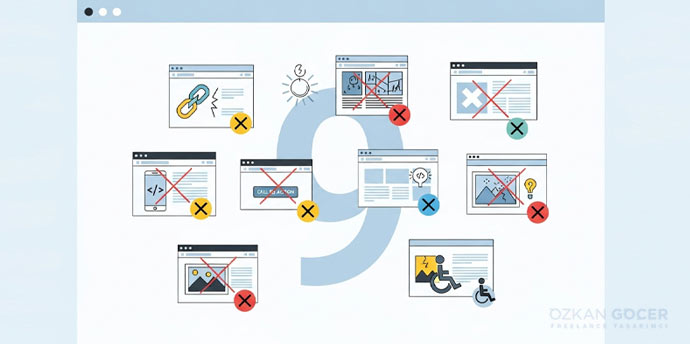
A visitor might need to understand a service, compare a product or make a booking. If the page looks attractive but hides the information or prevents them from completing the form, there is still a design problem to solve. On a booking page, understanding the service, finding a time and completing registration are connected design decisions.
How Web Design Differs from Web Development
Design establishes what people see, in what order, and how they move through a task. Web development builds the interface, connects it to the server and stores data where needed. The two disciplines work together; on a small team, one person may handle both.
Scroll sideways to read every column. Keyboard: focus the table and use the arrow keys.
| Work | Example Decision | Check |
|---|---|---|
| Web design | Show the service, duration and available days before the request | Can visitors understand what they are booking? |
| Frontend development | Build the date selector and form states | Does it work on mobile and with a keyboard? |
| Backend development | Check availability and create the record | Does the system reject a second booking for a full slot? |
This booking page is an illustrative example. For a closer look at the implementation work, see what a web developer does. UX concerns the overall experience of completing the task; UI concerns the interface people interact with. The guide to UX and UI explains their relationship in more detail.
What Does the Web Design Process Look Like?
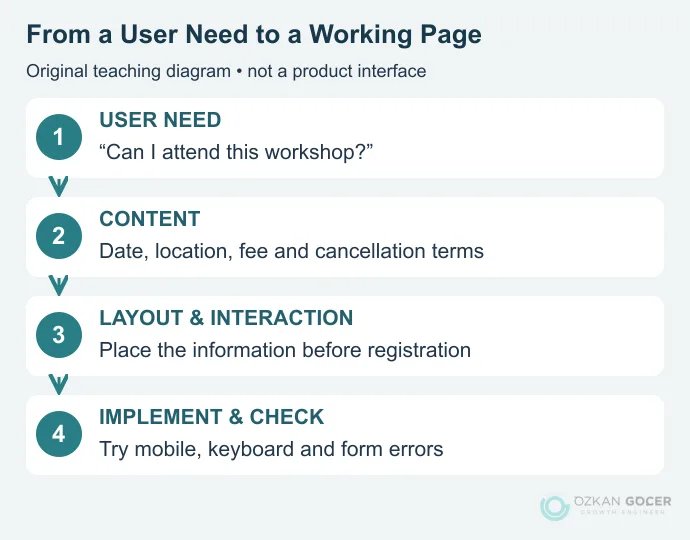
Start with the question the page must answer. A workshop registration page, for example, needs the date, location, what the fee covers and cancellation terms. Drawing a large “Register” button before those details are settled leaves the visitor without enough information.
Define the Need and the Content
Write down who the page serves, the task they need to complete and what they need to know first. Then create the page list. Prefer one useful page to two pages answering the same question, and give a service page a different role from an explanatory blog article.
Build a Wireframe with Realistic Content
A wireframe establishes the position of headings, explanations, images and actions. It does not need finished colours. Use a heading of realistic length, a meaningful service description and the actual form fields. A box that looks balanced with a short placeholder may overflow when the content arrives.
Design the Visual Style and the Interactions
Keep text sizes, spacing, colours and components consistent. Design the open menu, invalid form and completed request as well as the first screen. A clickable prototype demonstrates the route through the interface; it does not prove that a real booking reaches the server.
Implement, Try the Tasks and Check the Handover
Once the design is built, read it on real devices and at different widths. Complete a sample request, deliberately leave an invalid field and navigate back. Before launch, establish who owns the domain, hosting, backups, editing access and maintenance. The website setup guide covers the broader route from a domain name to a live site.
Technical Features of a Good Website Design
Turn “modern and fast” into observable acceptance criteria. These are initial checks, rather than a complete security or accessibility audit.
Scroll sideways to read every column. Keyboard: focus the table and use the arrow keys.
| Feature | What to Check |
|---|---|
| Clear structure | The main heading and navigation explain the page’s purpose; link text describes the destination. |
| Flexible layout | Text remains visible on narrow screens, controls do not overlap and necessary tables can scroll within their container. |
| Accessible use | Keyboard focus is visible, fields have labels, errors use more than colour and informative images have useful alternatives. |
| Performance | Oversized images and unnecessary scripts are reduced; loading, responsiveness and layout movement are measured separately. |
| Maintenance and security | HTTPS works, updates and recovery have an owner, and administrative access is limited to what each person needs. |
W3C’s initial accessibility checks offer a starting point for keyboard use and image alternatives. The web accessibility checklist develops these checks into a wider review.
What Width Should a Website Be?
There is no single correct pixel width for every website. A desktop frame in a design file does not mean the finished page should work only at that size. Responsive design rearranges content to fit the available space. A breakpoint is where the layout changes; choose it around the needs of the content, rather than device names alone.
Narrow the browser and watch the heading, menu, form and images. Test intermediate widths as well as phone and desktop layouts, and enlarge the text. MDN’s responsive design guide explains the role of flexible columns and images.
How Does Web Design Affect SEO?
Page structure helps search engines discover and understand content while helping people reach the answer. Meaningful headings, pages reachable through real links, visible main content and appropriate image descriptions all contribute. An attractive interface cannot replace incomplete or inaccurate information.
For performance, LCP measures when the largest eligible content element in the viewport loads; INP measures the delay before a visual response to interaction; CLS measures unexpected layout movement. The good Core Web Vitals thresholds are at most 2.5 seconds, 200 milliseconds and 0.1 respectively. Field assessment uses the 75th percentile, separately for mobile and desktop. One lab run does not represent every visitor.
Google explains that good Core Web Vitals scores do not guarantee top rankings. After a redesign, monitor technical problems, whether people complete their tasks, and the relevant page/query changes in Search Console separately. Crawling and indexing also require technical SEO checks.
Should You Use a Ready-Made System or a Custom Design?
A company information site, personal portfolio and store connected to inventory software have different requirements. A template or website builder can simplify the start for standard pages. Unusual workflows, integrations and access rules increase the development work. A content management system such as WordPress can also support a custom interface; using a CMS and commissioning a custom design are compatible choices.
Compare more than the initial setup. Who will update the content? Can the data be exported? Who handles licences, maintenance and integrations? If you need to define a professional engagement, see the scope of the web design service.
What Should a Website Brief Include?
Include the audience, main user task, necessary pages, available content, languages, forms, payments or membership requirements, and the people responsible for delivery. When sharing examples, explain what helps: the navigation, reading order or product comparison. “I like the look” leaves too much open to interpretation.
Time and price become meaningful once this scope is known. Ask for design, development, content entry, licences, revisions and ongoing support to be identified in the proposal. A universal price or number of weeks would hide those differences. If you are learning, sketch a small page, build its structure with HTML and its appearance with CSS, then check its mobile layout and keyboard use. MDN’s learning path provides a structured next step for that first exercise.
If you are considering design as a career, the path to becoming a web designer covers visual skills and portfolio practice.