What Is JavaScript? (The Programming Language of the Web)
JavaScript (JS for short) is a programming language that makes web pages dynamic and interactive. Something happening when you click a button, forms being checked, content updating without a page reload, and animations are all done with JavaScript; it is the language that adds "behavior" to a page.
While it was at first a language that ran only in browsers, today it also runs on servers thanks to Node.js and has become one of the web's most common programming languages. Almost every modern, interactive site you visit (social media, e-commerce, web apps) uses JavaScript behind the scenes. In short, JavaScript is the language that turns the web from a static document into a living application.
What Is JavaScript For? What Can Be Built?
JavaScript is versatile and used in many areas. Its greatest strength is being the only language that runs natively in the browser and being usable in both front-end and back-end development.
- Websites: interactive elements like menus, sliders, forms and pop-ups, and content that updates without a page reload.
- Web applications: complex apps like Gmail or Google Maps (with frameworks like React, Angular, Vue).
- Server side: web servers and APIs with Node.js.
- Mobile and desktop: with tools like React Native and Electron.
- Games, data visualization and automation.
That range makes JavaScript worth learning and highly in demand for a career. I compiled the commonly used ready tools in my popular JavaScript libraries article. In short, whatever interactive thing you see on the web, JavaScript is very likely behind it.
HTML, CSS and JavaScript: How the Trio Works
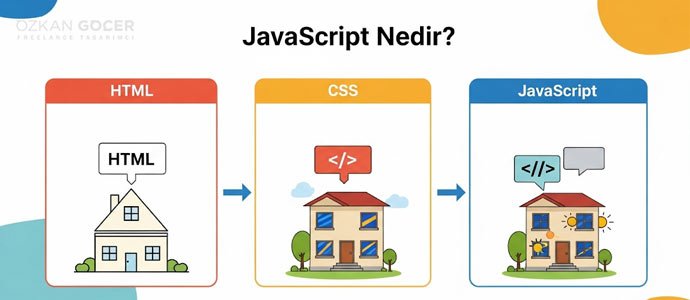
Together, the three form the foundation of web pages and complement each other; with a common analogy, they can be likened to a human being. HTML is the page's structure and skeleton (the bones); CSS is its appearance and style (the clothing); and JavaScript is its behavior and interaction (the muscles and motion).
A web page without HTML has no content, without CSS no form, and without JavaScript no motion. Modern web development uses the three together: HTML builds the skeleton, CSS beautifies, JavaScript brings it to life. Someone starting web development usually learns HTML and CSS first, then JavaScript.
How Does JavaScript Work? (Browser and Server)
JavaScript is run by an "engine". On the client, that is the browser side, every modern browser has a JavaScript engine (for example V8 in Chrome); when you open a page, the browser reads the JavaScript in the code and runs it on your device. So you get an instant response when you click a button, or content changes without a page reload.
JavaScript is an interpreted language; it is processed while running, without being compiled in advance. On the server side, Node.js uses the same V8 engine to let JavaScript run outside the browser, on servers (database operations, APIs). So JavaScript is a two-way language that can run both on the user's device and on the server; for developer documentation, MDN Web Docs is the most reliable source.
The Difference Between Java and JavaScript
Java and JavaScript are different languages despite the similar names; this is a very common confusion. The name similarity is largely for marketing, and technically they are not related.
Java is a general-purpose, compiled and stricter language; it is used for large enterprise applications, Android apps and big systems. JavaScript is a more flexible, interpreted language designed for the web and used primarily for web pages and applications. By analogy, the relationship between "Java" and "JavaScript" is like that between a "cat" and a "tiger"; the names are similar but they are not the same thing. The language you need for web development, especially on the browser side, is JavaScript.
How Do You Enable JavaScript in the Browser?
In most browsers JavaScript is on by default; but if it is off or a site shows an "enable JavaScript" warning, you can turn it on in the browser settings. The general path is this: go to the browser's Settings, then Privacy and Security, then Site Settings and the JavaScript section, and turn on "Allow". The menu names differ slightly in Chrome, Firefox, Edge and Safari, but the logic is the same.
If JavaScript is turned off, many modern sites do not work properly: menus, forms, buttons and dynamic content break, and some sites do not open at all. Because the modern web relies heavily on JavaScript. For normal use, JavaScript should be on; turning it off is preferred only in special security or accessibility cases and makes most sites unusable.
How Do You Learn JavaScript? Career
Learning JavaScript is very valuable for those interested in web development; because it is the web's most common language, it is in high demand on the job market. It is learned by writing code rather than just watching.
- First learn the basics of HTML and CSS (the web's structure and style).
- Move to JavaScript basics: variables, data types, conditions, loops, functions and the DOM.
- Build small projects: a calculator, a to-do list, a simple game.
- Later learn a framework or library (React, Vue).
Resources include free interactive platforms, video courses, freeCodeCamp, W3Schools and the MDN documentation. You can learn the basics in a few months and build simple projects, and reach a job-ready level with regular practice. What I have noticed in my own projects is this: writing plenty of code moves you forward far faster than only watching lessons. Since JavaScript is used on both front and back end, learning it opens wide career doors; I covered web development roles in my what is a web developer article.