
If you keep sending the same photos to every customer, start with the few products people ask about most. A useful card answers “Which model is this?”, “How big is it?” and “What is included?” before another exchange of messages. We will use a fictional pottery studio as a planning example, not as a real shop account.
What to Prepare Before Opening the Catalog
This guide covers the WhatsApp Business app. It is separate from personal WhatsApp chats and from a developer integration using the Business Platform API. Gather accurate product names, photos, descriptions and, where available, links to the corresponding web pages.
- Name: Make the model or variant clear. “Matte blue ceramic mug · 300 ml” tells the reader more than “Mug”.
- Images: Show the actual item for sale. A front view, a useful detail and a size reference usually explain more than repeated shots from the same angle.
- Description: Prepare the material, dimensions, package contents and delivery information. Do not turn an unverified property into a selling point.
- Code: Use your existing product or stock code if you have one. It helps distinguish similar items in a conversation.
Working through a small group first keeps mistakes from spreading across a large catalog. WhatsApp's catalog introduction lists a capacity of 500 products or services. Filling that space is not the goal; helping someone find the right item is.
How to Add the First Item
The current help instructions use Tools → Catalog → Add new item on Android and iPhone. Menu labels can vary with the app language.
- Select the product photos or video.
- Enter the product or service name. Complete the requested country-of-origin field using the country where the item was created.
- Add the relevant price, sale price, description, website and item code.
- Save, then check the review status.
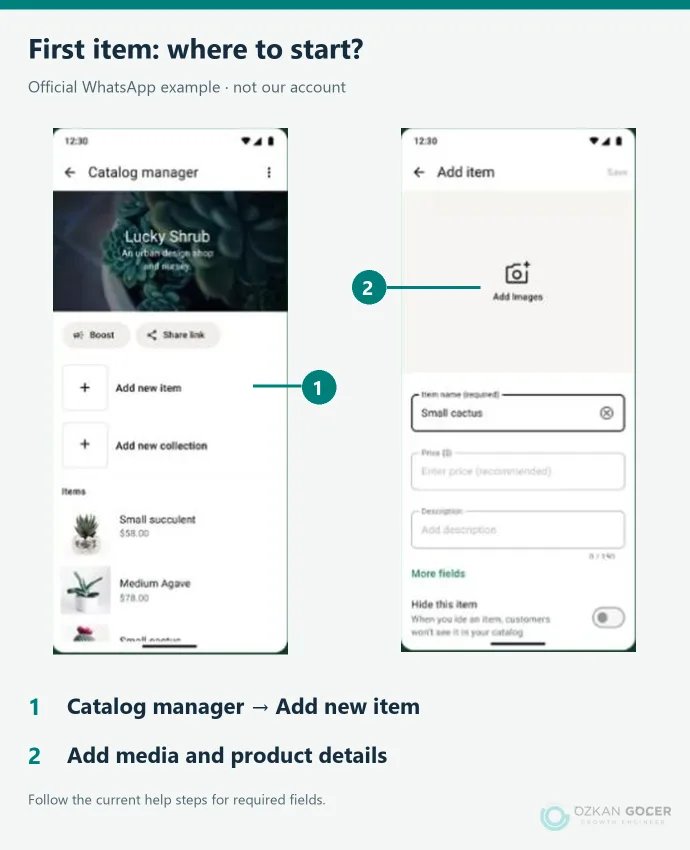
An item can have up to 10 photos or videos; the help page specifies a 50 MB limit per video. Media is reviewed, and pending or rejected items are not visible to customers. Saving a card is therefore different from confirming that a customer can see it.
Write a Product Card That Answers the Next Question
The image identifies the item; the description should resolve what the image cannot show. Replace the example below with verified details about your own product. Do not guess its price or country of origin.
Scroll sideways to read every column. Keyboard: focus the table and use the arrow keys.
| Field | Example or check |
|---|---|
| Name | Matte blue ceramic mug · 300 ml |
| Code | MUG-BLU-300 |
| Description | One mug. Add verified material, dimensions and care instructions. |
| Photos | Front view, handle detail and a size reference |
| Price and origin | The actual selling price and production information |
| Link | The current page for this item, if available |
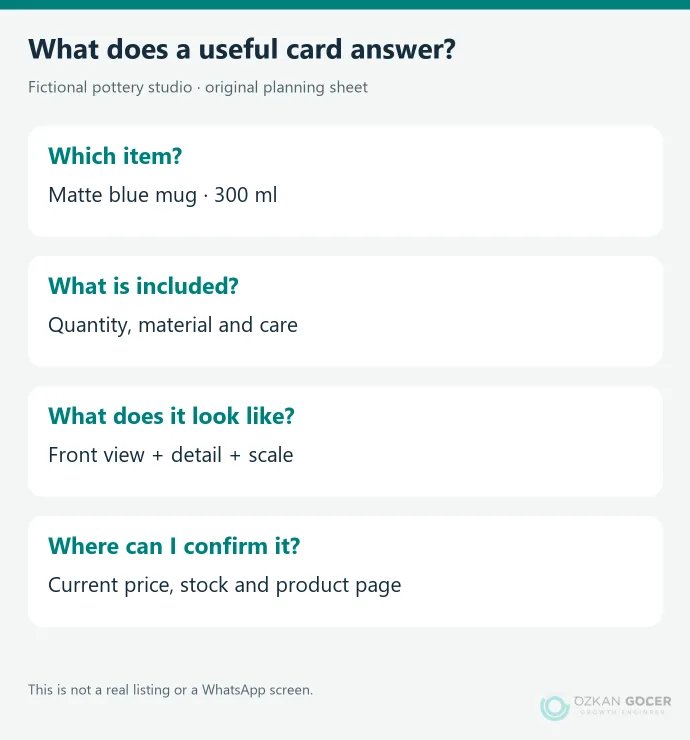
If availability varies by color, say so. Avoid promises such as “always in stock” unless you can maintain them. Update the card when a price or option changes; continuing to send old screenshots gives customers conflicting information.
Organize Collections Around What Customers Look For
Once items exist, collections let you group them. A studio selling mugs, plates and gift sets can use those names. They are easier to understand than “Collection 1”. A seasonal range may deserve its own group.
On Android, open the catalog's additional options, go to Collections, create a collection, name it and select the items. The web view offers Add new collection. You can later change its name, items and order. A collection's review status does not remove the need to check its individual products.
Share an Item or the Whole Catalog?
If someone asks about one mug, open that item and use Share. If they want to browse the range, send the catalog link. The official sharing instructions cover copying the link, sending it in WhatsApp and sharing it through other apps.
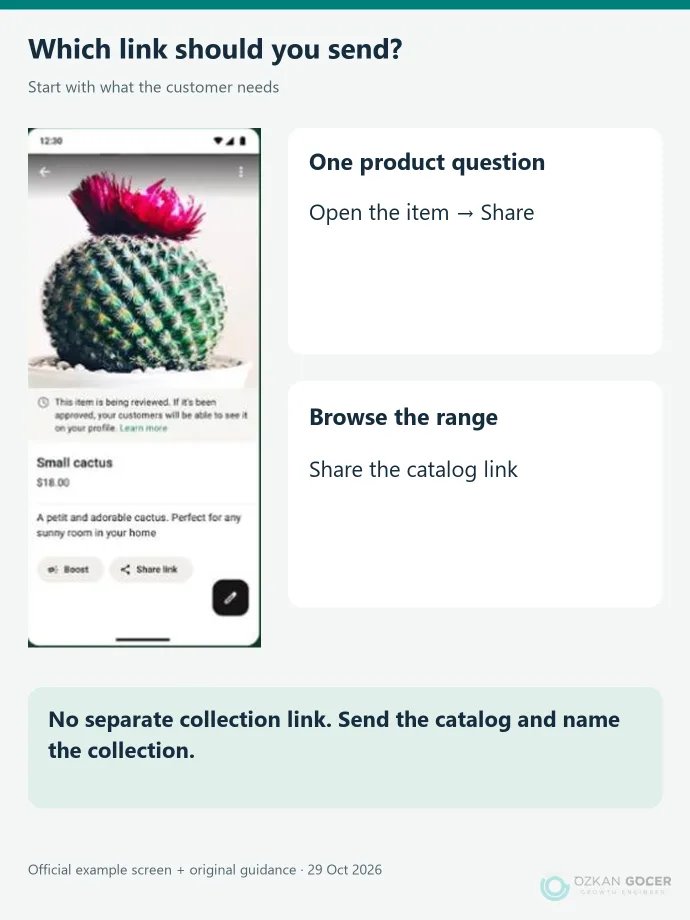
A note about collection links: the help page checked on 29 October 2026 says that individual collections cannot be shared by link. Do not construct an address yourself. Share the catalog and name the collection, or send a specific item instead. Editing a generated catalog link can also stop it working.
Before placing a link on a website, social profile or campaign, open it as a recipient would and check the destination. We did not send links to real customers for this guide. For the wider channel decision, see our guide to planning content and channels for social media marketing.
Does Receiving a Cart Mean the Order Is Complete?
The cart feature lets a customer send selected items and quantities to the business as a WhatsApp message. That message is not proof of payment or stock confirmation. Agree on availability, the total and delivery terms before treating the request as a completed order.
Payment and order features can depend on the country and account. Do not assume that every catalog opens the same checkout. If your website handles stock, payment and shipping, point the catalog card to the relevant product page.
What to Check When an Item Is Missing or Will Not Save
Scroll sideways to read every column. Keyboard: focus the table and use the arrow keys.
| Situation | First check |
|---|---|
| Pending review | Check its status; do not treat it as a customer-visible listing. |
| Rejected or marked with a red warning | Read the reason and commerce requirements. If you believe there is an error, use the in-app review request. |
| Error while adding an item | Check the connection and app version. Wait a few minutes and try adding items individually. |
| A previously visible item is missing | Check whether it is hidden. Rule out connection and app issues before uploading duplicates. |
WhatsApp's troubleshooting guidance notes that some display issues are temporary. Deleting the whole catalog should not be the first response. Record the error text, item status and when it began. Keep customer numbers and order details out of public support screenshots.
A Short Routine for Keeping the Catalog Useful
Check the product card when stock or pricing changes. An item that is temporarily unavailable can be hidden and shown again later. Hiding it for a while and permanently removing it serve different needs.
- Do the name, description and photos refer to the same variant?
- Are the price, availability and website link still accurate?
- Do collection names help customers find the item they want?
- Which repeated chat question could the card answer?
If you work at a computer, our WhatsApp Web instructions cover connecting it. A PDF or printed brochure is a separate design task; use the catalog design guide to plan its pages and product layout.
Good products can still look inconsistent when every card uses different photos and wording. Our graphic design service can help make the product presentation consistent across your catalog, social posts and website. We start with what customers need to know and arrange the design around finding that information.