
Start by finding out whether your hosting panel manages certificates. Then establish domain coverage, verify HTTPS and check automatic renewal. This guide is for a site owner setting up a first certificate or investigating an existing installation. Panel labels vary, but the purpose of each check stays the same.
What Is the Difference between SSL, TLS and HTTPS?
SSL stands for Secure Sockets Layer, and TLS stands for Transport Layer Security. SSL is the predecessor protocol family to TLS. Today, “installing SSL” usually means configuring a TLS certificate and HTTPS. HTTPS is HTTP communication protected by TLS. A certificate is neither a protocol nor a program that encrypts your website’s files.
TLS protects confidentiality and integrity in transit and, in ordinary web use, includes server authentication. It does not automatically secure your database, remove malicious code or prove that a seller is honest. Treat the browser’s secure-connection indicator accordingly; Chromium’s explanation of the icon makes this distinction clear.
Which Certificate Do You Need?
Make two separate decisions: the names that need coverage and the level of identity validation. Wildcard describes name coverage; EV describes validation, rather than a larger set of domains.
Scroll sideways to read every column. Keyboard: focus the table and use the arrow keys.
| Need | What to Check |
|---|---|
| Root domain and www | Both example.com and www.example.com must appear in, or validly match, the certificate’s SAN entries. |
| One level of subdomains | *.example.com can cover names such as shop.example.com. By itself, it does not cover example.com or a.shop.example.com. |
| Different domains | Each required name needs an entry in a multi-domain certificate or its own certificate. |
SAN means Subject Alternative Name, the certificate field listing alternative names. Under RFC 9525’s matching rule, a wildcard matches only one domain label. Read the actual certificate rather than relying on a package name; some packages add the root domain separately.
DV validates domain control. OV adds organization validation, and EV involves more extensive organization checks. Choose the certificate type and validation level around your organization’s requirements. Paying for a certificate does not, by itself, make the connection’s encryption stronger. Validation, support and management services are separate considerations.
Can You Use a Free SSL Certificate?
Yes. Let’s Encrypt provides free TLS certificates, and many hosts can manage them for you. A zero certificate price does not mean setup and maintenance require no work. Check domain coverage, renewal, incident support and subsequent charges separately. When comparing hosting options, verify whether certificate management is included in the actual plan.
How to Get and Activate an SSL Certificate
If Your Host or Website Platform Manages It
- Select the right site: Check the domain and additional names such as www in the panel. Confirm that DNS points to the intended service.
- Enable the managed certificate: Follow the provider’s SSL/TLS or HTTPS instructions. Forcing redirects before issuance completes can cause errors.
- Open HTTPS directly: Try important subpages, login and forms as well as the homepage. Inspect the served certificate’s names and expiry.
- Assign renewal ownership: Confirm automatic renewal and where failure notifications will be delivered.
Let’s Encrypt’s getting-started guide also begins by distinguishing host-managed certificates from running your own client. A managed service may remove the need for a separate ACME installation.
If You Manage the Server
ACME automates certificate requests and renewal. Use an ACME client appropriate for your operating system and web server; Certbot is one option. The same command will not suit every Nginx, Apache, Windows or container installation. Follow the relevant setup instructions with a backup and a rollback plan.
For Let’s Encrypt, HTTP-01 validation needs access on port 80 and cannot issue wildcard certificates. DNS-01 validates a TXT record in DNS and can support wildcards. Plan the DNS provider’s API support and narrowly scoped credentials for automatic renewal. The validation methods and their limits help determine the setup.
For manual installation, keep the private key secret and bind the certificate and required intermediate chain to the correct site. Check the server documentation for the loading or reloading step. A certificate file on disk does not prove that visitors are being served that certificate.
What Should You Check after Installation?
Look beyond a green status in the hosting panel. Check from the address visitors reach, using the sequence below. If there is a CDN, assess its public connection and its connection to the origin separately.
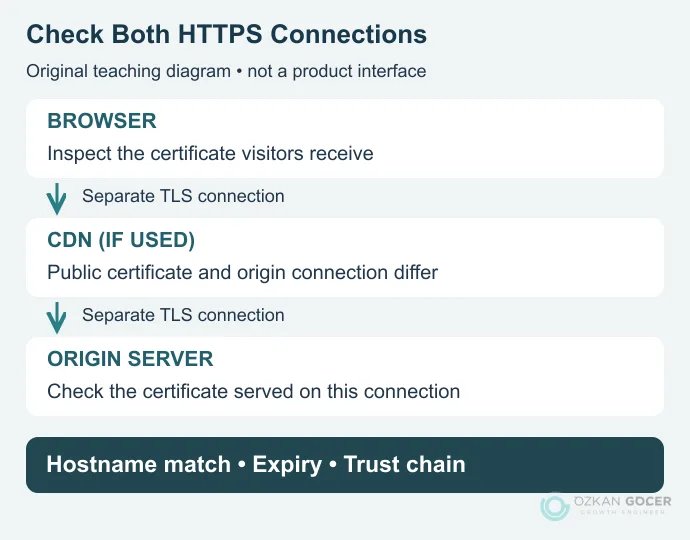
- Name and dates: Does the certificate match the exact hostname, and is it within its validity period?
- Trust chain: Can the browser and required clients validate it? Missing intermediates can cause failures in some clients.
- Page resources: Do images, scripts, styles and form destinations work over HTTPS? Inspect Console and Network in browser developer tools.
- Real tasks: Do important operations such as login and form submission complete correctly?
- External monitoring: Monitor expiry and HTTPS availability from outside the system performing renewal.
If You Use Cloudflare or Another CDN
HTTPS between the browser and CDN does not establish that the CDN-to-origin connection is correctly protected. Cloudflare’s Full (strict) mode encrypts both connections and validates the origin certificate. Check that the origin meets its requirements before changing the setting, then verify availability. The CDN explanation shows why these are separate connections.
How Do You Renew an SSL Certificate?
Renewal obtains a new certificate and deploys it to the service. Check three parts of the automation: whether the scheduled job runs, domain validation succeeds and the new certificate is actually served externally. Automation can fail quietly if its error notifications do not reach anyone.
On an existing Certbot installation using the standard Let’s Encrypt environment, certbot renew --dry-run can test the renewal path. Check the Certbot documentation first if you use a custom ACME server or hooks. A successful test does not mean the live certificate changed; after a real renewal, read the expiry from outside the service again.
A Current Note on Certificate Lifetimes
As of 11 October 2026: not all SSL certificates last 90 days; Let’s Encrypt itself offers profiles with different lifetimes. Its 7 October announcement says the default will change to 64 days on 10 February 2027. That does not change the lifetime of every existing certificate today. Use ACME Renewal Info (ARI) where your client supports it, and avoid hard-coding renewal to a rule such as “day 80.”
How to Distinguish Common SSL Errors
Scroll sideways to read every column. Keyboard: focus the table and use the arrow keys.
| Symptom | Possible Cause | First Check |
|---|---|---|
| Date or validity warning | Expired or not-yet-valid certificate, or an incorrect device clock | Compare the served certificate’s dates with the device time. |
| Hostname mismatch | Missing www/subdomain coverage or the wrong site certificate | Compare the exact hostname with SAN entries and the server mapping. |
| Untrusted certificate | Missing chain, self-signed certificate or client trust-store issue | Inspect the chain and issuer; disabling the warning does not fix the cause. |
| HTTPS works but the page is broken | HTTP subresources or a separate application problem | Find the request in Console/Network and correct the resource to a working HTTPS URL. |
| Renewed internally, old externally | Deployment, service reload or separate CDN/origin certificates | Inspect what visitors receive and identify the owner of each connection. |
This table starts an investigation; each symptom can have more than one cause. With mixed content, browsers may upgrade an HTTP request or block it depending on the resource type. Do not assume the browser will repair every insecure resource for you.
What Does an HTTPS Migration Require for SEO?
A certificate does not automatically redirect old HTTP addresses. Once HTTPS pages work, permanently redirect each old URL to its corresponding new URL, rather than sending every subpage to the homepage. Canonicals, internal links and the XML sitemap should consistently use HTTPS. Check that staging noindex directives or crawling blocks have not accidentally remained on the live site.
Google’s URL-change guide treats redirects and monitoring together. After the change, monitor page and query data in Search Console. Renewal failures, indexing status and traffic changes are different issues. A wider review also needs technical SEO checks. HTTPS protects transport; it does not promise a ranking increase by itself.