
Quick answer: Choose the behavior you want to address. Validate consent and event tracking, exclude buyers where appropriate, and check that the audience is eligible in the advertising platform. Assess results against actual orders and profitability, rather than clicks or ROAS alone.
Imagine someone adds a backpack to their cart and leaves after seeing the delivery charge. Another picture of the backpack does not answer their concern. A clear explanation of delivery terms is a more useful message to test. If checkout is broken, fix checkout first; more advertising cannot repair it.
How remarketing works—and where retargeting fits
Eligible interactions help define an audience, which can then inform an advertising campaign. Sources can include website or app activity, interactions on a platform, or customer data that meets the platform’s requirements. Google Ads now generally describes its former remarketing audiences as “your data” segments.
Retargeting usually refers to advertising to previous visitors or contacts. Remarketing is sometimes used more broadly to include email. There is no universal distinction followed by every platform. “Ads for cart abandoners” or “an email to opted-in customers” describes the actual work more clearly. For email, follow a separate permission-based campaign process.
Choose an audience by behavior, not visits alone
“Everyone who visited in the past 30 days” is easy to define. It can also combine job applicants, customers looking for support and people comparing products. Write down the question your ad should answer, then choose the behavior closest to that need.
Scroll sideways to read every column. Keyboard: focus the table and use the arrow keys.
| Behavior | Message worth testing | Check first |
|---|---|---|
| Viewed a product | A use case or comparison | A visit does not prove purchase intent. |
| Added to cart without buying | Delivery, returns or an unresolved product question | Validate purchase tracking and buyer exclusions. |
| Read a service page | The scope of the service and how a quote works | Avoid repeating the enquiry request to someone who has already submitted it. |
| Purchased | A relevant accessory or repeat purchase, if useful | Separate this from the first-purchase campaign. |
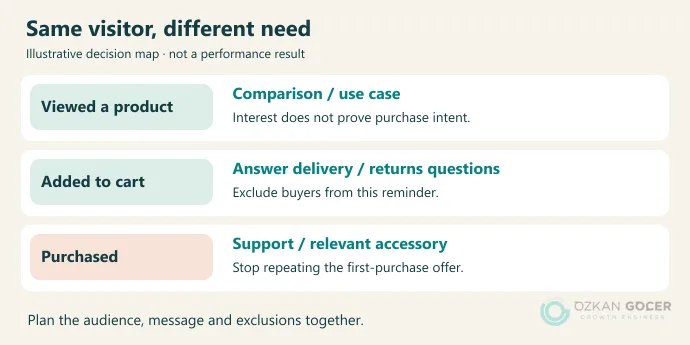
These are planning examples, not promised results. If you do not yet know where people leave, examine drop-off between sales funnel steps. Few cart additions and failed payments require different repairs.
Before setup: events, consent and cookies
Start by checking whether the data represents what actually happened. Clicking a button is not a purchase; purchase should represent a successful transaction. A faulty event can create both a faulty audience and a misleading conversion count. Work through the GA4 installation and event checks if the implementation is uncertain.
Consent Mode adjusts Google tag behavior to the user’s consent choices; it does not obtain consent itself. Signals for ad personalization and advertising use of user data are distinct from analytics storage. Moving collection to a server does not override those choices or platform requirements.
Do not build a plan around the assumption that cookies have disappeared and remarketing has ended. In April 2025, Google announced that it would retain Chrome’s existing approach to user choice. Current Chrome cookie controls let users block third-party cookies. The practical limit remains: you cannot assume that every visitor will be available for advertising. Browser behavior, consent and matching all affect reach.
Using a GA4 audience in Google Ads
- Validate the behavior. A cart audience needs a real event such as
add_to_cart; distinguishing buyers needs a correctly implementedpurchase. Finding an event name in code is not a successful test. - Check the account link. In GA4, go to Admin → Product links → Google Ads links. Confirm the intended Ads account and review ad personalization. Linking accounts requires the relevant permissions.
- Define the audience. Open Admin → Data display → Audiences → New audience → Create a custom audience. Set the inclusion rule, exclusions and membership duration together.
- Check export requirements. Google’s GA4 remarketing requirements include the link and ad personalization, plus Google signals or user-provided data collection. Assess whether the data use is appropriate before enabling a setting.
- Read the campaign’s targeting behavior. Creating a list does not start advertising. Inspect audience selection, exclusions and targeting in the campaign. A Performance Max audience signal does not restrict delivery to those people.
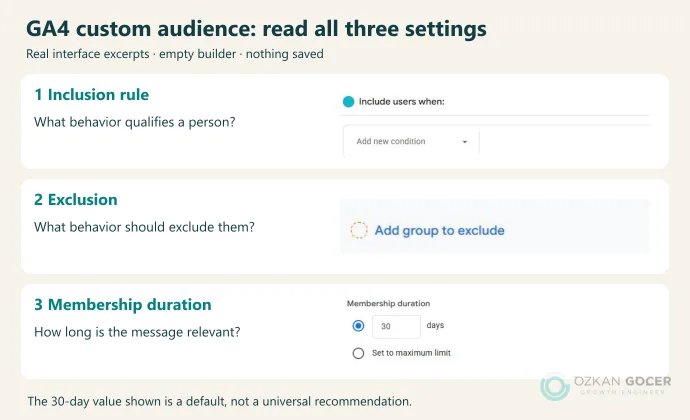
The image contains excerpts from the real English GA4 interface with an empty audience builder. Account details and user counts are excluded. No audience was saved and no advertising setting was changed. The displayed 30 days is a default, not a recommended duration for every campaign.
GA4’s temporary and permanent exclusions behave differently. Permanently removing every buyer may be unsuitable for repeat purchases. If buyers should stop seeing an offer for a defined period, document that exclusion audience’s duration too. Review the rules before saving; changing an existing audience’s conditions can require creating a new audience.
Applying the same thinking to Meta and Instagram
Meta uses Custom Audiences to work with previous interactions. Website behavior and engagement on Instagram describe different groups. Name the source explicitly in your campaign plan. Meta’s audience training covers custom audiences alongside Advantage+ audience use.
For a cart reminder, decide how buyers will be separated before writing the offer. Then check whether the selected audience is a strict delivery boundary or a suggestion that can be expanded. Selecting a list alone does not prove that every impression reached a previous visitor. Available controls vary by account and campaign type, so do not expect Google’s setup steps to appear under identical names.
Why an audience stays empty or ads do not run
Check the following before raising the budget:
- Are events arriving? The wrong event name, property or tag can prevent anyone from meeting the rule.
- Are the conditions too restrictive? Several simultaneous requirements may reduce useful traffic to a handful of people. Adjust a rule to describe the intended need accurately, not merely to collect unrelated visitors.
- Are enough users eligible for ads? GA4’s total audience count is not the same as the usable Ads audience. Google’s current website data segment documentation specifies at least 100 active eligible users within 30 days for Display, Search and YouTube. Meeting the threshold does not guarantee delivery.
- Has the new setup had time to process? Export is not immediate. The relevant documentation allows up to two days for GA4 audience availability and 48–72 hours for newly created Ads lists to populate fully. If the list remains empty, inspect linking and consent settings.
- Can the campaign serve? Pauses, ad approval, dates, locations, bidding and contradictory exclusions can also prevent impressions.
Plan duration, message and budget together
Buying shoes and choosing enterprise software rarely take the same amount of time. A seven-day cart audience might be a useful short experiment; it is not an industry standard. Choose a duration around observed time to purchase and how long the offer remains relevant. A longer window makes a list larger without proving continued interest.
A large budget for a small audience can repeatedly reach the same people. Review reach, frequency, cost and order quality together. There is no universal ideal frequency or budget percentage. If the message has worn out, reconsider the message and group first. Automatically offering a discount is not the only response.
For dynamic product advertising, also check that product identifiers in events match the catalog. GA4’s dynamic remarketing process uses the relevant events and parameters. Better copy cannot correct mismatched product identifiers.
Read what ROAS does—and does not—tell you
Suppose a hypothetical campaign spends $1,000 and receives $3,000 in attributed revenue. ROAS is 3. You still need product costs, returns and other expenses to calculate profit. Nor have you proved that advertising caused all $3,000: some visitors might have returned without seeing an ad.
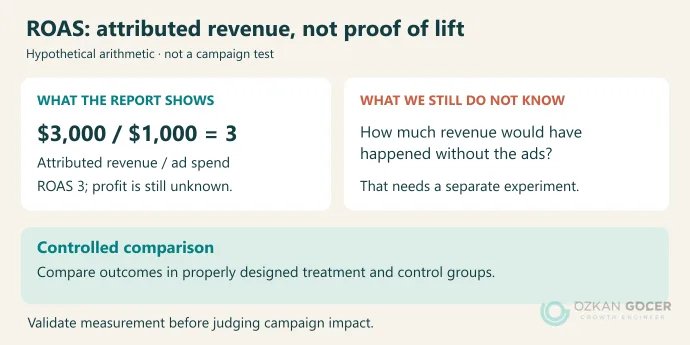
Do not add revenue reported by Google Ads and Meta and call it total sales. Reconcile against actual orders; more than one platform can claim credit for the same transaction. If reports disagree, check attribution, dates and conversion windows.
“How many extra sales did the ads cause?” needs a different answer. Google’s Conversion Lift explanation compares outcomes in an ad-exposed treatment group and a withheld control group. It needs a suitable design and sufficient data; not every account can run the study. The arithmetic here is instructional, not a campaign test or a claim of achieved performance.
A final check before launch
Can you explain who should see the ad, which behavior qualifies them and what the message answers? Are buyers excluded where intended? Does the landing page deliver the offer? Can measurement distinguish a completed order from a click? Resolve any uncertain answer before spending more. A larger budget will not make an unclear setup easier to interpret.
Would you like a second pair of eyes on your audiences, exclusions and conversion tracking before launch? Through my Google Ads management and account audit service, you can share your goal and the part of the setup you are unsure about. We can then agree what needs attention first.