- |
- ·
User experience (UX) design shapes how easily your visitors navigate and achieve their goals on your website, while user interface (UI) design builds the visual touchpoints like buttons, typography, and layouts they interact with. I have seen many businesses fail by focusing only on aesthetics, which is why understanding the distinct roles of both disciplines is vital for your conversion rates. You will learn how to balance usability with visual appeal and implement practical design strategies that keep your users engaged.
What Is UX (User Experience)?
User experience (UX) represents the overall efficiency and satisfaction a person encounters while interacting with a digital product. In my own practice, I often see businesses confuse UX with visual aesthetics. While UI (user interface) focuses on how a site looks, UX dictates how it works. Effective web design must prioritize how easily a visitor can find information, complete a purchase, or contact support. If your navigation feels like a maze, users will abandon the site within seconds. They want a logical flow that respects their time and guides them naturally to their destination.
Optimizing UX requires analyzing user behavior through heatmaps, session recordings, and conversion rates. You cannot rely on guesswork. Data-driven decisions help identify where users get stuck or confused. For example, a checkout form with ten fields often causes high abandonment rates. Reducing those fields to the bare minimum can drastically improve completion rates. To take control of your digital performance, you must run regular usability tests and analyze drop-off points in your sales funnel. Small adjustments in button placement, font readability, or loading speed can yield noticeable changes in user retention.
Research from the Forrester group indicates that every dollar invested in UX can bring a return of up to $100, though actual results depend on your industry and execution. Bad design costs money. When users encounter slow loading times, broken links, or confusing menus, they switch to competitors. Building a solid UX framework involves continuous testing, mapping user journeys, and simplifying complex processes. Investing in user research before writing a single line of code prevents expensive redesigns later. Your digital platform must serve the user first, converting attention into action without friction.
What Is UI?
User Interface (UI) represents the visual and interactive touchpoints of a digital product. It spans everything from buttons, typography, and color schemes to spacing, imagery, and responsive layouts. In my own practice auditing digital products, I often see businesses confuse UI with UX. While UX focuses on the overall journey and structure, UI shapes the actual aesthetic and interactive layer. A functional UI translates complex code into an intuitive visual language that guides user actions without friction. You interact with UI elements every time you tap a button, swipe through a gallery, or fill out a form on a screen.
UI design differs from traditional graphic design. While graphic design focuses primarily on static visual communication like logos, print layouts, and branding assets, UI design requires a deep understanding of interactive behavior, accessibility standards, and technical constraints. When building a digital interface, you make decisions based on how elements respond to user input. For example, a button must change color when hovered over, and menus must collapse cleanly on mobile screens. Making deliberate layout choices directly helps to improve conversion rates and user retention by reducing cognitive load.
To build an interface that converts, you must take user psychology into account. Color choices, visual hierarchy, and element placement dictate where a visitor looks first. In the projects I have managed, optimizing button placement and form fields based on real-world interaction data consistently resolved drop-off issues. High-quality UI does not just look pretty; it directly facilitates the user's goals. Clear visual cues prevent confusion, ensuring that visitors navigate your platform with minimal effort.
UX vs UI: The Difference (With Examples)
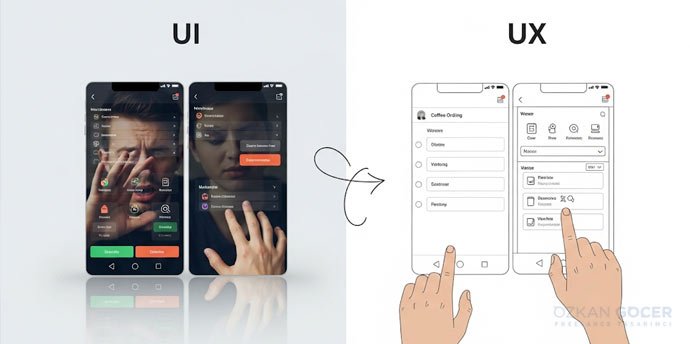
User experience (UX) focuses on the structural journey and logic of a digital product. User interface (UI) handles the visual touchpoints, translating that logic into interactive elements. In my own practice auditing conversion funnels, I often see beautiful interfaces fail because the underlying user flow forces visitors to take unnecessary steps. UX designers map user pathways using wireframes and research data. UI designers then apply color palettes, typography, and interactive components to those wireframes. Both disciplines must align to turn abstract user needs into functional layouts.
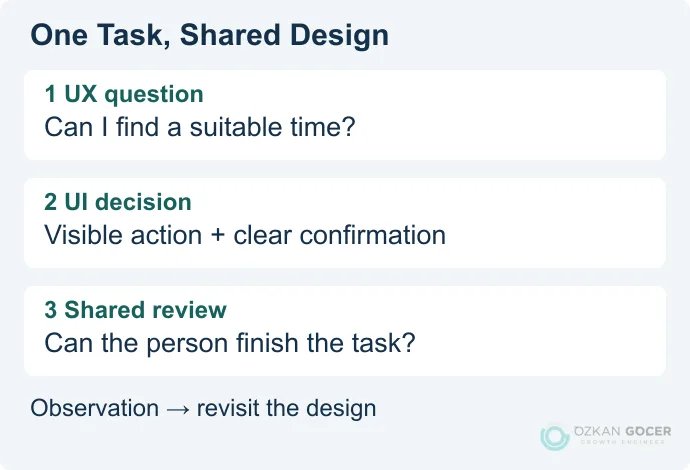
Consider an e-commerce checkout process to understand how these concepts interact. UX decisions dictate the number of form fields and the placement of the guest checkout option to reduce friction. UI design determines the exact shade of the payment button, interactive elements like loading animations, and how the form fields look on a mobile screen. Ensuring the layout is responsive across different device sizes is a shared responsibility. UI elements must scale down without losing clarity, while the UX must remain logical on a five-inch screen. Testing layouts on actual devices helps identify where users get stuck and reveals opportunities to improve the overall flow.
| Aspect | User Experience (UX) | User Interface (UI) |
|---|---|---|
| Primary Focus | User journey and usability | Visual design and interactivity |
| Key Deliverables | Wireframes, user flows, personas | Mockups, UI kits, style guides |
| Success Metric | Task completion rate, low friction | Aesthetic appeal, brand alignment |
To build digital products that convert, do not prioritize aesthetics over structure. Launching a visually stunning website that confuses visitors yields zero return on investment. Take time to map the user journey before writing code or choosing colors. Prioritizing structure over decoration saves development hours and directly supports your business goals.
How UX and UI Work Together
UX and UI function as a single, interconnected system where structure meets visual execution. In the web optimization projects I have managed, separating these two disciplines always leads to friction, high bounce rates, and lost conversions. UX acts as the structural blueprint, mapping out how a visitor navigates your site to complete an action. UI designers take that skeletal framework and apply visual elements like typography, color schemes, and interactive spacing. The Nielsen Norman Group defines UX as encompassing all aspects of the end-user's interaction with the company, its services, and its products. UI serves as the visual touchpoint making that interaction possible.
Data-driven decisions guide how both fields collaborate to improve performance. For instance, a UX researcher might discover that users abandon a registration form because it requires too many steps. The UI designer then uses this insight to redesign the form layout, using visual cues like progress bars and clear input fields to reduce cognitive load. You cannot build a high-converting website by prioritizing one over the other. Beautiful interface design fails if the navigation logic confuses the visitor; logical wireframes fail to convert if the visual elements look untrustworthy.
| Website Element | UX Responsibility | UI Responsibility |
|---|---|---|
| Navigation Menu | Determines page hierarchy and categorization based on user search intent. | Selects font sizes, hover effects, and drop-down animations. |
| Call-to-Action Buttons | Decides button placement on the page to match user flow. | Chooses color contrast, button shape, and click states to attract attention. |
| Search Function | Defines auto-suggest logic and filtering options. | Designs the search bar input field and the layout of results. |
What Does a UI/UX Designer Do?
UX Designer Responsibilities
UX designers focus on the structural and analytical side of a digital product. In the projects I have managed, I observe that the best UX professionals start with user research, mapping out user journeys, and building low-fidelity wireframes to define how a user navigates a system. They analyze user behavior data to identify friction points and run usability tests to validate their design decisions.
Their primary goal is to improve the overall usability and accessibility of the product. They take complex workflows and simplify them. Users complete tasks faster when navigation feels intuitive.
UI Designer Responsibilities
UI designers translate wireframes into high-fidelity visual interfaces. They establish the visual identity of a product by choosing color palettes, typography, and interactive elements like buttons, icons, and spacing. Modern UI workflows rely heavily on tools like Figma to build responsive layouts and interactive prototypes.
Maintaining a design system ensures that developers can easily translate visual mockups into clean code. Consistent visual patterns build trust and make the product look professional. UI designers also ensure that layouts adapt fluidly to mobile, tablet, and desktop screens.
Key Skills
Succeeding in UI/UX requires a mix of technical and analytical capabilities. If you want to excel in this field, you must balance creative execution with data-driven logic.
- User Research: Conducting interviews and analyzing quantitative data to understand user needs.
- Prototyping: Creating interactive models in Figma to test user flows before development begins.
- Visual Communication: Mastering typography, color theory, and grid systems to guide user attention.
- Collaboration: Working closely with developers and product managers to ensure technical feasibility.
Is UI/UX Design Coding?
UI/UX design does not require writing code. Designers focus on user behavior, visual hierarchy, and interface architecture rather than compiling HTML, CSS, or JavaScript. Industry standard tools like Figma, Sketch, and Adobe XD form the core toolkit for creating wireframes and interactive prototypes. In my own practice, keeping the design phase distinct from frontend development prevents expensive structural revisions later. Designers make layout decisions based on user research, mapping out how a visitor navigates a system before a developer writes the first line of code. Visual design is about solving user problems, not managing server databases.
Understanding basic frontend constraints helps designers make realistic decisions that developers can execute without friction. Knowing how CSS layout engines like Flexbox or Grid operate allows you to design interfaces that translate directly to clean code. You avoid creating complex animations that degrade site performance or require heavy custom JavaScript libraries. Developing technical empathy helps improve the handoff process, reducing the time it takes to launch a product. Designers who grasp how browsers render elements can take calculated risks with layouts without breaking the development budget. Collaboration improves when both sides speak a shared technical language.
| UI/UX Design Focus | Frontend Coding Focus |
|---|---|
| User research and persona creation | Semantic HTML structure |
| Wireframing and interactive prototyping | CSS styling and responsive layouts |
| Visual hierarchy and typography systems | JavaScript functionality and API integration |
| Usability testing and feedback loops | Performance optimization and browser compatibility |
Hybrid roles like UI developers do exist, bridging the gap by designing and writing the presentation layer code. Most organizations maintain a clear division of labor to ensure specialists focus on their core strengths. Designers research user pain points and build visual systems, while developers transform those static assets into functional software. Attempting to master both fields often dilutes your expertise; focusing on one discipline while understanding the boundaries of the other yields the best project outcomes.
The UX Design Process
Research
User research forms the foundation of any digital product strategy. In the projects I have managed, skipping this phase always resulted in misaligned features and wasted development budgets. You gather qualitative data through user interviews and quantitative data via analytics tools to understand user behavior. Industry resources like Smashing Magazine frequently highlight how empirical data prevents costly design errors.
Relying on assumptions kills conversion rates. You must analyze competitor workflows and map user journeys to make informed decisions. Mapping user journeys ensures the product addresses actual user pain points rather than imaginary ones.
Wireframe and Prototype
Translating research into visual structures begins with low-fidelity wireframes. Basic blueprints map out content hierarchy and navigation paths without the distraction of colors or typography. In my own practice, I use tools like Figma to build interactive prototypes that mimic the actual user journey.
Prototyping allows stakeholders to experience the flow before developers write a single line of code. You can test interactive elements, button placements, and form fields to see how users navigate the interface. Interactive mockups act like a dress rehearsal for your digital product.
Test and Iterate
Usability testing exposes the friction points in your layout. You observe real users interacting with the prototype to identify where they get confused or abandon tasks. Gathering this feedback allows you to improve the design iteratively, refining elements based on actual performance metrics.
Expect to run multiple testing cycles. Launching a product without iterative testing is a financial gamble. You take the insights gained from each session, implement changes, and validate them again to ensure the final product meets functional standards.
UX/UI Design Tools
Selecting the right software directly impacts conversion rates and user retention. Figma dominates the collaborative design landscape, while Adobe XD and Sketch remain viable alternatives for specific ecosystem integrations. In my own practice, I have seen teams waste weeks on static mockups when interactive prototypes could have solved usability issues in days. Modern platforms allow you to build high-fidelity wireframes that mimic actual application behavior. Visualizing the final product before developers write a single line of code saves thousands of dollars in development waste.
Design does not end with aesthetics; it requires continuous optimization based on user behavior. Integrating quantitative analytics with qualitative tools like Hotjar or Microsoft Clarity reveals where users get stuck. Heatmaps and session recordings show exact friction points, enabling you to make informed layout changes. Base your design decisions on actual user interactions rather than subjective opinions. For example, moving a primary call-to-action button based on scroll-map data can significantly improve click-through rates.
| Tool | Primary Use | Key Benefit | Starting Price |
|---|---|---|---|
| Figma | UI/UX prototyping | Real-time team collaboration | Free / $12 per user |
| Hotjar | Behavior tracking | Visual heatmaps and session replays | Free / $32 per month |
| Optimizely | A/B testing | Data-driven layout validation | Custom pricing |
To implement these changes, establish a structured workflow. Start with low-fidelity sketches, transition to interactive Figma prototypes, and run usability tests with real users. Testing with a small sample size of five users usually uncovers the majority of usability problems. Once the design goes live, monitor performance metrics weekly. Take immediate action when drop-off rates spike on specific steps of your checkout funnel. Constant iteration keeps your digital product competitive.
UI/UX Designer Salary (US 2026)
United States compensation trends for user interface and user experience (UI/UX) professionals point toward steady growth heading into 2026. Entry-level designers can expect starting base salaries between $75,000 and $90,000, while mid-level practitioners with three to five years of experience command between $105,000 and $130,000. Senior specialists and design leads frequently secure offers exceeding $155,000, particularly in high-cost-of-living tech hubs. Organizations prioritize professionals who translate user research into measurable business outcomes.
| Experience Level | Estimated 2026 Salary Range (USD) | Primary Skill Requirements |
|---|---|---|
| Junior (0-2 Years) | $75,000 - $90,000 | Wireframing, prototyping, basic user research |
| Mid-Weight (3-5 Years) | $105,000 - $130,000 | Interaction design, usability testing, data analysis |
| Senior (6+ Years) | $140,000 - $180,000+ | Design systems, product strategy, team leadership |
In my own practice collaborating with product teams, I observe that the highest compensation packages go to designers who back their creative choices with hard data. Businesses want to see how your design iterations directly improve conversion rates or reduce churn. When you take ownership of product metrics and align your layout decisions with user behavior analytics, your market value rises. Employers in competitive sectors like fintech and healthcare SaaS pay a premium for specialists who do more than draw wireframes. They seek strategic thinkers who understand how design impacts the bottom line.
Location still dictates a significant portion of your earning potential, though remote work has partially flattened the landscape. Tech hubs like San Francisco, New York, and Seattle continue to offer the highest base salaries to offset local living costs. If you work from a lower-cost region for a company based in these metropolitan areas, expect localized salary adjustments. Negotiating a top-tier salary requires a portfolio that showcases problem-solving processes rather than just polished final screens.
How to Become a UI/UX Designer (Can You Learn It in 3 Months?)
Three months is a tight window to master user interface (UI) and user experience (UX) design. You can learn the fundamental tools like Figma and understand basic wireframing in 90 days, but building a professional portfolio takes longer. In the projects I have managed, I often see junior designers who rushed their training struggle with real-world constraints. They know how to use the software, but they fail to justify their layout choices. To transition successfully, you must commit to daily practice and study cognitive psychology alongside visual hierarchy. You need to take real-world websites, analyze their flaws, and redesign them from scratch.
UI/UX is not just about making things look pretty; it is about solving business problems. Every button placement, color choice, and navigation flow must stem from user data and research. In my own practice, the most successful design iterations come from analyzing heatmaps and user session recordings rather than personal preferences. You must learn to base your design decisions on user testing rather than what you personally like. Adopting a data-driven mindset separates amateur decorators from professional product designers. To improve your skills rapidly, seek feedback from senior practitioners and participate in design hackathons.
Success in UI/UX requires a structured learning path. While a three-month timeline can give you a baseline, securing a paid role usually requires six to twelve months of consistent application. The table below outlines the realistic expectations for different learning paths based on current industry standards.
| Learning Path | Weekly Commitment | Average Cost | Portfolio Outcome |
|---|---|---|---|
| Self-Taught Route | 15–20 hours | $0 - $500 | Variable quality; requires high self-discipline to finish. |
| Structured Bootcamp | 30–40 hours | $3,000 - $15,000 | Guided case studies with direct mentor feedback. |
Frequently Asked Questions
Quick answers for readers who skipped to the end.