
A product photo may be identical for every visitor, while a shopping cart changes for each customer. Sharing a cached photo is useful. Showing one customer’s cart to another would be a serious error. That distinction comes before cache settings.
How a CDN works: cache HIT and MISS
The origin is the source of the file or application. An edge handles requests within the distribution network. A PoP, or Point of Presence, is a service location in that network. A cache stores a response that may be reused.
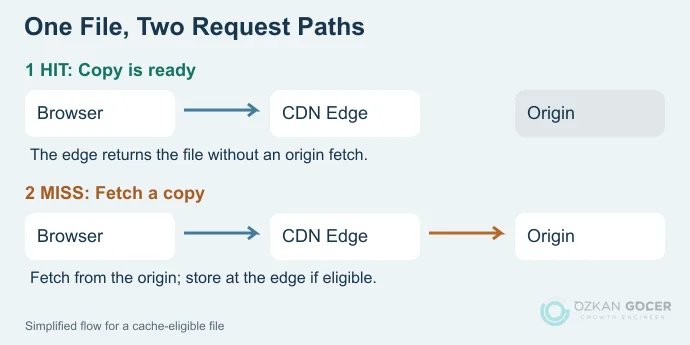
- A browser requests an asset, such as a product image, through the CDN.
- If an eligible, usable copy is available at that location, the cache returns it: a HIT.
- If the copy is missing, the request goes to the source: a MISS. An eligible response can then be stored for subsequent requests.
The diagram is simplified; some networks use additional cache tiers. The chosen location is not necessarily the geographically nearest city. For example, Amazon CloudFront describes routing in terms of low latency. Expired, personalized or deliberately uncacheable responses can follow different handling.
CDN vs hosting vs browser cache
Scroll sideways to read every column. Keyboard: focus the table and use the arrow keys.
| Component | Job | Important boundary |
|---|---|---|
| Hosting / origin | Holds the application, database or source files. | Adding a CDN does not remove origin maintenance. |
| CDN | Handles requests through a distributed network and may serve eligible responses from shared caches. | Does not replace the database or your backups. |
| Browser cache | Stores reusable files on one visitor’s device. | Does not serve other visitors’ first requests. |
You can put a service such as Cloudflare in front of an existing website while the files remain with the host. Platforms sometimes bundle hosting and CDN delivery, but the responsibilities still differ. Start with how hosting works and how to evaluate a hosting plan when choosing infrastructure. A CDN does not automatically fix an under-resourced database.
What should, and should not, be cached?
Images, CSS, JavaScript and fonts shared by all visitors are useful starting candidates. HTML and API responses can also be cached under suitable rules; CDNs are not limited to images. Distinguish a provider’s defaults from everything its product can do.
For example, Cloudflare’s default caching uses a defined set of file extensions and does not include HTML or JSON by default. Custom rules can change that behavior. Do not apply a blanket “cache everything” rule to a store without accounting for personalized content.
Scroll sideways to read every column. Keyboard: focus the table and use the arrow keys.
| Content | Starting approach |
|---|---|
| Logo, product images, versioned CSS/JS | Consider shared caching; use a new filename or an appropriate purge process when files change. |
| Article HTML identical for everyone | Design rules around update frequency, cookies and language variants. |
| Cart, checkout, account and administration | Keep personalized responses out of shared caches and test session behavior. |
| Personalized API response | Check authentication and response headers before treating it as shareable. |
In Cache-Control directives, private excludes shared caching and no-store requests that a response not be stored. no-cache is different: storage is possible, but reuse requires validation. Review CDN rules for lifetime, cookies and query parameters alongside the application’s headers.
Does your website need a CDN?
- Visitors span countries: Testing static delivery through suitable edge locations may reveal a useful improvement.
- The same files are requested repeatedly: Cache hits can reduce repetitive work at the origin.
- Campaigns cause traffic spikes: Distributing cacheable content can help, while checkout and inventory operations still need adequate source capacity.
- The site is small and local: First check oversized images, origin response time and unnecessary code. A direct fix may be more useful than another service.
Evaluate web application firewall (WAF), security and load-balancing features separately; not every CDN package includes all of them. The core delivery function cannot restore a lost origin database.
How to set up a CDN: a Cloudflare checklist
Setup varies by product. Proxying traffic for your main domain differs from delivering files through an address such as static.example.com. For a new project, finish the basic site setup and publishing checks first so you have a working baseline. If your host already supplies a CDN, inspect that arrangement before adding a second layer.
- Record the baseline: Note important URLs, DNS records, certificate status and current response times. Keep a current backup of the site and database.
- Verify the domain and records: When adding the site to Cloudflare, compare detected DNS records with the existing ones. Follow the nameserver or DNS instructions for your setup without casually changing mail records.
- Proxy the intended traffic: Eligible A, AAAA and CNAME records can be proxied. DNS-only records do not pass through CDN delivery. MX/TXT records are not proxied; preserve email and domain-verification settings. Cloudflare’s proxy-status documentation explains the scope.
- Verify HTTPS on both connections: With a valid certificate for the correct hostname at the origin, Full (strict) also validates that connection. Fix certificate problems rather than hiding them with weaker encryption settings.
- Start with limited caching: Check static assets first and exclude personal pages. If HTML needs special treatment, evaluate Cache Rules against your application’s behavior.
- Retest actual tasks: Check login, forms, cart, checkout, uploads and email. A working home page is not enough to establish a successful migration.
How to check whether the CDN is working
Open Chrome DevTools, choose Network, reload the page and select an image or CSS request. Inspect Headers → Response Headers; Chrome’s network inspection documentation explains this panel. Disabling the browser cache for a measurement does not clear the CDN cache.
With Cloudflare, inspect CF-Cache-Status. Its cache-status definitions distinguish HIT from a missing eligible copy, MISS. DYNAMIC or BYPASS is not automatically a fault: keeping a personal page out of shared caching may be correct. Repeating a request does not guarantee a HIT under every condition.
If an edited image still looks old, confirm that you are checking the intended file URL, then purge the relevant cached URL. Cloudflare Development Mode temporarily bypasses caching for up to three hours; it does not purge stored files or fully disable the CDN service.
How a CDN affects SEO, and what to measure
Earlier image delivery can help the loading time of a page’s largest content element. Measure the effect on Largest Contentful Paint (LCP) on the actual page, distinguishing field and lab data in your Core Web Vitals assessment. A CDN alone does not solve JavaScript interaction work or layout shifts caused by missing image dimensions.
Google’s Core Web Vitals guidance covers loading, interaction and visual stability, and good scores do not guarantee top rankings. Enabling a CDN does not buy an SEO score. Include performance, access errors and challenge pages accidentally shown to crawlers in your technical SEO checks.
Free CDN or usage-based pricing?
Cloudflare Free provides a free starting option; review the service terms and advanced-feature requirements separately. Providers such as Bunny CDN charge according to traffic and region. CloudFront is another option for an AWS environment. A provider’s name alone does not establish your bill.
Account for file types, monthly transfer, destination regions, request charges, origin egress, minimum fees and required extras. Video or a large download archive may have different service conditions from ordinary page images.
Begin by verifying delivery for one group of static files, then compare the page experience and origin load. Success means giving the correct response to the correct user, rather than caching as much as possible.