A frontend vacancy and a software developer vacancy may involve different responsibilities. To understand the distinction, follow the work from a visitor submitting a form to a record being created. We will first separate the job titles, then use that flow to explain the work and a practical way to start learning.
Developer, Software Developer and Web Developer: The Difference
In software, a developer is someone who builds and improves programs. “Development” names the activity or process. The word developer has other meanings outside software; this guide uses it in the technical career sense.
Scroll sideways to read every column. Keyboard: focus the table and use the arrow keys.
| Term | Meaning | Example |
|---|---|---|
| Software developer | A broad role covering software across different application areas | Desktop, mobile, server or web software |
| Web developer | Someone who develops sites and applications using web technologies | A membership system, news website or online booking service |
| Web development | The activity and process of building for the web | Interface work, server operations, testing and deployment |
| Web designer | Someone who designs content presentation, layouts and interactions | Planning the order of a registration form and how its errors appear |
Web programming is the code and behaviour part of that development work. Design and development collaborate, with boundaries varying between teams. See the web design process for how layouts and user journeys are planned.
What Do Frontend, Backend and Full-Stack Developers Do?
Frontend: The Interface People Use
Frontend developers make menus, forms, tables and other interactive elements usable in a browser. They implement loading, empty, error and success states, alongside the initial appearance. They check narrow screens, keyboard operation and browser differences. For a closer look at this specialism, see the frontend developer’s responsibilities.
Backend: Data and Business Rules
Backend developers validate requests, check permissions, access databases and return appropriate responses. If an interface shows two places left on a workshop, the server still needs to check availability when a registration arrives. Browser-side field checks cannot replace validation on the server.
Full Stack: Working across Both Sides
A full-stack developer can work on the interface and the server. The title does not mean knowing every language or independently covering every aspect of design, security, infrastructure and quality assurance. Read the technologies and responsibilities in the actual job description.
What Work Happens When Someone Submits a Form?
Imagine a workshop registration form. This is an illustrative example of responsibilities, rather than a real client system or measured result.
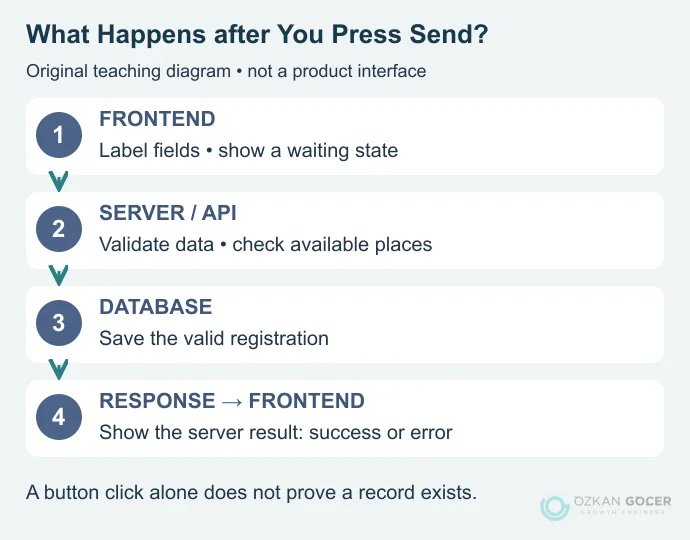
- Build the interface: Label the name and email fields and show a waiting state when the button is pressed.
- Validate the request on the server: The interface sends data through an API, an agreed interface through which software components communicate. The server checks the fields and available places, applying the necessary permission and abuse controls.
- Store a valid registration: A record that passes the checks is written to the database.
- Show the response: The interface waits for the server’s response before showing success or an explanatory error.
Pressing the button does not prove that a record exists. If the network fails or the server rejects the request, the interface should not report success. MDN’s client/server introduction explains this division with technical examples.
Which Languages and Tools Should a Web Developer Learn?
You do not need every tool at once. First understand how a page works, then expand towards your chosen role. MDN’s core learning modules cover structure, appearance, behaviour, accessibility and version control together.
Scroll sideways to read every column. Keyboard: focus the table and use the arrow keys.
| Skill | Purpose |
|---|---|
| HTML | The meaningful structure of headings, links, images and forms; a markup language. |
| CSS | Layout, typography and colours; a style sheet language. |
| JavaScript | Interaction and program logic; a programming language. |
| HTTP and APIs | Understanding requests, responses, status codes and data exchange. |
| Git and browser developer tools | Tracking changes and investigating problems through Console and Network tools. |
| A server language and database | Backend logic in a language such as PHP, Python or JavaScript; relational data queries with SQL. |
Node.js is a runtime for JavaScript outside the browser, rather than a separate programming language. An interface library such as React is not a replacement language for JavaScript either. Projects use different tools; a grounding in the underlying concepts makes those changes easier to handle.
How to Start Learning Web Development
Use a small event page as your first working project. The sequence below is a suggested practice plan, not a promise of employment within a fixed number of months.
- Structure the content with HTML: Create meaningful headings, links and a labelled form.
- Style it with CSS: Fix overflow on narrow screens and check readability.
- Add JavaScript behaviour: Implement field checks and waiting/error states. If there is no server, clearly label the form as an interface demo.
- Track a change with Git: Explain what changed and why.
- Build one server operation: Use one chosen language and a small data model to complete the registration flow. Work with test data rather than real personal information.
- Document the project: Include setup instructions, known limitations, the cases you tested and your own contribution.
MDN’s free learning material progresses from first steps to practical foundations. Finishing a course and independently diagnosing a bug are different milestones. Being able to reduce a problem to a small example and explain it is also progress.
How Should You Check Your First Project?
Try more than a successful submission. Test empty fields, invalid email addresses, network failure and repeated submissions. Navigate with a keyboard: can you see the current focus? Does the error explain how to fix the problem? The accessibility checks provide a useful extension to these tests.
Degrees, Learning Time and Working Conditions
You can begin learning without a particular degree, although an employer may require one. The US Bureau of Labor Statistics occupational profile also describes education expectations as varying with the work setting. That does not establish a universal hiring rule for every employer or country.
There is no fixed answer to how many months it takes. Assess what you can do independently: build an accessible page, investigate an error, explain a change and complete a small data flow. When comparing pay, keep country, experience, role, gross versus net pay and employment type consistent. A freelancer’s project invoice is not the same measure as an employee’s monthly salary.
Developers may work in agencies, product teams, internal company teams or independently. Remote arrangements depend on the employer and project. A working example, clear project notes and code showing your decisions make your skills easier to assess than screenshots alone.